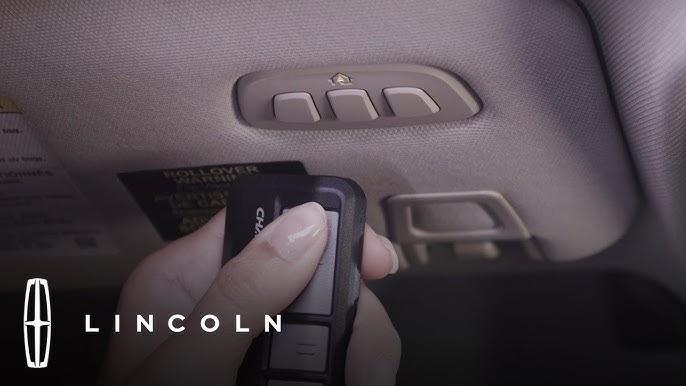
Struggling to sync your garage door with your luxury SUV? You’re not alone. Many 2022 Lincoln Navigator owners find the initial setup of the integrated garage door opener slightly confusing. This guide will show you exactly how to program 2022 Lincoln Navigator garage door opener systems quickly and safely, getting you back on the road without the hassle of manual remotes.
The 2022 Lincoln Navigator comes equipped with the HomeLink universal transceiver, a sophisticated system designed to replace up to three separate remote controls. Whether you are setting up a new home or replacing an old remote, understanding the specific sequence for your vehicle is crucial. Unlike older models, the 2022 Navigator features updated software and button placements that require a precise approach. By following this guide, you will leverage the full convenience of your vehicle’s technology while maintaining the highest security standards for your home.
Understanding the HomeLink System in Your 2022 Navigator
Before diving into the buttons, it is essential to understand what you are working with. The HomeLink system in the 2022 Lincoln Navigator is not just a simple radio transmitter; it is a learning remote that mimics the signal of your existing garage door opener.
Why Use HomeLink?
Integrating your garage door into your vehicle offers more than just convenience. It enhances security by eliminating the need to keep loose remotes in your car, which can be stolen. Furthermore, it declutters your visor or center console. According to automotive technology experts, integrated systems like HomeLink reduce the risk of signal interception compared to older, fixed-code remotes because they often utilize rolling code technology.
For a deeper technical understanding of how universal transceivers communicate with garage door motors, you can refer to the detailed explanation on Wikipedia’s page for HomeLink. This resource provides historical context and technical specifications that highlight why this system has become an industry standard in luxury vehicles like the Lincoln Navigator.
Identifying Your Garage Door Opener Type
Not all garage door openers are created equal. Before programming, check your existing garage door motor unit. Look for a label that indicates whether it uses:
- Fixed Code: Older systems (pre-1995) that use a static signal.
- Rolling Code: Newer systems (post-1995) that change the code every time the button is pressed for enhanced security. Most 2022 homes use rolling code openers from brands like LiftMaster, Chamberlain, or Genie.
Knowing this distinction is vital because rolling code openers require an extra step during the programming process involving the “learn” button on the motor unit itself.
Step-by-Step Guide: How to Program 2022 Lincoln Navigator Garage Door Opener
Programming your HomeLink system involves two main phases: clearing any previous settings and training the system to recognize your garage door. Follow these steps precisely to avoid errors.
Phase 1: Clearing HomeLink Buttons (If Necessary)
If your 2022 Navigator is pre-owned or if you have previously attempted to program a device, you must clear the memory first.
- Turn the ignition to the ON position (you do not need to start the engine).
- Locate the HomeLink buttons on your overhead console or rearview mirror. In the 2022 Navigator, these are typically found on the rearview mirror assembly.
- Press and hold the two outer HomeLink buttons simultaneously.
- Keep holding them for approximately 20 seconds.
- Watch the indicator light. It will begin to flash slowly, then rapidly. Once it flashes rapidly, release the buttons.
- The memory is now cleared. Note: If you are programming a brand-new vehicle, you can skip this phase.
Phase 2: Training the HomeLink Transmitter
This is the core process where your car learns the signal from your garage door remote.
- Position Your Vehicle: Park your 2022 Lincoln Navigator outside your garage, ensuring you have a clear line of sight to the garage door motor unit. Keep the engine running or the ignition in the ON position to prevent battery drain.
- Prepare Your Handheld Remote: Have your original garage door remote ready.
- Initiate Learning Mode: Choose the HomeLink button you wish to program (e.g., Button 1). Press and hold this button.
- Sync the Signals: While holding the HomeLink button, bring your handheld remote 1–3 inches away from the HomeLink surface. Press and hold the button on your handheld remote.
- Wait for the Flash: Continue holding both buttons. The HomeLink indicator light will flash slowly at first. Keep holding until the light changes from a slow flash to a rapid flash. This usually takes between 20 to 30 seconds.
- Release Both Buttons: Once the rapid flash occurs, release both the HomeLink button and the handheld remote button.
Phase 3: Programming Rolling Code Openers (Crucial Step)
If your garage door opener uses rolling code technology (most modern units), the above steps are not enough. You must complete the synchronization at the motor unit.
- Locate the Learn Button: Inside your garage, climb a ladder to access the garage door motor unit. Look for a small button labeled “Learn,” “Smart,” or “Program.” It is often colored yellow, purple, or red.
- Press the Learn Button: Press and release this button. You typically have 30 seconds to complete the next step. An LED light on the motor unit may blink or turn on to indicate it is in learning mode.
- Return to Your Vehicle: Within the 30-second window, go back to your 2022 Navigator.
- Finalize the Sync: Press and hold the programmed HomeLink button for 2 seconds, then release it. Press and hold it again for 2 seconds, then release. Repeat this cycle (press-hold-release) up to three times.
- Test the Door: Press the HomeLink button firmly. The garage door should activate. If it does, the programming is successful.
| Step | Action | Indicator |
|---|---|---|
| 1 | Clear Memory | Rapid Flashing Light |
| 2 | Train Signal | Slow to Rapid Flash |
| 3 | Rolling Code Sync | Motor Unit LED Activation |
| 4 | Final Test | Door Movement |
Troubleshooting Common Programming Issues
Even with careful attention, things can go wrong. Here are the most common issues faced by Lincoln Navigator owners and how to fix them.
The Indicator Light Does Not Flash
If the HomeLink light does not change from slow to rapid flashing during Phase 2, the system is not receiving the signal.
- Solution: Check the battery in your handheld remote. A weak battery may not transmit a strong enough signal for the HomeLink system to learn. Replace the battery and try again.
- Distance: Ensure the handheld remote is within 1–3 inches of the HomeLink buttons. Too far away, and the signal won’t be captured.
The Garage Door Moves but Reverses Immediately
This is a safety feature trigger. If the door starts to close but immediately goes back up, the safety sensors may be misaligned or obstructed.
- Solution: Check the photo-eye sensors at the bottom of your garage door tracks. Ensure they are clean and aligned. Also, verify that nothing is blocking the door’s path.
Rolling Code Sync Fails
If you press the HomeLink button after completing Phase 3 and nothing happens, the rolling code sync likely timed out.
- Solution: You must restart Phase 3. Press the “Learn” button on the motor unit again and quickly return to the vehicle to perform the press-hold-release cycle. Speed is critical here.
Interference from Other Devices
LED light bulbs in your garage door opener can sometimes emit frequency interference that blocks the HomeLink signal.
- Solution: If programming fails repeatedly, try temporarily unscrewing the LED bulbs in the garage door motor unit and using incandescent bulbs during the programming process. Once programmed, you can switch back.
Frequently Asked Questions (FAQ)
1. Can I program multiple garage doors to my 2022 Lincoln Navigator?
Yes, the HomeLink system in the 2022 Lincoln Navigator can store up to three different devices. You can program a primary garage door, a secondary gate, or even a home lighting system. Each button operates independently, so you can follow the same programming steps for each additional device.
2. What if I don’t have the original handheld remote?
If you have lost your original remote, you cannot program HomeLink directly. You will need to purchase a compatible universal remote from your garage door opener’s manufacturer (e.g., LiftMaster or Genie) and program that remote to your motor unit first. Once the new remote works, you can use it to train the HomeLink system.
3. Does programming HomeLink void my garage door warranty?
No, programming a universal transceiver like HomeLink does not void your garage door opener’s warranty. It is a standard feature supported by major manufacturers. However, always consult your garage door opener’s manual for specific compatibility notes.
4. Why is my HomeLink button working intermittently?
Intermittent operation is often due to signal interference or a weak battery in the vehicle. Ensure your 2022 Navigator’s battery is healthy. Additionally, check if there are new sources of radio frequency interference near your garage, such as new LED security lights or neighboring wireless devices.
5. Can I reset HomeLink if I sell my car?
Absolutely. For security reasons, it is highly recommended to clear the HomeLink memory before selling or trading in your 2022 Lincoln Navigator. Follow the “Clearing HomeLink Buttons” steps in Phase 1 to erase all stored codes, ensuring the new owner cannot access your garage.
Conclusion
Learning how to program 2022 Lincoln Navigator garage door opener systems transforms your driving experience from convenient to seamless. By integrating your home access into your vehicle, you enhance both security and daily efficiency. Remember, the key to success lies in identifying whether you have a rolling code opener and executing the synchronization steps with precision.
Don’t let a few tricky buttons keep you from enjoying the full potential of your luxury SUV. If you followed this guide and successfully programmed your HomeLink, share your success story on social media! Tag us and let other Lincoln owners know how easy it can be. If you encountered any unique challenges, drop a comment below—your experience might help another driver solve their problem today.



Leave a Reply