Introduction
There are few things more frustrating than pulling into your driveway in the rain, only to realize you still have to dig through your glovebox or purse for a bulky remote. If you are searching for how to program overhead garage door opener to car, you are likely ready to embrace the convenience of a built-in vehicle transmitter. This guide eliminates the guesswork, providing clear, empathetic, and tested steps to get your integrated system working safely and quickly.
Whether you drive a newer model with factory-installed tech or an older vehicle with an aftermarket visor clip, syncing your car to your Overhead Door® opener is a manageable DIY task. Below, we break down the process by system type so you can stop fumbling for remotes and start enjoying seamless home entry.
Understanding Your In-Car Transmitter System
Before pressing any buttons, it is vital to identify which technology your vehicle uses. Not all systems communicate with Overhead Door openers in the same way. According to Wikipedia, the two dominant in-car wireless control systems in the North American market are HomeLink and Car2U.
Identifying your system prevents wasted time trying incompatible programming sequences. Check your rearview mirror, overhead console, or visor for one of these logos:
| Feature | HomeLink | Car2U |
|---|---|---|
| Logo Appearance | Three curved arrows forming a house shape | Two straight arrows pointing inward |
| Button Count | Typically 3 buttons | Typically 3 buttons |
| Compatibility | Rolling Code & Fixed Code | Primarily Rolling Code (Security+) |
| Indicator Light | Solid/Flashing LED above buttons | LED between or above buttons |
| Common Vehicles | Ford, GM, Toyota, Honda, BMW | Chrysler, Dodge, Jeep, some Hyundai |
Note: Some newer vehicles use “Smart” integration via smartphone apps rather than RF transmitters. This guide focuses specifically on traditional RF button programming.
How to Program HomeLink to an Overhead Door Opener
HomeLink is the most widely used system. The programming method depends on whether your Overhead Door opener uses Rolling Code (manufactured after 1996) or Fixed Code (older models). Most modern Overhead Door units are Rolling Code.
Step 1: Clear Previous Codes (If Pre-Owned Vehicle)
If this is not a brand-new car, previous owner data may interfere.
- Press and hold the two outer HomeLink buttons simultaneously.
- Hold for approximately 10–20 seconds until the indicator light flashes rapidly.
- Release both buttons. The memory is now cleared.
Step 2: Train the HomeLink Button
- Sit in the driver’s seat with the ignition in the “ON” or “ACC” position. Some vehicles require the engine to be running; consult your owner’s manual if programming fails.
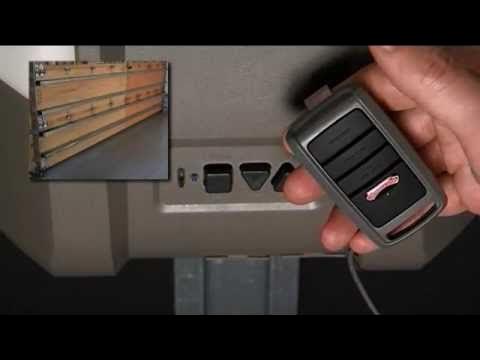
- Hold your original Overhead Door handheld remote 1–3 inches away from the HomeLink buttons.
- Simultaneously press and hold the desired HomeLink button AND the handheld remote button.
- Watch the HomeLink indicator light. It will flash slowly at first, then rapidly/solidly when trained. This typically takes 5–30 seconds.
- Release both buttons once the light changes pattern.
Step 3: Complete Rolling Code Synchronization
This step is mandatory for Overhead Door openers manufactured after 1996.
- Locate the “Learn” or “Program” button on your Overhead Door motor unit (usually on the back or side panel near the antenna wire).
- Press and release the Learn button. You typically have 30 seconds to complete the next step.
- Return to your vehicle and press the newly programmed HomeLink button firmly for 2 seconds, then release.
- Repeat this press-hold-release cycle up to 3 times. On the third press, the garage door should activate, confirming successful synchronization.
Expert Tip: If the door does not respond after three attempts, verify that your Overhead Door opener’s Learn button color matches your remote frequency. Purple, yellow, orange, and red Learn buttons indicate different security protocols. Using a compatibility bridge like the Overhead Door Universal Remote Kit may be necessary for legacy systems.
How to Program Car2U Systems to Overhead Door Openers
Car2U operates differently than HomeLink and requires a distinct sequence. Do not attempt HomeLink instructions on a Car2U system.
Step-by-Step Car2U Programming
- Turn the ignition to “ON/RUN”.
- Press and hold the two outer Car2U buttons for 20 seconds until all LEDs begin flashing. Release immediately when flashing starts.
- Within 30 seconds, press and hold the desired Car2U button while simultaneously pressing the handheld Overhead Door remote button held 1–3 inches away.
- When the Car2U LED flashes rapidly, release both buttons.
- Go to the garage door motor and press the Learn/Smart button.
- Return to the car within 30 seconds and press the programmed Car2U button once firmly. The door should cycle.
Troubleshooting Common Programming Failures
Even professionals encounter hiccups. Before calling a technician, work through this diagnostic checklist:
- Battery Check: Replace the battery in your handheld remote before programming. A weak signal is the #1 cause of training failure.
- Distance Adjustment: If training fails at 1 inch, try 6 inches. Some frequencies require slight separation.
- Ignition State: Ensure the vehicle is in the correct power mode. Hybrid/EV owners often need the vehicle fully powered on, not just accessory mode.
- Opener Memory Full: Most Overhead Door openers store only 5–7 remotes. Clear the opener’s memory by holding the Learn button for 10 seconds until the LED goes out, then reprogram all devices.
- Frequency Mismatch: Overhead Door has used 315 MHz, 390 MHz, and dual-frequency bands over decades. Verify your car’s transmitter supports your opener’s frequency via the manufacturer’s compatibility chart.
Safety First: Critical Precautions During Programming
Programming involves moving mechanical parts. Always observe these safety protocols:
- Clear the Threshold: Never program while people, pets, or objects are in the door’s path.
- Watch the Sensors: Ensure photo-eye sensors at the floor level are clean and aligned. A blocked sensor will prevent programming completion on modern units.
- Avoid Distraction: Keep children away from the vehicle and garage during the process.
- Test Auto-Reverse: After successful programming, test the safety reversal feature by placing a 2×4 board flat on the floor under the door. The door must reverse upon contact.
Frequently Asked Questions (FAQ)
Can I program my car to an Overhead Door opener without the original remote?
Generally, no. The handheld remote acts as the signal bridge during initial training. However, if your opener has a “Learn” button and your vehicle supports direct-to-opener pairing (rare, mostly newer Tesla/Ford models), you may bypass the remote. Otherwise, purchase a compatible Overhead Door replacement remote first.
Why does my HomeLink work intermittently after programming?
Intermittent operation usually indicates signal interference or a failing handheld remote battery used during training. Reprogram using a fresh battery in the handheld remote. Also check for LED lighting or transformers near the opener motor, as these can emit RF noise that disrupts the signal.
Does programming my car erase other remotes from the opener?
No. Adding a HomeLink or Car2U code simply adds another device to the opener’s memory. Existing keypads and handheld remotes remain functional unless you manually clear the opener’s entire memory.
My vehicle has HomeLink but my Overhead Door opener is from 1985. Will it work?
Possibly, but you will likely need a compatibility bridge. Older fixed-code openers operate on frequencies that modern HomeLink cannot replicate natively. Overhead Door and Gentex offer adapter kits that translate between old and new protocols.
How long does the entire programming process take?
For a standard Rolling Code Overhead Door opener with HomeLink, expect 5–10 minutes total. Car2U systems may take 10–15 minutes due to additional reset steps. Troubleshooting can extend this to 30 minutes.
Can I program multiple garage doors to one car?
Yes. Most HomeLink and Car2U systems offer three programmable buttons, allowing you to control your primary garage, a detached workshop, and even community gate access from a single vehicle interface.
Conclusion
Mastering how to program overhead garage door opener to car transforms daily convenience and enhances home security by eliminating lost remotes. Whether you use HomeLink or Car2U, the key to success lies in correctly identifying your system, following the precise timing sequences, and completing the rolling code synchronization step that many beginners overlook.
Remember: patience and fresh batteries solve 90% of programming issues. If you’ve followed this guide and still face challenges, your local Overhead Door distributor can provide model-specific support.
Found this guide helpful? Share it with friends, family, or neighbors who are still struggling with clunky garage remotes! Tag us on social media with your success story—we’d love to celebrate your seamless entry upgrade. 🏠🚗
Disclaimer: Always refer to your specific vehicle owner’s manual and Overhead Door opener documentation for model-specific variations. This guide provides general best practices and should not replace manufacturer instructions. Prioritize safety and consult a certified technician if unsure about electrical components.



Leave a Reply