Introduction
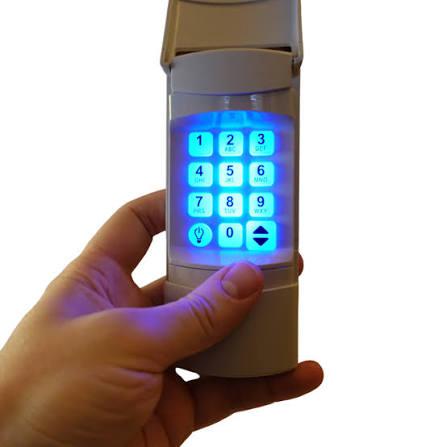
Have you ever stood outside your garage, frantically pressing buttons on your new keypad, wondering why it won’t open? You’re not alone. Thousands of US homeowners struggle with how to program a Linear garage door opener keypad every year, often losing valuable time and feeling frustrated by unclear instructions. Whether you’ve just installed a new system or replaced an old keypad, getting the programming right is crucial for both convenience and security. This comprehensive guide will walk you through every step, ensuring your Linear keypad works perfectly from day one.
Understanding Your Linear Garage Door System
Before diving into the programming process, it’s essential to understand what makes Linear garage door openers unique. Linear LLC, now part of Nortek Security & Control, has been manufacturing garage door systems since 1965. Their keypads are known for reliability and user-friendly design, but each model may have slightly different programming requirements.
Common Linear Keypad Models
| Model Number | Features | Compatibility |
|---|---|---|
| DKP-1 | Basic 4-digit code | Most Linear openers |
| DKP-2 | Advanced features | Linear Elite series |
| WDK-2500 | Wireless operation | Universal compatibility |
| KP3A | Weather-resistant | Outdoor installation |
According to industry data from Wikipedia’s garage door opener entry, over 85% of American homes have garage door openers, with Linear being among the top five manufacturers in the US market.
Step-by-Step Programming Instructions
Preparing for Programming
Before you begin, gather these essential items:
- Your Linear garage door opener remote (for reference)
- A ladder (if needed to reach the motor unit)
- The keypad manual (if available)
- Patience and attention to detail
Pro tip: Write down your desired PIN code before starting. Choose something memorable but not obvious, like your birth year or address numbers.
Method 1: Programming Using the Learn Button
This is the most common method for newer Linear models:
- Locate the Learn button on your garage door opener motor unit. It’s typically colored yellow, red, or purple and located on the back or side panel.
- Press and release the Learn button. You’ll see an indicator light turn on or blink, signaling that the system is ready to receive new codes.
- Within 30 seconds, enter your desired 4-digit PIN on the keypad. Press each digit clearly and wait for confirmation.
- Test the code by entering it again. The garage door should respond within 2-3 seconds.
- Program additional users by repeating steps 2-4 for each family member who needs access.
Method 2: Programming Without Remote Access
If you don’t have access to the original remote:
- Clear existing codes by holding the Learn button for 6-10 seconds until the indicator light turns off.
- Wait 30 seconds for the system to reset completely.
- Follow Method 1 steps to program your new keypad code.
- Verify functionality by testing the code multiple times from different distances.
Method 3: Advanced Programming for Multi-User Systems
For households with multiple users:
- Assign unique codes to each family member (e.g., Mom: 1234, Dad: 5678, Teen: 9012).
- Document each code in a secure location, such as a password manager or locked drawer.
- Test each code individually to ensure proper registration.
- Consider temporary codes for service providers or guests, which can be changed later.
Troubleshooting Common Issues
Even with careful programming, issues can arise. Here are solutions to the most frequent problems:
Keypad Not Responding
- Check battery levels: Replace batteries if they’re older than 6 months
- Verify range: Ensure you’re within 15-20 feet of the opener
- Clean contacts: Remove any dirt or corrosion from battery terminals
Code Not Being Accepted
- Reprogram the code: Follow the programming steps again carefully
- Check for interference: Other electronic devices might cause signal disruption
- Reset the system: Clear all codes and start fresh
Intermittent Operation
- Inspect wiring: Look for loose connections at the motor unit
- Weather considerations: Extreme temperatures can affect performance
- Antenna positioning: Ensure the opener’s antenna isn’t obstructed
Security Best Practices
Programming your keypad correctly is just the beginning. Maintaining security requires ongoing attention:
Choosing Strong PIN Codes
- Avoid obvious combinations: Skip 1234, 0000, or your birth year
- Use 4-6 digits: Longer codes provide better security
- Change regularly: Update codes every 6-12 months
Physical Security Measures
- Mount keypad securely: Use weather-resistant screws and proper height
- Regular maintenance: Check for wear and tear quarterly
- Backup access: Always keep a physical key or remote as backup
Digital Security Considerations
Modern Linear keypads offer enhanced security features:
- Rolling code technology: Prevents code interception
- Encryption protocols: Protects against hacking attempts
- Automatic lockout: Temporarily disables after multiple failed attempts
When to Call a Professional
While most programming tasks are DIY-friendly, certain situations require professional assistance:
- Complex multi-door systems with interconnected openers
- Electrical issues beyond basic battery replacement
- Warranty concerns where DIY repairs might void coverage
- Safety sensor problems that affect door operation
According to the International Door Association, approximately 15% of garage door issues require professional intervention, particularly those involving springs and electrical components.
Frequently Asked Questions
How long does it take to program a Linear garage door keypad?
Typically, programming takes 5-10 minutes per keypad. However, allow extra time for troubleshooting if you encounter issues. Having the manual handy can reduce this time significantly.
Can I program multiple keypads to one garage door opener?
Yes, most Linear garage door openers can accommodate 3-5 keypads simultaneously. Each keypad needs individual programming following the same steps outlined above.
What should I do if I forget my programmed code?
If you forget your code, you’ll need to reprogram the keypad entirely. This involves clearing existing codes using the Learn button and setting up new ones. Keep a record of your codes in a secure location to avoid this situation.
Are Linear garage door keypads weatherproof?
Most Linear keypads are designed for outdoor use and feature weather-resistant construction. However, extreme conditions may affect performance over time. Regular inspection and maintenance help ensure longevity.
How often should I change my garage door keypad code?
Security experts recommend changing your garage door code every 6-12 months, or immediately if you suspect unauthorized access. Also change codes when moving to a new home or after giving temporary access to service providers.
Can smartphones replace garage door keypads?
While smartphone apps offer convenience, keypads provide reliable backup access without requiring internet connectivity or charged devices. Many homeowners use both methods for maximum flexibility and security.
Conclusion
Learning how to program a Linear garage door opener keypad doesn’t have to be intimidating. With the right approach and attention to detail, you can have your system working perfectly in under 15 minutes. Remember to choose strong codes, maintain regular security updates, and keep backup access methods available.
Your garage door keypad is more than just a convenience—it’s a crucial component of your home’s security system. By following these guidelines, you’ll ensure reliable operation while maintaining peace of mind.
Found this guide helpful? Share it with friends and neighbors who might be struggling with their Linear garage door keypad programming. Together, we can make home security accessible to everyone!
Note: Always consult your specific model’s manual for detailed instructions, as programming steps may vary between different Linear garage door opener models. When in doubt, contact Linear customer support or a qualified technician for assistance.



Leave a Reply