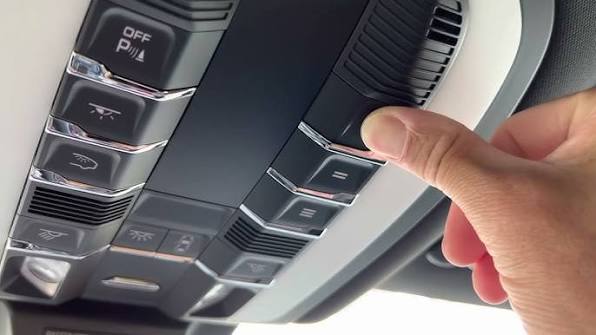
Have you ever pulled into your driveway, pressed the button on your Porsche’s sun visor, and… nothing happened? It is a frustrating experience that many new and used Porsche Panamera owners face. Whether you just bought the car or recently changed your garage door motor, figuring out how to program garage door opener in Porsche Panamera can feel like solving a complex engineering puzzle. But don’t worry; you don’t need a degree from Stuttgart to get it working.
The Porsche Panamera comes equipped with the HomeLink® universal transceiver, a system designed to replace up to three handheld remote controls. However, the programming process varies significantly depending on whether you have an older model (pre-2017) or the newer PCM-integrated systems. In this guide, we will walk you through the exact steps, troubleshoot common issues, and ensure your luxury sedan communicates perfectly with your home.
Understanding Your Porsche’s HomeLink System
Before pressing any buttons, it is crucial to identify which type of HomeLink system your Panamera uses. Porsche has updated this technology over the years, and using the wrong method will result in failure.
The Two Main Systems
- Visor-Mounted Module (Older Models): Typically found in Panameras from 2010–2016. The buttons are located on the driver’s side sun visor.
- PCM-Integrated System (Newer Models): Found in 2017+ models. The controls are integrated into the Porsche Communication Management (PCM) touchscreen under the “Vehicle” or “Settings” menu.
According to HomeLink’s official compatibility guide, over 95% of garage door openers manufactured since 1993 are compatible with these systems. However, security protocols like “rolling codes” require specific pairing steps that differ from standard remotes.
Step-by-Step: Programming Visor-Mounted HomeLink (Pre-2017)
If your Panamera has physical buttons on the sun visor, follow this precise sequence. This method works for most Chamberlain, LiftMaster, Genie, and Craftsman openers.
Step 1: Clear Previous Codes
If the buttons were previously used, you must erase them.
- Press and hold the two outer buttons (I and III) simultaneously.
- Keep holding for about 20 seconds until the indicator light begins to flash rapidly.
- Release the buttons. The memory is now cleared.
Step 2: Position the Vehicle
- Park your Panamera outside the garage, facing the door.
- Ensure the engine is running or the ignition is in the “On” position to maintain power during programming.
- Have your original handheld garage remote ready.
Step 3: Train the HomeLink Button
- Choose the HomeLink button you wish to use (e.g., Button I).
- Press and hold the chosen HomeLink button and the button on your handheld remote simultaneously.
- Hold both until the HomeLink indicator light changes from a slow blink to a rapid flash. This usually takes 15–30 seconds.
- Note: Some “smart” remotes may require you to repeat this step twice.
Step 4: Test the Connection
- Press the programmed HomeLink button in your Porsche.
- If the garage door moves, you are done.
- If it does not move, proceed to the “Rolling Code” section below.
Step-by-Step: Programming PCM-Integrated HomeLink (2017+)
For newer Panameras, the process is digital and handled through the infotainment screen. This interface is more intuitive but requires attention to detail.
Step 1: Access the Menu
- Turn on the ignition.
- On the PCM touchscreen, navigate to Vehicle > Settings > HomeLink.
- Select “Add New Device.”
Step 2: Enter Training Mode
- The screen will prompt you to press a button on your original remote.
- Point your handheld remote at the rearview mirror (where the antenna is often located in newer models) or the front windshield area.
- Press and hold the button on your handheld remote until the PCM screen confirms signal reception.
Step 3: Finalize Pairing
- Follow the on-screen prompts to name the device (e.g., “Home Garage”).
- Test the function by pressing the virtual button on the screen.
Troubleshooting Rolling Code Security
Most modern garage door openers use rolling code technology for security. This means the code changes every time you press the button. If your basic programming didn’t work, you likely have a rolling code opener.
The “Learn Button” Method
- Locate the “Learn” or “Smart” button on your garage door motor unit (usually hanging from the ceiling). It is often yellow, purple, or red.
- Press and release the “Learn” button. The indicator light on the motor will turn on or blink.
- You have 30 seconds to return to your Porsche.
- Press and hold the programmed HomeLink button in your car for 2 seconds, release, and repeat this press-hold-release cycle three times.
- The garage door should activate, confirming the sync.
| Feature | Standard Code | Rolling Code |
|---|---|---|
| Security Level | Low | High |
| Programming Difficulty | Easy | Moderate |
| Requires Motor Access? | No | Yes |
| Common Brands | Older Genie/Craftsman | LiftMaster, Chamberlain, Sommer |
Common Issues and Expert Solutions
Even with careful following, things can go wrong. Here are solutions to the most frequent problems reported by Panamera owners.
Issue 1: Weak Signal
Porsche windows, especially those with acoustic glass or tinting, can interfere with radio frequencies.
- Solution: Try programming with the window rolled down. If that fails, consider installing a HomeLink repeater kit, which amplifies the signal from inside the car.
Issue 2: Battery Problems
A weak key fob battery or car battery can disrupt the programming voltage.
- Solution: Ensure your Panamera’s battery is fully charged. Replace the battery in your handheld garage remote before starting the process.
Issue 3: Interference from LED Lights
Newer LED bulbs in garage door openers can emit frequency interference.
- Solution: Temporarily unscrew the LED bulb in the garage motor unit during programming, then reinstall it afterward.
Frequently Asked Questions (FAQ)
1. Can I program my Porsche Panamera to open gates as well as garage doors?
Yes. The HomeLink system is universal. It can be programmed to operate gate operators, entry doors, lighting systems, and even home alarms, provided they use radio frequency remote controls.
2. Why does my HomeLink work intermittently?
Intermittent operation is often due to distance or angle. The transmitter in the Panamera is directional. Try adjusting the angle of your car relative to the receiver. If the problem persists, check for nearby radio towers or high-voltage lines that may cause interference.
3. Do I need a professional to program my Porsche’s garage opener?
No. While dealerships offer this service, it is a DIY-friendly task. However, if you have a complex multi-door system or a commercial-grade opener, consulting the manufacturer’s manual is recommended.
4. Will resetting the HomeLink delete my other settings?
No. Resetting HomeLink only clears the stored remote codes for the garage or gate. It will not affect your seat positions, radio presets, or navigation history.
5. What if I lost my original garage remote?
You cannot program HomeLink without an existing remote or access to the “Learn” button on the motor unit. If you lost the remote, you must buy a universal replacement compatible with your garage motor brand first.
Conclusion
Learning how to program garage door opener in Porsche Panamera is a small task that yields significant daily convenience. Whether you drive a classic 2012 model or the latest 2026 edition, the integration of your home and vehicle enhances the luxury ownership experience. By following the steps above, you can avoid costly dealership visits and ensure seamless entry every time you arrive home.
Did this guide help you get your Homelink working? Share this article with fellow Porsche enthusiasts on social media or leave a comment below with your specific model year and any unique challenges you faced. Happy driving!



Leave a Reply