Struggling to sync your remote before pulling into the driveway? Learning how to program garage door opener Honda Odyssey 2012 models is easier than you think. Let’s get your door working smoothly in just a few minutes!
How To Program Garage Door Opener Honda Odyssey 2012: Preparation
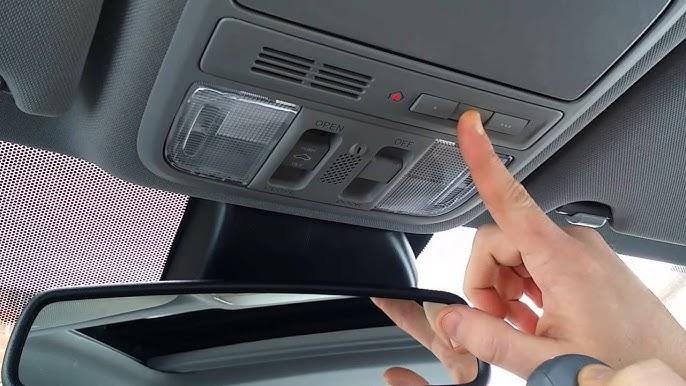
Before we dive into the buttons, let’s gather what you need. Your 2012 Honda Odyssey is equipped with the Homelink system, a revolutionary universal transceiver built right into your rearview mirror. Instead of fumbling for a tiny remote in the dark, Homelink integrates your garage door control seamlessly into your vehicle.
To get started, ensure you have the following:
- Your handheld garage door opener remote.
- A sturdy ladder (if you need to press the “Learn” button on the motor head).
- About 5 minutes of your time.
According to a survey by the International Door Association, over 70% of homeowners use their garage door as their primary entrance. Having a seamlessly programmed Homelink system isn’t just a luxury; it’s an absolute daily convenience.
How to Clear the Homelink Memory First
If you bought your Odyssey used, or if previous programming attempts failed, you must clear the memory first. This is a crucial step that many beginners overlook.
- Locate the two outer Homelink buttons on your rearview mirror.
- Press and hold both outer buttons simultaneously.
- Keep holding them for exactly 20 seconds.
- Watch the LED indicator light. It will begin to blink slowly at first, then flash rapidly after 10 seconds, and finally turn solid after 20 seconds.
- Release the buttons. The memory is now completely erased.
Note: Skipping this step is the number one reason why programming fails for used vehicles.
Step-by-Step Instructions to Sync Your Remote
Now that the system is clean, let’s tackle the core process. There are two main types of garage door openers: fixed code and rolling code. Most modern openers (like Chamberlain, LiftMaster, and Genie) use rolling codes for enhanced security. To identify if you have a rolling code opener, look at the motor unit hanging from your ceiling. If the “Learn” button is yellow, red, orange, or purple, you have a rolling code system.
Method 1: Standard Programming (For Fixed Code Openers)
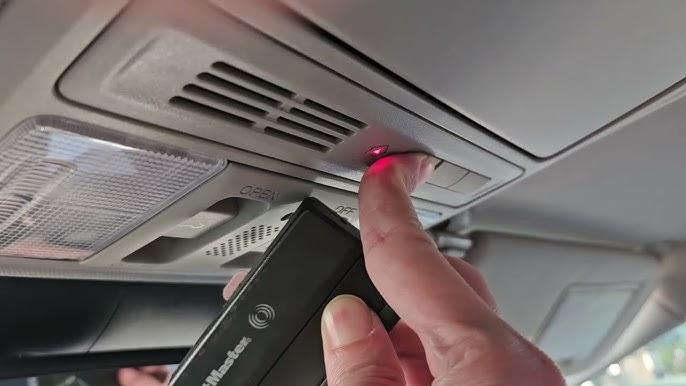
- Hold your handheld garage door remote 1 to 3 inches away from the Homelink buttons.
- Press and hold the desired Homelink button you want to program.
- Simultaneously, press and hold the button on your handheld remote.
- Watch the Homelink LED indicator. It will flash rapidly after about 15 to 20 seconds.
- Release both buttons.
- Test the Homelink button by pressing it once. If your garage door moves, you are done!
Method 2: Rolling Code Programming (For Modern Openers)
If Method 1 doesn’t work, you will need to access the garage door motor unit.
- Complete the standard programming steps (1-5) above.
- Locate the “Learn” or “Smart” button on your garage door opener motor.
- Press and release the “Learn” button. The indicator light next to it will illuminate or blink.
- Within 30 seconds, go back to your Honda Odyssey.
- Press and hold the programmed Homelink button for 2 seconds, then release.
- Press and hold it again for another 2 seconds, and release.
- Your garage door should activate, confirming the rolling code is synced.
For more technical details on how these universal transmitters operate, you can read the comprehensive HomeLink Wikipedia page.
Homelink System: Pros and Cons
To give you a better perspective, here is a quick comparison of using your Odyssey’s built-in system versus a standard sun visor clip-on remote.
| Feature | Built-in Homelink (Odyssey) | Sun Visor Clip-On Remote |
|---|---|---|
| Convenience | Excellent (Always in the car) | Good (Can be lost easily) |
| Aesthetics | Sleek, integrated into mirror | Bulky, hangs visibly |
| Battery Life | Powered by the car (No batteries) | Requires battery replacements |
| Cost | Included in the 2012 Odyssey | $30 – $50 to purchase |
As you can see, the built-in system is vastly superior for daily use, saving you money and hassle in the long run.
Troubleshooting Common Programming Issues
Even with a perfect guide, things can occasionally go wrong. Here are the most common issues and how to fix them:
- The LED Never Flashes Rapidly: Your handheld remote might have a weak battery. Replace the battery in your handheld remote and try again.
- The Door Moves Only When Very Close: This means the frequency isn’t syncing perfectly. Repeat the rolling code steps, ensuring you press the “Learn” button on the motor unit right before testing.
- The Garage Door Opener Motor Light Blinks: If the light bulb on your garage motor unit starts flashing when you press the Homelink button, it means the motor didn’t receive the programming signal correctly. Wait for the light to stop blinking (usually takes 30 seconds) and try the sequence again.
- It Works, But Only for One Cycle: If the door opens but won’t close, or vice versa, the rolling code didn’t sync properly. Repeat the 2-second press sequence at the motor unit.
Frequently Asked Questions (FAQ)
1. How many garage door openers can the 2012 Honda Odyssey store? The 2012 Honda Odyssey Homelink system has three buttons. This means you can program up to three different devices, such as a garage door, a gate, or even a home lighting system.
2. Do I need to reprogram the Homelink if my car battery dies? No, you do not. The Homelink memory is non-volatile, meaning it retains its programming even if the car’s main battery is disconnected or completely dies.
3. Why won’t my Homelink work with my new LiftMaster opener? Newer LiftMaster openers use Security+ 2.0 rolling codes. Ensure you are pressing the yellow “Learn” button on the motor unit and completing the 2-second press cycle in the car within 30 seconds.
4. Can I program a Homelink button to open my house lights? Yes! If you have compatible smart home devices or specific plug-in light modules, you can program a Homelink button to toggle your indoor or outdoor lights.
5. Is it safe to use Homelink for my garage? Absolutely. Homelink uses encrypted rolling code technology, which changes the access code every time you use it. This prevents code grabbing and keeps your home highly secure.
6. Can I program a Homelink button to operate a gate or community door? Yes, the Homelink system is not limited to just garage doors. You can program the buttons to operate electronic gates, community pool doors, or even outdoor lighting systems, provided they operate on compatible radio frequencies.
Conclusion
Mastering how to program garage door opener Honda Odyssey 2012 models is a straightforward process that saves you from juggling multiple remotes. By following these steps, you ensure your Homelink system is synced, secure, and ready for daily use. You no longer have to worry about losing your remote or dealing with dead batteries!
Did this guide help you get back into your garage hassle-free? Share this article on Facebook, Twitter, or Pinterest to help fellow Honda owners master their Homelink systems today!
Leave a Reply