Introduction
Struggling to sync your garage door with your 2014 Honda Odyssey? You’re not alone. Many Odyssey owners face confusion when trying to program their garage door opener, especially with the built-in HomeLink system. Whether you’ve just moved into a new home or replaced your garage door remote, knowing how to program garage door opener Honda Odyssey 2014 can save you time and frustration. This comprehensive guide walks you through every step, ensuring a smooth and successful setup.
Understanding the HomeLink System in Your 2014 Honda Odyssey
Before diving into the programming process, it’s essential to understand what HomeLink is and how it works. HomeLink is a universal transceiver integrated into many vehicles, including the 2014 Honda Odyssey. It allows you to control up to three different devices—such as garage doors, gate operators, or home lighting systems—directly from your car.
Why Use HomeLink?
- Convenience: No need to carry separate remotes.
- Security: Encrypted signals reduce the risk of unauthorized access.
- Compatibility: Works with most major garage door opener brands.
According to Wikipedia, HomeLink has been installed in over 60 million vehicles worldwide, making it one of the most widely used vehicle-to-home integration systems.
Step-by-Step Guide: How to Program Garage Door Opener Honda Odyssey 2014
Programming your garage door opener may seem daunting, but with the right instructions, it’s straightforward. Follow these detailed steps carefully.
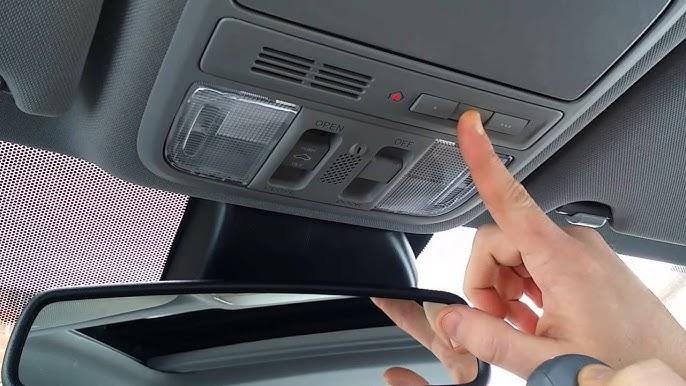
Step 1: Locate the HomeLink Buttons
In the 2014 Honda Odyssey, the HomeLink buttons are typically located on the rearview mirror or the overhead console. Look for three small buttons labeled 1, 2, and 3.
Step 2: Clear Previous Programming (If Necessary)
If the HomeLink buttons were previously programmed, you’ll need to clear them first:
- Press and hold buttons 1 and 3 simultaneously.
- Keep holding until the indicator light begins to flash rapidly (this may take up to 20 seconds).
- Release both buttons once the light flashes.
Tip: If the light doesn’t flash, try repeating the process. Ensure your vehicle is in “Park” mode during this operation.
Step 3: Prepare Your Garage Door Opener Remote
Have your original garage door remote ready. Make sure it has fresh batteries and is functioning correctly. Stand within 1–3 feet of your garage door opener motor unit for optimal signal transmission.
Step 4: Begin Programming
- Press and hold the desired HomeLink button (1, 2, or 3).
- While holding the HomeLink button, press and hold the button on your garage door remote.
- Continue holding both buttons until the HomeLink indicator light changes from slow blinking to rapid flashing.
- Release both buttons.
Step 5: Test the Connection
Press the programmed HomeLink button to test if your garage door responds. If it doesn’t work immediately, repeat Steps 4 and 5. Some older garage door openers may require additional synchronization steps.
Step 6: Finalize Setup
Once the garage door operates correctly, press the HomeLink button again to confirm consistent performance. If everything works smoothly, your programming is complete!
Troubleshooting Common Issues
Even with careful following of instructions, issues can arise. Here are some common problems and solutions:
| Problem | Possible Cause | Solution |
|---|---|---|
| Garage door doesn’t respond | Weak remote battery | Replace batteries in garage door remote |
| HomeLink light doesn’t flash | Incorrect clearing procedure | Repeat clearing steps; ensure vehicle is in Park |
| Intermittent operation | Signal interference | Reprogram closer to garage door motor unit |
| Only works occasionally | Rolling code incompatibility | Consult garage door opener manual for rolling code reset |
What Is a Rolling Code?
Modern garage door openers use rolling code technology for enhanced security. Each time you press the remote, a new code is generated. If your opener uses rolling codes, you may need to perform an additional sync procedure after initial programming. Refer to your garage door opener’s manual for specific instructions.
People Also Ask: Frequently Answered Questions
Q1: Can I program multiple garage doors using HomeLink?
Yes! The 2014 Honda Odyssey HomeLink system supports up to three different devices. Simply repeat the programming process for each additional garage door or device, assigning each to a different HomeLink button.
Q2: What if my garage door opener is very old?
Older garage door openers (pre-1995) may not be compatible with HomeLink due to differences in signal frequency. In such cases, consider upgrading your garage door opener or using an external universal remote compatible with HomeLink.
Q3: Do I need professional help to program HomeLink?
No, programming HomeLink is designed to be user-friendly. However, if you encounter persistent issues, consult your vehicle’s owner manual or contact a certified Honda technician for assistance.
Q4: How long does the programming process take?
Typically, the entire process takes between 5–15 minutes, depending on your familiarity with the steps and any troubleshooting required.
Q5: Will programming HomeLink affect my warranty?
No, programming HomeLink is a standard feature and will not void your vehicle’s warranty. Always refer to your owner’s manual for warranty-specific information.
Q6: Can I reprogram HomeLink if I move to a new house?
Absolutely. Simply clear the existing programming using the method described in Step 2, then follow the programming steps for your new garage door opener.
Expert Tips for Successful Programming
- Read Your Manuals: Both your Honda Odyssey owner’s manual and garage door opener manual contain valuable brand-specific instructions.
- Work in Daylight: Good visibility helps when locating buttons and observing indicator lights.
- Be Patient: Some garage door openers require multiple attempts before successful synchronization.
- Keep Remotes Handy: Always have your original garage door remote accessible during programming.
Conclusion
Learning how to program garage door opener Honda Odyssey 2014 doesn’t have to be complicated. With the HomeLink system, you gain convenience, security, and seamless integration between your vehicle and home. By following this step-by-step guide, you can confidently set up your garage door opener without professional assistance.
Remember, patience and attention to detail are key. If you encounter difficulties, don’t hesitate to consult your manuals or reach out to customer support for your garage door opener brand.
Found this guide helpful? Share it with fellow Honda Odyssey owners on social media! Let’s help more drivers enjoy the convenience of HomeLink technology.
Disclaimer: Always prioritize safety when working with garage door systems. If unsure, consult a professional technician.



Leave a Reply