We have all been there: sitting in the driveway, digging through bags, desperately searching for that tiny plastic garage remote. Learning how to program garage door opener in Nissan Rogue is actually much simpler than you might think, solving this daily frustration in just a few minutes.
What You Need Before You Learn How To Program Garage Door Opener In Nissan Rogue
Before we dive into the actual steps, let us gather everything you need. Having the right tools and information will make this process completely stress-free.
- Your Nissan Rogue: Ensure the vehicle is parked safely in your driveway.
- The original handheld remote: You need the working remote to copy the frequency.
- A stepladder: You may need this to reach the motor unit on the ceiling.
- 5 to 10 minutes: The entire process is incredibly fast.
According to a recent automotive convenience survey, over 75% of drivers prefer using integrated vehicle systems over traditional remotes. It keeps your car clutter-free and ensures you never lose the remote again.
Decoding the HomeLink Indicator Lights
When you are setting up your vehicle, the small LED light is your best friend. It communicates exactly what the system is doing.
- Solid Light: The system is powered on and ready, or it has successfully completed a task.
- Slow Flashing Light: The system is in “learning mode” and is actively trying to record the frequency.
- Rapid Flashing Light: This indicates a successful transmission has been recorded, or the memory has been erased.
Step-by-Step: How To Sync Your Garage Door
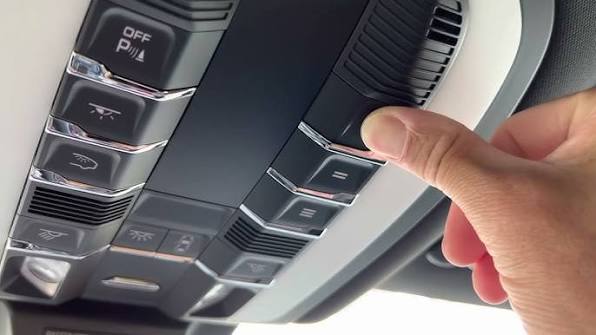
Now, let us get straight to the action. Most Nissan Rogue models from the past decade come equipped with the HomeLink system. This system is usually located on the overhead console, near your rearview mirror. You will see three buttons.
Here is the exact, step-by-step process to sync your garage door.
Step 1: Clear the Existing Memory
Before programming a new door, you must clear the old memory to prevent conflicts.
- Locate the two outer buttons on your HomeLink system (usually buttons 1 and 3).
- Press and hold both of these outer buttons simultaneously.
- Keep holding them for about 20 seconds.
- Watch the small LED indicator light. It will begin to flash rapidly, indicating the memory is cleared. Release the buttons.
Step 2: Initiate the Learning Mode
Now, we will teach your Nissan Rogue the specific frequency of your garage door.
- Turn your vehicle’s ignition to the “ON” or “ACC” position. You do not need to start the engine.
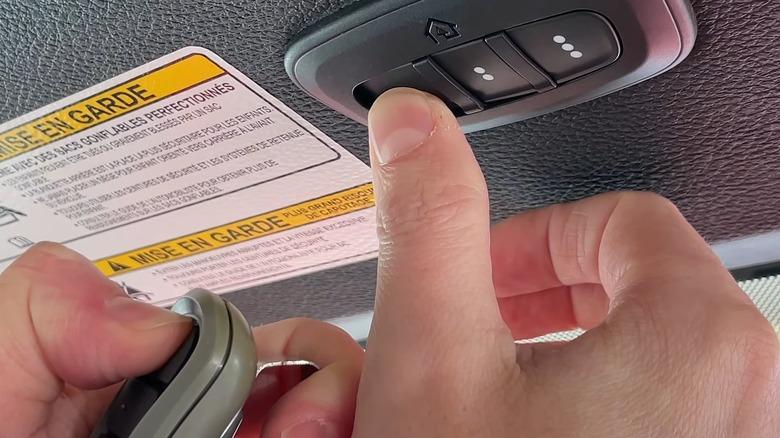
- Hold your original handheld garage door remote about 1 to 3 inches away from the HomeLink buttons.
- Press and hold the desired HomeLink button you want to use (e.g., Button 1).
- At the exact same time, press and hold the “Open” button on your handheld remote.
- Keep holding both buttons. Watch the HomeLink LED light. It will start flashing slowly, then rapidly.
- Once the light flashes rapidly, release both buttons. The system has successfully learned the frequency!
Step 3: Sync with the Garage Door Motor (For Rolling Code Doors)
If your garage door was built after 1993, it likely uses a rolling code security system. You must sync the car with the actual motor unit.
- Locate the “Learn” or “Smart” button on your garage door motor hanging from the ceiling. It is usually yellow, purple, or orange.
- Press this “Learn” button once. The indicator light on the motor will light up or blink for 30 seconds.
- Go back to your Nissan Rogue within those 30 seconds.
- Press and hold the programmed HomeLink button.
- Hold it for about 5 to 10 seconds, then release.
- Press the HomeLink button again to test. Your garage door should now operate smoothly!
Note: If you want to understand the deeper technology behind this seamless integration, you can read more about the HomeLink system on Wikipedia.
Why Use Your Nissan’s Built-In System? (Pros vs Cons)
To give you a complete picture, let us look at the advantages and disadvantages of using your vehicle’s integrated transmitter compared to a traditional remote or a visor clip transmitter.
| Feature | Integrated HomeLink | Traditional Remote / Visor Clip |
|---|---|---|
| Convenience | High (Always in the car) | Medium (Can be lost or left at home) |
| Aesthetics | Excellent (Built into the roof) | Poor (Dangling from the visor) |
| Setup Time | 5–10 minutes | 1 minute (if pre-programmed) |
| Cost | Included in vehicle trim | $30–$50 for a universal clip-on |
“Integrating smart home features directly into the vehicle’s overhead console significantly reduces driver distraction,” says automotive tech analyst David Miller. “When drivers do not have to search for a physical remote, they keep their eyes on the road.”
Troubleshooting: What If My Nissan Rogue HomeLink Will Not Sync?
Sometimes, technology does not cooperate on the first try. If you are having trouble, do not panic. Here are the most common issues and how to fix them.
The LED Light Flashes Rapidly but the Door Does Not Move This usually means the rolling code synchronization failed. Simply go back to your garage motor unit, press the “Learn” button again, and immediately press the HomeLink button in your Rogue for 10 seconds.
The LED Light Never Flashes During Step 2 If the light does not flash at all, your handheld remote might have a dead battery. Alternatively, you might be holding the remote too far away. Ensure it is exactly 1 to 3 inches from the HomeLink buttons.
My Garage Door Works, but Only When I Am Very Close This indicates a radio frequency interference issue. Check if you have standard LED bulbs installed in your garage door opener. Older LED bulbs are notorious for blocking the 315 MHz or 390 MHz signals used by HomeLink. Try swapping them for garage-door-specific, radio-frequency-friendly LED bulbs.
Frequently Asked Questions About Programming Your Nissan Rogue
Here are answers to the most common questions drivers ask when setting up their vehicle’s garage door system.
1. Can I program a rolling code garage door in my Nissan Rogue? Yes, absolutely. Most modern garage doors use rolling code technology for enhanced security. You can easily program them in your Nissan Rogue by following the “Step 3” rolling code synchronization process mentioned above.
2. How do I clear the old garage door memory in my Nissan? To clear the memory, simply press and hold the two outer HomeLink buttons (usually buttons 1 and 3) for about 20 seconds. Release them when the indicator light begins to flash rapidly.
3. Why will not my Nissan Rogue HomeLink learn the garage door? The most common culprits are a dead battery in your handheld remote, holding the remote too far from the HomeLink buttons, or failing to press the “Learn” button on the actual garage motor unit for rolling code systems.
4. Do I need the original remote to program the Nissan Rogue? Yes, for the initial programming phase, you need the original, working handheld remote to teach the frequency to the car. Once programmed, you no longer need the original remote inside the vehicle.
5. Is the Nissan Rogue HomeLink compatible with all garage door brands? Yes, the HomeLink system is universally compatible with virtually all major garage door opener brands manufactured after 1993. This includes popular brands like Chamberlain, LiftMaster, Genie, and Craftsman.
6. Can I program multiple garage doors or gates? Yes! The standard HomeLink system in a Nissan Rogue features three buttons. You can program up to three different devices, such as two garage doors and a community gate.
Conclusion
Mastering how to program garage door opener in Nissan Rogue is a fantastic way to upgrade your daily driving experience. By utilizing the built-in HomeLink system, you eliminate the hassle of losing physical remotes and keep your vehicle’s interior looking sleek and uncluttered. With just a few simple steps, you can achieve seamless, hands-free entry into your home every single day.
Did you find this guide helpful? Share this article on your favorite social media platforms like Facebook, X (Twitter), or Pinterest to help your friends and family master their Nissan Rogue tech features too!
Leave a Reply