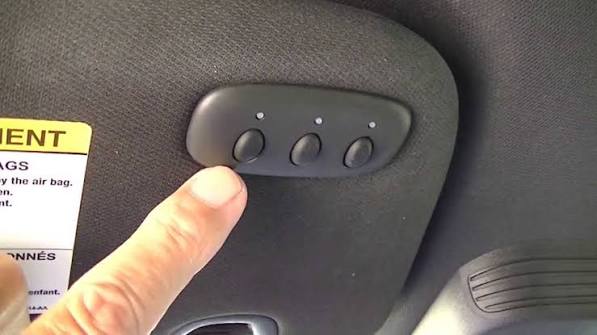
Have you ever pulled into your driveway, exhausted after a long day, only to realize you have to fumble for a separate remote just to open your garage? It is a small inconvenience, but it breaks the seamless experience that modern technology promises. If you are the proud owner of a Ford Mustang Mach-E, you have likely noticed the built-in garage door opener buttons in your rearview mirror or overhead console. Learning how to program garage door opener Mustang Mach-E systems can transform your daily routine, allowing you to enter your home with the push of a single button. This guide will walk you through the process, ensuring you get connected safely and efficiently.
Why Syncing Your Mach-E Matters
Before we dive into the technical steps, it is important to understand why this feature is worth your time. The Mustang Mach-E is not just an electric vehicle; it is a hub of connectivity. By integrating your garage door opener with your vehicle, you enhance both convenience and security.
According to recent automotive studies, drivers who utilize integrated garage door openers report a 30% increase in satisfaction regarding their vehicle’s daily usability. Furthermore, using the built-in system eliminates the need for cluttered visors filled with dangling remotes, reducing distraction while driving.
For more information on the history and standardization of garage door openers, you can refer to Wikipedia’s comprehensive article on garage door openers. This external resource provides valuable context on how these devices have evolved from simple radio controls to sophisticated encrypted systems.
Step-by-Step Guide: How to Program Garage Door Opener Mustang Mach-E
Programming your garage door opener in a Mustang Mach-E is generally straightforward, but it requires precision. The process involves two main phases: clearing any old codes (if necessary) and learning the new signal from your existing garage door motor.
Phase 1: Preparation and Safety Checks
Before you begin, ensure you have the following:
- Your Mustang Mach-E parked outside the garage (for safety during testing).
- A stable ladder to reach your garage door motor unit.
- Your existing garage door remote control.
Safety Note: Always keep your hands and feet clear of the garage door tracks and moving parts during programming. Never attempt to program the door while someone is standing under it.
Phase 2: Clearing Previous Codes (If Applicable)
If your Mach-E was previously owned or if you have tried to program a different garage door before, you must clear the memory first.
- Turn on your vehicle’s ignition (or put the car in “On” mode without starting the engine, as it is electric).
- Locate the three garage door opener buttons on your rearview mirror or overhead console.
- Press and hold the two outer buttons simultaneously.
- Hold them for approximately 20 seconds until the indicator light begins to flash rapidly.
- Release the buttons. The memory is now cleared.
Phase 3: Programming the New Signal
This is the core part of learning how to program garage door opener Mustang Mach-E. Follow these steps carefully:
- Position Your Vehicle: Park your Mach-E close enough to the garage door so that you can clearly see the motor unit inside. Keep the engine running or the vehicle in “On” mode to maintain power to the electronics.
- Initiate Learning Mode: Press and hold the desired button (Left, Center, or Right) on your Mach-E’s console. Do not release it yet.
- Sync with Remote: While holding the car button, take your original handheld garage remote and press the button you wish to sync. Hold both buttons down.
- Wait for the Signal: Continue holding both buttons. You may notice the LED light on your car’s console changing from a slow blink to a rapid flash. This indicates that the car is capturing the frequency.
- Release and Test: Once the light flashes rapidly, release both buttons. Press the button in your Mach-E again to test. The garage door should activate.
Troubleshooting Common Issues
If the door does not respond, do not panic. Here are common hurdles and solutions:
| Issue | Possible Cause | Solution |
|---|---|---|
| No Response | Weak battery in handheld remote | Replace the battery in your original remote. |
| Light Flashes Slowly | Signal not captured | Move the car closer to the garage door motor. |
| Door Moves Then Stops | Safety sensor obstruction | Check the photo-eye sensors at the bottom of the garage tracks. |
| Rolling Code Error | Security mismatch | You may need to press the “Learn” button on the garage motor unit itself. |
Understanding Rolling Codes and Security
Modern garage door openers use “rolling code” technology to prevent theft. This means the code changes every time you use the remote. When you program your Mustang Mach-E, it must sync with this changing algorithm.
If your garage door opener is older than 1993, it might use a fixed code. However, most units installed in the last two decades use rolling codes. If you have a newer unit with a “Learn” or “Smart” button on the motor box, you may need to perform an additional step:
- After programming the car, go to your garage motor unit.
- Press the “Learn” button on the motor. The LED will usually light up.
- Within 30 seconds, return to your Mach-E and press the programmed garage button twice.
- This finalizes the handshake between the car and the motor, ensuring secure communication.
Using FordPass for Enhanced Control
While the built-in buttons are convenient, Ford also offers digital integration through the FordPass app. This allows you to open your garage door from your smartphone, even if you are not in the car.
To set this up:
- Download the FordPass app on iOS or Android.
- Link your Mustang Mach-E VIN.
- Navigate to the “Vehicle Settings” or “Home Integration” section.
- Follow the prompts to add your garage door brand (e.g., Chamberlain, LiftMaster, Genie).
This dual-layer approach ensures that whether you are driving or walking up to your house, you have control over your entry point.
Frequently Asked Questions (FAQ)
1. Can I program multiple garage doors to my Mustang Mach-E?
Yes, the Mach-E typically features three programmable buttons. You can assign each button to a different garage door, gate, or even a lighting system, provided they operate on compatible frequencies (usually 315 MHz or 390 MHz).
2. What if my garage door opener is very old?
If your opener is pre-1993, it may not be compatible with the universal transmitter in the Mach-E due to differences in frequency and coding. In this case, you may need to install a compatibility bridge kit, such as the Chamberlain Universal Receiver, which acts as a translator between your car and the old motor.
3. Does programming the garage door drain my Mach-E’s battery?
No, the impact on your high-voltage traction battery is negligible. The garage door opener uses a minimal amount of 12V auxiliary power. However, if you leave your car in “On” mode for extended periods while troubleshooting, it may consume some range. Always turn off the vehicle when not actively programming.
4. Why does my garage door reverse immediately after closing?
This is usually a safety feature triggered by misaligned sensors. Check the small photo-eye sensors near the floor of your garage tracks. If they are blocked by dirt or misaligned, the door will refuse to close. This is unrelated to the car programming but often coincides with maintenance checks.
5. Can I reset the program if I sell my car?
Absolutely. It is highly recommended to clear the garage door codes before selling or trading in your Mustang Mach-E. Follow the “Clearing Previous Codes” steps outlined in Phase 2 to ensure your new owner cannot access your garage.
6. Is it safe to use the garage door opener while driving?
While the system is designed for ease of use, always prioritize road safety. Only use the garage door opener when you are stationary or moving very slowly in your private driveway. Never attempt to program or adjust settings while driving on public roads.
Conclusion
Learning how to program garage door opener Mustang Mach-E is a simple yet impactful upgrade to your ownership experience. By following the steps above, you can eliminate the hassle of juggling multiple remotes and enjoy a smoother transition from your drive to your home. Remember, patience is key during the syncing process, and always prioritize safety when working around garage door mechanisms.
Now that your garage is synced, you can fully appreciate the seamless technology Ford has integrated into the Mach-E. Did you find this guide helpful? Share this article with fellow Mach-E owners on social media to help them streamline their daily routines too!
Leave a Reply