Introduction
Struggling to sync your garage door with your brand-new 2021 Ford F-150? You’re not alone. Many truck owners find themselves confused when trying to connect their garage door opener to their vehicle’s built-in HomeLink system. Learning how to program garage door opener on 2021 F150 doesn’t have to be complicated or frustrating. This comprehensive guide will walk you through every step, ensuring you can open your garage with just a press of a button in your truck.
What Is HomeLink and Why Does Your 2021 F150 Have It?
HomeLink is a universal transceiver system integrated into many modern vehicles, including the 2021 Ford F-150. This technology allows your truck to communicate with various radio-controlled devices, most commonly garage door openers, but also gate operators, home lighting systems, and security alarms.
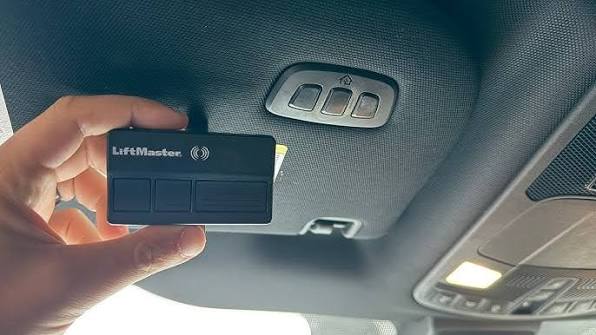
The 2021 F-150 features HomeLink buttons typically located on the overhead console near the rearview mirror. Depending on your trim level, you may have two or three programmable buttons. This convenient feature eliminates the need for multiple remote controls cluttering your vehicle or home.
According to automotive experts, over 60% of new vehicle buyers consider integrated garage door openers a valuable convenience feature. The HomeLink system in your F-150 uses rolling code technology, which provides enhanced security by changing the access code each time you use it.
Before You Begin: Essential Preparation Steps
Gather Necessary Information
Before starting the programming process, collect the following items:
- Your garage door opener remote control (the original handheld unit)
- A ladder or step stool to reach your garage door opener motor unit
- Your 2021 F-150 parked inside or near the garage
- The owner’s manual for both your truck and garage door opener
Identify Your Garage Door Opener Type
Different garage door openers require slightly different programming approaches:
| Opener Type | Brand Examples | Programming Method |
|---|---|---|
| Fixed Code | Older Chamberlain, Genie | Simple button press |
| Rolling Code | LiftMaster, Craftsman, newer Chamberlain | Requires “Learn” button |
| Smart/Internet-Connected | MyQ, Nexx | May need app integration |
Important: If your garage door opener was manufactured after 1995, it likely uses rolling code technology, which requires an additional step during programming.
Check Your HomeLink System Status
Ensure your 2021 F-150’s HomeLink system is functional by checking that:
- The vehicle battery is fully charged
- The overhead console lights are working
- No warning messages appear on your dashboard
For more information about universal garage door opener systems, visit Wikipedia’s page on garage door openers.
Step-by-Step: How to Program Garage Door Opener on 2021 F150
Step 1: Clear Existing HomeLink Memory (If Needed)
If you’re reprogramming or if this isn’t your first time setting up HomeLink:
- Turn your ignition to the “ON” position (engine can be off)
- Press and hold the two outer HomeLink buttons simultaneously
- Continue holding for approximately 20 seconds
- Release when the indicator light begins flashing rapidly
- All previously programmed codes are now erased
Note: Skip this step if programming for the first time.
Step 2: Position Your Vehicle Correctly
Proper positioning ensures successful programming:
- Park your 2021 F-150 outside the garage, facing the garage door opener motor
- Maintain a distance of 6 to 12 feet from the garage door
- Ensure no large metal objects are between your truck and the opener
- Keep your garage door opener remote within easy reach inside the vehicle
Step 3: Initiate HomeLink Programming Mode
- Turn your ignition to the “ON” position
- Choose which HomeLink button you want to program (1, 2, or 3)
- Press and hold your chosen HomeLink button
- While holding the HomeLink button, bring your garage door remote 1 to 3 inches from the HomeLink buttons
- Press and hold the button on your garage door remote
- Continue holding both buttons until the HomeLink indicator light changes from slow blinking to rapid flashing (typically 20-30 seconds)
- Release both buttons
Step 4: Program Rolling Code Openers (Additional Step)
If your garage door uses rolling code technology:
- Locate the “Learn” or “Smart” button on your garage door opener motor unit (usually on the back or side)
- Use your ladder to safely reach the motor unit
- Press and release the “Learn” button (the indicator light will illuminate or blink)
- You have 30 seconds to complete the next step
- Return to your 2021 F-150
- Press and hold the programmed HomeLink button for 2 seconds, then release
- Repeat this press-and-release cycle three times
- Test the system by pressing the HomeLink button
Step 5: Test Your Programming
Verify successful programming:
- Stand outside your garage with your 2021 F-150
- Press the programmed HomeLink button
- Your garage door should activate (open or close)
- Test from different distances (close and far)
- Try programming additional devices if desired
Troubleshooting Common Programming Issues
Problem: HomeLink Light Doesn’t Flash Rapidly
Solutions:
- Ensure you’re holding both buttons long enough (up to 30 seconds)
- Move the remote closer to the HomeLink buttons (within 1 inch)
- Try a different HomeLink button
- Check your garage door remote battery
Problem: Garage Door Doesn’t Respond After Programming
Solutions:
- Verify you completed the rolling code programming step if applicable
- Reposition your vehicle closer to the garage door opener
- Ensure the garage door opener motor has power
- Try clearing memory and starting over
Problem: Programming Works Intermittently
Solutions:
- Reprogram using the rolling code procedure
- Check for interference from other electronic devices
- Ensure your vehicle isn’t parked near large metal structures
- Contact your garage door opener manufacturer for compatibility issues
Problem: Can’t Find the “Learn” Button
Solutions:
- Consult your garage door opener manual
- Look for a colored button (usually yellow, purple, red, or green)
- Some models hide the button behind a light cover
- Search online for your specific model number
Advanced Tips for Optimal Performance
Maximize Signal Strength
- Keep your HomeLink buttons clean and unobstructed
- Avoid parking directly under power lines or near cell towers
- Consider installing a signal repeater if you experience consistent issues
Program Multiple Devices
Your 2021 F-150 can store up to three different devices:
- Button 1: Primary garage door
- Button 2: Secondary garage door or gate
- Button 3: Home lighting or security system
Security Best Practices
- Regularly update your garage door opener codes
- Don’t share your HomeLink programming with unauthorized users
- Consider upgrading to a smart garage door opener with encryption
- Monitor your garage door activity if using internet-connected systems
Frequently Asked Questions
Q: How long does it take to program a garage door opener on a 2021 F150?
A: The entire process typically takes 5-10 minutes for fixed-code openers and 10-15 minutes for rolling-code systems. Most of this time involves positioning your vehicle and locating the “Learn” button on your garage door opener.
Q: Can I program my 2021 F150 HomeLink without the original remote?
A: Unfortunately, no. You need the original garage door remote to transmit the signal to your HomeLink system during programming. If you’ve lost your remote, contact your garage door opener manufacturer to purchase a replacement compatible with your system.
Q: Will programming my garage door opener affect my warranty?
A: No, programming your HomeLink system will not void your 2021 F-150 warranty. This is a standard feature designed for user programming. However, improper installation of aftermarket garage door openers could potentially affect coverage.
Q: My HomeLink worked initially but stopped functioning. What should I do?
A: This commonly occurs with rolling code systems that have been reset. Simply repeat the programming process, ensuring you complete the rolling code steps at your garage door opener motor. If problems persist, clear the HomeLink memory and start fresh.
Q: Can I program a garage door opener from a different brand than my previous one?
A: Yes, HomeLink is designed to be universal and works with most major garage door opener brands including LiftMaster, Chamberlain, Genie, Craftsman, and others. The programming process remains the same regardless of brand.
Q: Is it safe to leave my garage door connected to my vehicle?
A: Yes, modern HomeLink systems use encrypted rolling codes that change with each use, making them highly secure. However, always practice good security habits like keeping your vehicle locked and not sharing access codes unnecessarily.
Conclusion
Learning how to program garage door opener on 2021 F150 is a straightforward process that enhances your daily convenience and modernizes your driving experience. By following these detailed steps, you can successfully integrate your garage door with your truck’s HomeLink system in under 15 minutes.
Remember to identify your opener type, position your vehicle correctly, and complete all necessary steps including the rolling code procedure if applicable. With proper programming, you’ll enjoy seamless garage access every time you pull into your driveway.
Found this guide helpful? Share it with fellow F-150 owners on Facebook, Twitter, or Reddit who might be struggling with their HomeLink setup. Your share could save someone hours of frustration!
Don’t forget to bookmark this page for future reference, and feel free to leave comments below if you have additional questions or success stories to share.



Leave a Reply