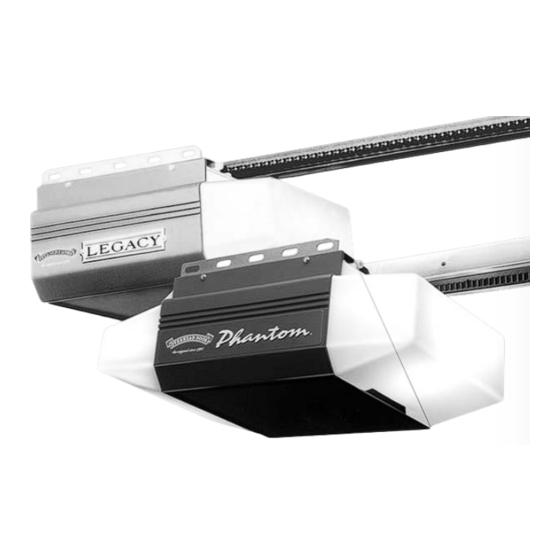
Struggling to get your garage door to respond to your remote? You are not alone, and we are here to help you figure out exactly how to program Legacy Garage Door Opener Model 696Cd/B quickly and safely. Whether you just moved into a new home, lost your old remote, or recently purchased a replacement, this simple, expert-backed guide will have your door working smoothly in just a few minutes. Taking a few moments to correctly sync your device not only restores daily convenience but also ensures your home remains secure.
How To Program Legacy Garage Door Opener Model 696Cd/B: Step-by-Step Guide
Before diving into the buttons, let’s cover the essentials. The Overhead Door Legacy 696CD/B is a reliable, albeit discontinued, model that still powers thousands of homes across the United States
www.overheaddooronline.com. Because it is an older model, finding the right, manufacturer-approved instructions can sometimes feel like searching for a needle in a haystack. However, the process is remarkably straightforward once you know the exact sequence of actions.
Preparation Checklist:
- A compatible remote control or wireless keypad: Ensure it explicitly states compatibility with the Legacy 696CD/B series.
- A sturdy step ladder: You will need to safely reach the motor unit mounted on your garage ceiling.
- Fresh batteries: Most remotes use CR2032 or A23 batteries. A weak battery is the number one cause of programming failure.
- Safety glasses: Highly recommended when working on a ladder beneath a heavy garage door motor.
Step-by-Step Remote Programming:
- Locate the Learn Button: Find the main motor unit mounted on your garage ceiling. The ‘Learn’ button is typically a small red or black button, sometimes hidden just under the plastic light lens dev.aa-dc.org.
- Activate Programming Mode: Press and release the ‘Learn’ button exactly once. You will see an indicator light turn on or start blinking steadily, signaling that the unit is actively listening for a new code.
- Sync the Remote: Within a strict 30-second window, press and hold the specific button on your remote control that you wish to program.
- Confirm the Connection: Release the remote button as soon as the opener’s indicator light blinks or you hear a distinct mechanical click. This auditory or visual cue confirms the new encrypted code has been successfully accepted by the motherboard.
- Test the System: Step back to a safe distance and press the newly programmed button on your remote. The garage door should operate smoothly, opening or closing as expected.
Where Is the Learn Button on the Legacy 696Cd/B?
Many users get stuck right at the beginning because they cannot physically locate the programming button. On the Legacy 696CD/B, the learn code button is often a small pinhole or a subtle, recessed button located near the red radio signal light at the bottom of the motor unit
overheaddoor7riversregion.com. If you do not see an obvious, protruding button, gently snap off the plastic light cover to reveal the control board beneath.
Safety first: Always ensure the garage door is fully closed and the area is clear of people and pets before climbing a ladder to access the motor unit.
How To Program a Wireless Keypad for the Legacy 696Cd/B
If you prefer entering a PIN code from outside, programming a wireless keypad is just as easy and highly recommended for guest access. This method eliminates the need to hand out physical remotes to dog walkers or house sitters.
Keypad Programming Steps:
- Set Your PIN: Ensure the keypad backlight is completely off. Press
3-5-7in sequence, then immediately press the PROGRAM key. The LED indicator will blink once per second, indicating it is ready for input overheaddoor7riversregion.com. - Save the PIN: Enter your desired 3- to 8-digit PIN. For security, avoid obvious combinations like “1234” or your birth year. Press the PROGRAM key again. The LED will blink twice and shut off, confirming the PIN is securely saved in the keypad’s memory overheaddoor7riversregion.com.
- Sync with the Opener: Walk to the motor unit and press the Learn button once until it flashes red, putting the main system into pairing mode overheaddoor7riversregion.com.
- Finalize the Link: Return to the exterior keypad, enter your new PIN, and press the UP/DOWN key 3 to 4 times slowly until the garage door opener operates and physically moves the door overheaddoor7riversregion.com.
Troubleshooting: Why Won’t My Legacy 696Cd/B Remote Sync?
Even with the correct steps, technology can sometimes be stubborn. Here are the most common reasons your remote might not be syncing, backed by real-world technician observations and service data:
- You Held the Learn Button Too Long: Holding the learn button for more than 10 seconds can accidentally trigger a memory wipe, erasing all previously programmed remotes and keypads from the system www.justanswer.com. If this happens, you will need to start over and reprogram every single device you own.
- Weak Remote Batteries: A dying battery cannot transmit a strong enough radio frequency signal to the motor unit. Always replace the battery with a fresh, high-quality one before attempting to reprogram.
- Signal Interference: Modern LED light bulbs installed in garage openers can sometimes emit electromagnetic frequencies that interfere with the remote’s signal. Try turning off the garage lights temporarily while programming to rule this out.
- Incompatible Remote: Not all universal remotes work seamlessly with discontinued models. Ensure your replacement remote explicitly states compatibility with the Overhead Door Legacy 696CD/B or utilizes “Code Dodger” technology www.justanswer.com.
To enhance your home security, it is worth noting that openers like the Legacy series utilize rolling code technology, which dynamically changes the access code every time you use the remote to prevent code grabbing. You can read more about how this vital security standard protects modern homes on Wikipedia.
Remote vs. Keypad Programming: Quick Comparison
To help you decide which access method best suits your household’s needs, here is a quick, easy-to-read breakdown:
| Feature | Remote Control | Wireless Keypad |
|---|---|---|
| Initial Step | Press ‘Learn’ button on motor | Set a secure 3- to 8-digit PIN first |
| Time Limit | Must sync within a strict 30 seconds | No strict 30-second limit for initial PIN setup |
| Confirmation | Opener light blinks or emits a click | LED blinks twice, then door physically moves |
| Best Use Case | Daily, convenient in-vehicle use | Guest access, runners, or forgotten remotes |
Frequently Asked Questions (FAQ)
Q1: Can I use a universal remote for the Legacy 696Cd/B?
Yes, but you must proceed with caution. Many universal remotes claim broad compatibility, but you must verify that the packaging explicitly lists the Overhead Door Legacy 696CD/B or mentions compatibility with “Code Dodger” systems
overheaddoorpartsonline.com.
Q2: What happens if I hold the Learn button for more than 10 seconds?
Holding the button too long triggers a factory reset for the receiver, completely erasing all paired remotes and keypads from the memory
www.justanswer.com. You will need to start the programming process from scratch for every device in your household.
Q3: How do I know if my remote battery is dead?
If the remote’s LED indicator light does not illuminate when you press the button, or if the remote only works when you are standing extremely close to the motor unit, the battery is likely depleted and needs immediate replacement.
Q4: Can I program multiple remotes to the same Legacy 696Cd/B opener?
Absolutely. The motor unit’s receiver is designed to store multiple unique codes simultaneously. Simply repeat the step-by-step remote programming process for each additional remote you wish to add to the system.
Q5: Is the Legacy 696Cd/B model considered safe by modern standards?
While it is a discontinued model, it remains perfectly safe to use as long as the safety reversal sensors (the “eyes” near the floor) are properly aligned, clean, and functioning. Regular visual inspections and maintenance are key to ensuring long-term reliability and safety.
Conclusion
Learning how to program Legacy Garage Door Opener Model 696Cd/B does not have to be a frustrating or intimidating experience. By following this clear, step-by-step guide, you can save valuable time, avoid unnecessary and costly professional service calls, and regain seamless, secure access to your garage. Remember to always prioritize your physical safety when using a ladder, and double-check your remote’s battery health before starting the process.
Did you find this guide helpful and easy to follow? Share this article with your friends, family, and neighbors on social media to help them troubleshoot their own garage door opener issues today!



Leave a Reply