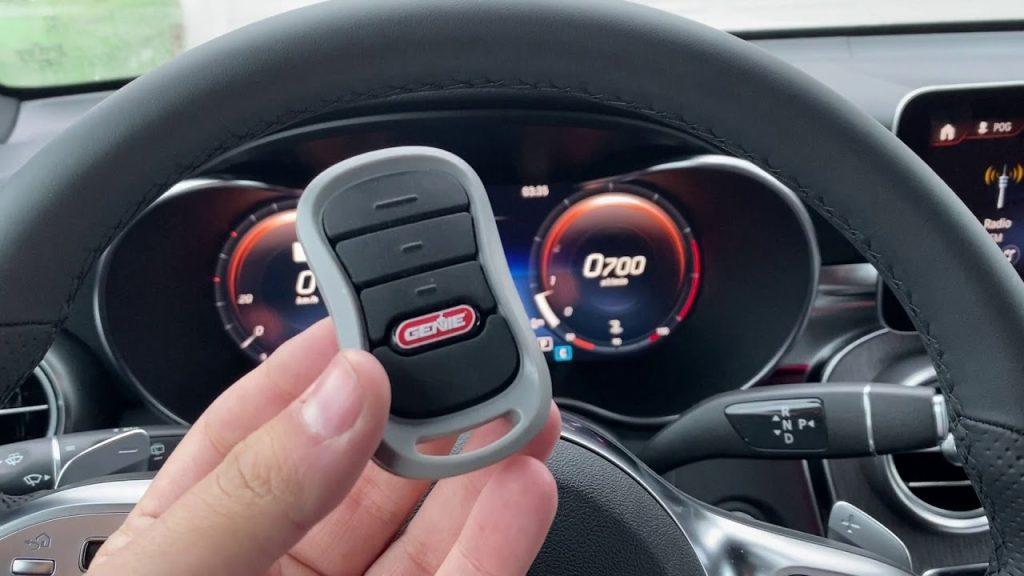
Introduction
There is nothing quite as frustrating as standing in your driveway, pressing the button in your car repeatedly, only to watch your garage door remain stubbornly closed. If you are driving a newer vehicle but still rely on an older garage system, you might feel stuck between two different technological eras. You are not alone; millions of American homeowners face this compatibility gap every day.
The good news is that bridging this gap is often simpler than you think. Whether you have a “dumb” legacy opener or a slightly older smart model, learning how to program legacy garage door opener to car can restore the convenience of hands-free entry. In this guide, we will walk you through the exact steps, troubleshoot common issues, and ensure your setup is secure and reliable.
Understanding the Compatibility Gap
Before diving into the buttons, it is crucial to understand why legacy openers behave differently than modern ones. Most cars manufactured after 2005 come equipped with built-in universal transmitters, commonly known by brand names like Homelink, Car2U, or AutoAssist. These systems are designed to mimic the radio frequency (RF) signal of your original garage remote.
However, “legacy” openers—typically those installed before 2010—often use fixed-code technology rather than the rolling-code security found in newer models. This distinction is vital because it dictates the programming method. Fixed-code systems send the same signal every time, making them easier to clone but less secure. Rolling-code systems change the signal with every use, requiring a specific “learning” handshake between the car and the opener motor.
According to data from the International Door Association, over 60% of residential garage doors in the US are still operating on systems that are more than 15 years old. This means a significant portion of drivers need to know how to interface modern car tech with older infrastructure.
Step-by-Step: How To Program Legacy Garage Door Opener To Car
The process varies slightly depending on whether your car uses Homelink or another system, but the core logic remains the same. Below is the universal method that works for most legacy setups.
Step 1: Clear Existing Memory
If your car’s garage button has been used before, it may hold old data. Start fresh by clearing the memory.
- Press and hold the two outer buttons on your car’s overhead console simultaneously.
- Hold them for about 10–20 seconds until the indicator light begins to flash rapidly.
- Release the buttons. The memory is now cleared.
Step 2: Position Your Vehicle
Park your car outside the garage, ensuring the front bumper is within 3 to 5 feet of the garage door opener motor unit. Keep the engine running or the ignition in the “On” position to ensure consistent power during programming.
Step 3: Initiate Learning Mode on the Opener
Locate the “Learn” or “Smart” button on your garage door opener motor unit (usually hanging from the ceiling).
- Note: For legacy openers, this button is often colored yellow, purple, or red.
- Press and release the Learn button. A small LED light on the motor unit should turn on or start blinking. You typically have 30 seconds to complete the next step.
Step 4: Sync the Car Remote
While the opener’s light is active:
- Go back to your car.
- Press and hold the desired garage button on your car’s console.
- Do not release the button yet. Watch the garage door opener motor unit. When the light on the motor unit blinks or turns off, it indicates the signal has been received.
- Release the car button.
Step 5: Test the Connection
Press the programmed button in your car again. The garage door should activate. If it does not, repeat the process, ensuring you are close enough to the motor unit.
Troubleshooting Common Issues
Even with careful following of instructions, legacy systems can be finicky. Here are the most common hurdles and how to overcome them.
| Issue | Possible Cause | Solution |
|---|---|---|
| Door doesn’t respond | Signal interference or distance | Move car closer (within 3 feet). Remove other electronics from the dashboard. |
| Light blinks but door won’t move | Incorrect code type | Try holding the car button for shorter/longer durations during sync. |
| Works intermittently | Weak battery in original remote | Replace the battery in your handheld legacy remote first, then reprogram. |
| Security+ 2.0 Error | Rolling code mismatch | You may need a compatible bridge device (see below). |
The “Rolling Code” Problem
If your legacy opener uses Security+ or rolling codes, simply cloning the signal might not work because the code changes after every use. In these cases, your car might open the door once, but fail the second time.
To fix this, you may need to perform a “Double Program” technique:
- Program the car using the steps above.
- Once synced, press the “Learn” button on the motor unit again.
- Immediately press the car button twice. This forces the opener to update its rolling code sequence to match the car’s transmitter.
When You Need a Bridge Device
Sometimes, the technology gap is too wide. If your garage opener is extremely old (pre-1990s) or uses a proprietary frequency that your car cannot mimic, you will need a hardware solution.
A universal repeater or bridge module (such as those made by Chamberlain or Genie) acts as a translator. It sits in your garage, learns the signal from your car, and then sends the correct legacy signal to your old opener. While this adds cost (typically $30–$50), it is the most reliable method for incompatible systems.
For a deeper understanding of radio frequency standards in home automation, you can refer to technical specifications on Wikipedia’s page on Home Automation Protocols. This resource provides excellent background on why certain frequencies clash.
Safety and Security Considerations
Programming your garage door to your car is convenient, but it introduces new security variables. Legacy openers are notoriously vulnerable to “code grabbing” attacks, where thieves intercept the fixed signal.
- Update Your Codes: If you haven’t changed your garage door keypad PIN in years, do it now.
- Disable Unused Remotes: If you have old handheld remotes lying around, clear their codes from the motor unit to prevent unauthorized access.
- Monitor Activity: If your opener supports it, enable activity logs. If not, consider upgrading to a smart hub that can monitor door status via Wi-Fi.
Remember, convenience should never compromise safety. If your legacy opener lacks modern safety sensors (auto-reverse features), consider upgrading the entire unit rather than just programming the car.
FAQ Section
Q1: Can I program any car to any legacy garage door opener?
A: Not always. Most cars with Homelink or similar systems can program to openers using standard frequencies (315 MHz or 390 MHz). However, very old openers using unique frequencies or proprietary encryption may require a bridge device.
Q2: Why does my garage door open but not close when using the car button?
A: This is usually a safety sensor issue, not a programming error. Check the photo-eye sensors at the bottom of your garage door tracks. If they are misaligned or dirty, the door will refuse to close for safety reasons, regardless of how the remote is programmed.
Q3: Do I need the original handheld remote to program my car?
A: In most cases, no. You can program directly from the car to the motor unit. However, having the original remote helps verify that the opener is functioning correctly before you attempt to sync the car.
Q4: How long does the programming last?
A: Once programmed, the connection should last indefinitely unless the car’s battery is disconnected for an extended period or the garage opener’s memory is reset. If it stops working, simply repeat the pairing process.
Q5: Is it safe to leave my garage door opener in “Learning Mode”?
A: No. Always ensure the learning mode times out or is manually canceled after programming. Leaving it active can allow neighboring remotes to accidentally pair with your opener.
Q6: What if my car manual says “Contact Manufacturer”?
A: This often happens with luxury vehicles or newer EVs. In this case, visit the manufacturer’s website and search for “Homelink compatibility list.” They often provide specific dip-switch settings or firmware updates required for legacy systems.
Conclusion
Learning how to program legacy garage door opener to car is a small task with a massive payoff in daily convenience. By understanding the difference between fixed and rolling codes, and following the step-by-step synchronization process, you can seamlessly integrate your modern vehicle with your existing home infrastructure.
Don’t let an old garage motor dictate your lifestyle. With a few minutes of effort, you can enjoy the luxury of pulling into your garage without ever fumbling for a plastic remote. If you found this guide helpful, please share it with friends or family who might be struggling with their own driveway dilemmas. Happy driving!



Leave a Reply