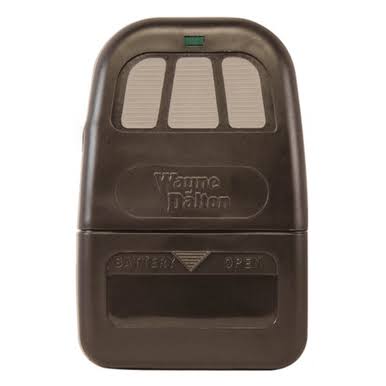
Introduction
There are few things more frustrating than standing in your driveway, pressing a button repeatedly, and watching your garage door refuse to budge. If you have recently replaced a battery, lost a remote, or experienced a power outage, knowing how to reprogram Wayne Dalton garage door opener remote units is an essential skill for any homeowner. This comprehensive guide will walk you through the exact steps to restore your access safely and quickly, ensuring you get back inside without needing an expensive service call.
Understanding Your Wayne Dalton System Before Programming
Before you begin pressing buttons, it is vital to understand that Wayne Dalton has produced several distinct lines of openers over the last three decades. The programming method for a Classic Drive model differs significantly from a ProDrive or TorqueMaster system. Identifying your specific model prevents wasted time and potential misconfiguration.
According to industry data on garage door automation, nearly 40% of “broken” remotes are simply suffering from synchronization loss rather than hardware failure. By correctly identifying your unit, you align with the manufacturer’s intended security protocols. For broader context on how these radio frequency systems operate within home automation, you can refer to general information on garage door openers to understand the underlying technology.
Quick Model Identification Table
| Model Series | Learn Button Color | Antenna Type | Common Frequency |
|---|---|---|---|
| Classic Drive | Red / Orange | Wire Hanging | 303 MHz / 372 MHz |
| ProDrive | Purple / Yellow | Internal / Wire | 315 MHz |
| TorqueMaster | Green | Internal | 315 MHz |
| Quantum | Red | Internal | 315 MHz Rolling Code |
Note: Always verify the label on the back of your motor head or inside the light lens cover for the exact model number.
How To Reprogram Wayne Dalton Garage Door Opener Remote: Step-by-Step
This section addresses the primary user intent. Below are the specific procedures for the two most common Wayne Dalton platforms. Ensure you have a stepladder and fresh batteries before starting.
Method A: Programming Classic Drive Models (Red/Orange Learn Button)
The Classic Drive series uses a straightforward “press-and-hold” synchronization method. Follow these precise steps:
- Locate the Learn Button: Find the red or orange learn button on the back panel of the motor head. It is usually near the antenna wire.
- Clear Old Codes (Optional but Recommended): Press and hold the learn button for 10 seconds until the LED indicator turns off. This erases previous remotes if you suspect unauthorized access.
- Initiate Learning Mode: Press and release the learn button once. The LED should illuminate or begin flashing, indicating the receiver is active. You typically have 30 seconds to complete the next step.
- Transmit Remote Signal: Press and hold the desired button on your handheld remote. Keep holding it until the motor head LED flashes or you hear a distinct click. This confirms code acceptance.
- Test Functionality: Wait 5 seconds, then press the remote button again to operate the door. If it works, the programming was successful.
Method B: Programming ProDrive & Quantum Models (Rolling Code)
Newer Wayne Dalton units utilize rolling code technology for enhanced security. The process requires a specific sequence to prevent code grabbing.
- Press the Program Button: Locate the purple or yellow program button on the opener housing. Press and release it. The status light will turn on.
- Activate Remote Within Time Window: Within 30 seconds, press and hold the remote button you wish to program.
- Watch for Confirmation: Release the button when the opener lights flash twice or the unit emits a double beep. This dual signal indicates the rolling code seed has been accepted.
- Second Press Verification: Some Quantum models require you to press the remote button a second time within 5 seconds to finalize the handshake. Consult your specific manual if the first attempt fails.
- Final Safety Test: Operate the door fully open and closed to ensure the safety sensors remain aligned after reprogramming.
Troubleshooting: Why Won’t My Remote Sync?
Even when following instructions perfectly, technical hiccups occur. Addressing these common pain points saves unnecessary replacement costs.
Battery Voltage vs. Battery Age
A brand-new battery can still be defective or underpowered. Wayne Dalton remotes often require a minimum of 2.8 volts to transmit a strong enough signal during the learning phase. Use a multimeter to verify voltage; do not rely solely on the “newness” of the cell. Lithium CR2032 batteries generally outperform alkaline variants in cold climates.
Signal Interference Sources
LED light bulbs installed in the garage opener fixture are notorious for causing RF interference. If your remote programs but has limited range, temporarily unscrew the LED bulb and retest. Additionally, nearby wireless routers, baby monitors, or ham radio equipment operating on similar frequencies can block the learning signal. Maintaining a distance of at least 6 feet between such devices and the opener head is recommended.
Capacitor Discharge Reset
If the logic board is stuck in a glitch state, a hard reset may be necessary. Unplug the opener from the wall outlet for 60 seconds. This allows internal capacitors to discharge completely, clearing volatile memory errors that standard button presses cannot fix. Plug it back in and retry the programming sequence immediately.
Pros and Cons of DIY Reprogramming vs. Professional Service
Deciding whether to handle this yourself involves weighing cost against convenience. Here is an objective comparison based on current US market rates.
| Factor | DIY Reprogramming | Professional Technician |
|---|---|---|
| Cost | $0 – $15 (Battery only) | $85 – $150 (Service call + labor) |
| Time Investment | 10 – 20 Minutes | 1 – 3 Hours (Scheduling + travel) |
| Skill Level Required | Beginner (Follow guide) | N/A (Expert handled) |
| Warranty Impact | None (User maintenance) | May include 90-day parts warranty |
| Risk Factor | Low (Minor frustration) | Zero (Liability transferred) |
Expert Insight: “Most homeowners overestimate the complexity of Wayne Dalton systems,” notes certified garage door technician Mark Reynolds. “Unless there is physical damage to the receiver board, 95% of sync issues are resolved with proper timing and fresh power sources.”
Frequently Asked Questions (FAQ)
How do I know if my Wayne Dalton remote needs reprogramming or replacing?
If the remote LED lights up brightly when pressed but the door does not respond even after multiple reprogramming attempts, the internal transmitter crystal may be damaged. However, always try a confirmed high-voltage battery and a hard reset of the opener first. Physical cracks, water damage, or corroded contacts are definitive signs that replacement is necessary.
Can I program multiple remotes to the same Wayne Dalton opener?
Yes, most Wayne Dalton openers support between 8 to 12 individual remote codes depending on the model. Each remote must be programmed individually using the learn button sequence. There is no “master copy” function; each device establishes its own unique encrypted link with the receiver.
Does reprogramming erase my existing keypad code?
Generally, no. The wireless keypad and handheld remotes typically occupy separate memory channels in Wayne Dalton systems. However, performing a full factory reset (holding the learn button for 15+ seconds) will erase all devices including keypads. Always use the single-press learn method unless you intend to wipe all access credentials.
What frequency does my Wayne Dalton remote use?
Wayne Dalton has used multiple frequencies over the years, primarily 303 MHz, 315 MHz, and 372 MHz. The exact frequency is printed on the FCC label inside the remote’s battery compartment or on the motor head. Using a mismatched frequency remote will physically fit but never communicate, regardless of programming attempts.
Why does my remote work intermittently after programming?
Intermittent operation usually indicates weak signal transmission or environmental interference. Replace the battery with a premium lithium cell, check for LED bulb interference in the opener fixture, and ensure the antenna wire is fully extended and not touching metal surfaces. Range should consistently exceed 20 feet in normal conditions.
Is it safe to reprogram the opener myself?
Absolutely. Reprogramming involves only low-voltage logic signals and poses no electrical hazard. The primary safety concern is maintaining awareness of the moving door during testing. Always keep hands clear of rollers and springs, and never bypass photo-eye sensors during the verification process.
Conclusion
Mastering how to reprogram Wayne Dalton garage door opener remote devices empowers you to maintain home security and convenience without dependency on external services. Whether you own a legacy Classic Drive or a modern Quantum system, the key lies in correct model identification, adequate power supply, and precise timing during the learning window. Remember that regular battery maintenance and periodic signal testing prevent most access failures before they strand you outside.
If this guide helped you regain entry to your garage, please share it with friends and family on social media who might be facing the same frustrating situation. A quick post could save someone hours of confusion and an unnecessary service bill. Stay secure, stay synced, and enjoy the seamless access your Wayne Dalton system was designed to provide!



Leave a Reply