Introduction
Struggling to sync your Genie garage door opener with your car’s HomeLink system? You’re not alone. Thousands of homeowners face this challenge every year, but the good news is that how to program Genie garage door opener to HomeLink is simpler than you might think. Whether you’ve just bought a new vehicle or upgraded your garage door system, getting these two technologies to work together seamlessly can save you time and hassle every single day.
In this comprehensive guide, we’ll walk you through everything you need to know about connecting your Genie garage door opener to your vehicle’s HomeLink system. From preparation steps to troubleshooting common issues, we’ve got you covered with clear, actionable instructions that anyone can follow.
Understanding HomeLink and Genie Compatibility
Before diving into the programming process, it’s essential to understand what makes these systems compatible. HomeLink is a universal transceiver system built into most modern vehicles, allowing you to control various devices like garage doors, gates, and home lighting from your car. Genie, on the other hand, is one of the leading manufacturers of garage door openers in the United States.
The compatibility between HomeLink and Genie garage door openers depends on several factors:
- Frequency matching: Most Genie openers operate on 315 MHz or 390 MHz frequencies
- Rolling code technology: Newer Genie models use rolling codes for enhanced security
- HomeLink version: Your vehicle’s HomeLink system generation affects programming methods
According to Wikipedia’s entry on HomeLink, this technology has been integrated into over 60 million vehicles worldwide, making it one of the most popular automotive convenience features available today.
Preparing for Programming: What You’ll Need
Successful programming requires proper preparation. Here’s your checklist before starting:
Essential Items
- Your vehicle with HomeLink system
- Genie garage door opener remote control
- A ladder (if needed to reach the garage door opener motor unit)
- Fresh batteries for your remote (recommended)
Important Safety Considerations
- Ensure your garage door is in good working condition
- Keep children and pets away from the garage during programming
- Have someone assist you if possible, especially when accessing the motor unit
Time Requirements
Most programming sessions take between 15-30 minutes, depending on your familiarity with the process and any troubleshooting that may be required.
Step-by-Step Programming Guide
Step 1: Clear Existing HomeLink Buttons
Before programming your Genie opener, you need to clear any existing codes from the HomeLink buttons you plan to use.
- Turn your vehicle’s ignition to the “ON” position (don’t start the engine)
- Press and hold the two outer HomeLink buttons simultaneously
- Continue holding until the indicator light begins to flash rapidly (usually takes 10-20 seconds)
- Release both buttons once the rapid flashing begins
Note: This process erases all previously programmed devices from those specific buttons.
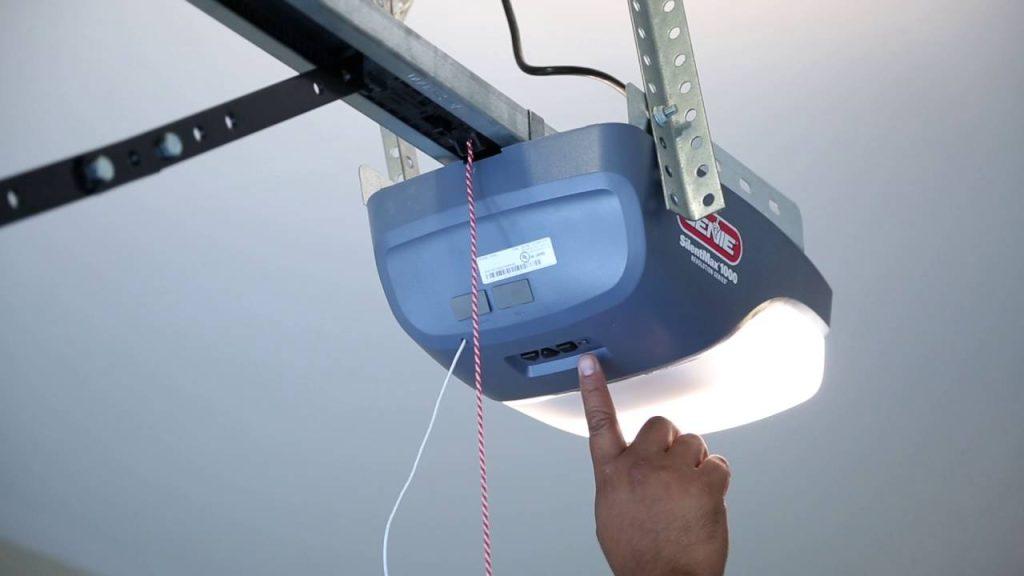
Step 2: Locate Your Genie Opener’s Learn Button
The learn button location varies by Genie model:
| Genie Model Series | Learn Button Location | Button Color |
|---|---|---|
| Aladdin Connect | Back panel of motor unit | Purple |
| Intellicode | Side or back of motor unit | Red or Purple |
| ChainLift/ChainDrive | Back panel near antenna | Purple |
| SilentMax | Side of motor housing | Red |
If you can’t locate the learn button, consult your Genie owner’s manual or look for a small LED light near the button, which typically indicates its position.
Step 3: Program HomeLink to Your Genie Remote
This is the core programming step where you teach HomeLink to recognize your Genie remote signal.
- Hold your Genie remote 1-3 inches away from the HomeLink buttons in your vehicle
- Press and hold the desired HomeLink button you want to program
- While continuing to hold the HomeLink button, press and hold the button on your Genie remote that operates the garage door
- Keep both buttons pressed until the HomeLink indicator light changes from slow blinking to rapid flashing
- Release both buttons
The entire process should take no more than 30 seconds. If the light doesn’t change pattern, repeat the process, ensuring you’re holding the remote close enough to the HomeLink buttons.
Step 4: Program the Genie Motor Unit
Now you need to teach your Genie opener to recognize the HomeLink signal.
- Locate the learn button on your Genie motor unit
- Press and release the learn button (the LED light will illuminate or blink)
- Within 30 seconds, return to your vehicle and press the programmed HomeLink button three times
- The garage door should activate, confirming successful programming
If the door doesn’t respond, you may need to repeat this step, ensuring you’re within range of the garage door opener.
Step 5: Test the Connection
After programming, test the system thoroughly:
- Drive away from your garage at least 50 feet
- Return and test the HomeLink button
- Try operating the door multiple times to ensure consistent performance
- Test from different angles and distances
Troubleshooting Common Issues
Even with careful following of instructions, you might encounter some challenges. Here are solutions to the most common problems:
HomeLink Light Doesn’t Flash Rapidly
- Solution: Ensure you’re holding the remote close enough (1-3 inches) to the HomeLink buttons
- Check that your remote batteries are fresh
- Verify you’re pressing both buttons simultaneously and holding them long enough
Garage Door Doesn’t Respond After Programming
- Solution: Repeat Step 4, ensuring you press the HomeLink button exactly three times
- Check if your Genie opener uses rolling codes (requires additional steps)
- Verify the learn button was pressed correctly on the motor unit
Intermittent Operation
- Solution: Reprogram the system, as the initial programming may not have completed successfully
- Check for interference from other electronic devices
- Ensure your vehicle is positioned consistently when testing
Rolling Code Genie Openers
If you have a newer Genie model with rolling code technology, you’ll need an additional step:
- After completing the standard programming process
- Press and hold the learn button on your Genie motor unit for 10 seconds until the LED blinks
- Press the HomeLink button in your vehicle once
- Wait for the garage door to cycle completely
Advanced Tips for Optimal Performance
Multiple Vehicle Programming
If you have multiple vehicles, you can program each one separately using different HomeLink buttons. Most vehicles support 3-8 programmable devices, giving you flexibility for family members.
Backup Remote Strategy
Always keep a physical Genie remote as backup. While HomeLink is convenient, having a backup ensures you’re never locked out due to technical issues.
Regular Maintenance
- Test your HomeLink connection monthly
- Replace remote batteries annually
- Keep your Genie opener firmware updated if applicable
Frequently Asked Questions
Q: Can I program multiple Genie garage doors to one HomeLink button?
A: No, each HomeLink button can only control one device. However, you can program different garage doors to separate HomeLink buttons in your vehicle. Most cars offer 3-8 programmable buttons, allowing you to control multiple garage doors, gates, or other compatible devices.
Q: What should I do if my Genie opener is very old?
A: Older Genie openers (pre-1993) may use fixed codes instead of rolling codes, which can actually make programming easier. However, if your opener is extremely old, consider upgrading to a newer model for better security and compatibility. Many older openers lack the safety features required by current standards.
Q: Why does my HomeLink work sometimes but not others?
A: Intermittent operation usually indicates incomplete programming or interference. Try reprogramming the system, ensuring you follow each step precisely. Also, check for sources of radio frequency interference near your garage, such as LED lights, wireless cameras, or other electronic devices.
Q: Do I need professional help to program HomeLink to Genie?
A: Most homeowners can successfully complete this programming themselves using this guide. However, if you’ve tried multiple times without success, or if you’re uncomfortable working with electrical components, contacting a professional garage door technician is recommended. Many Genie dealers also offer programming assistance.
Q: Will programming HomeLink affect my existing Genie remotes?
A: No, programming HomeLink won’t affect your existing Genie remotes. They will continue to work normally. HomeLink essentially becomes another remote control for your garage door opener, operating independently of your handheld remotes.
Q: How often do I need to reprogram HomeLink?
A: Under normal circumstances, HomeLink programming is permanent and doesn’t require regular reprogramming. However, you may need to reprogram if you replace your vehicle’s battery, reset the HomeLink system, or if you experience persistent connectivity issues.
Conclusion
Learning how to program Genie garage door opener to HomeLink doesn’t have to be complicated. With the right preparation and step-by-step approach, you can have your car and garage door working together seamlessly in under 30 minutes. The convenience of opening your garage door directly from your vehicle’s built-in controls is worth the initial setup effort.
Remember to test your system thoroughly after programming and keep your Genie remote as a backup. Regular maintenance and occasional testing will ensure reliable performance for years to come.
Did you find this guide helpful? Share it with friends and family who might be struggling with their own HomeLink programming challenges. Follow us on social media for more smart home tips and garage door maintenance advice!



Leave a Reply