Introduction
There are few things more frustrating than standing in the rain, punching numbers into a garage door keypad that simply refuses to respond. Whether you have moved into a new home, changed your access code for security, or replaced a dead battery, knowing how to reprogram a clicker keypad garage door opener is an essential homeowner skill. This comprehensive guide will walk you through the process safely and efficiently, getting you back into your garage without the need for an expensive service call.
Understanding Your Clicker Keypad System
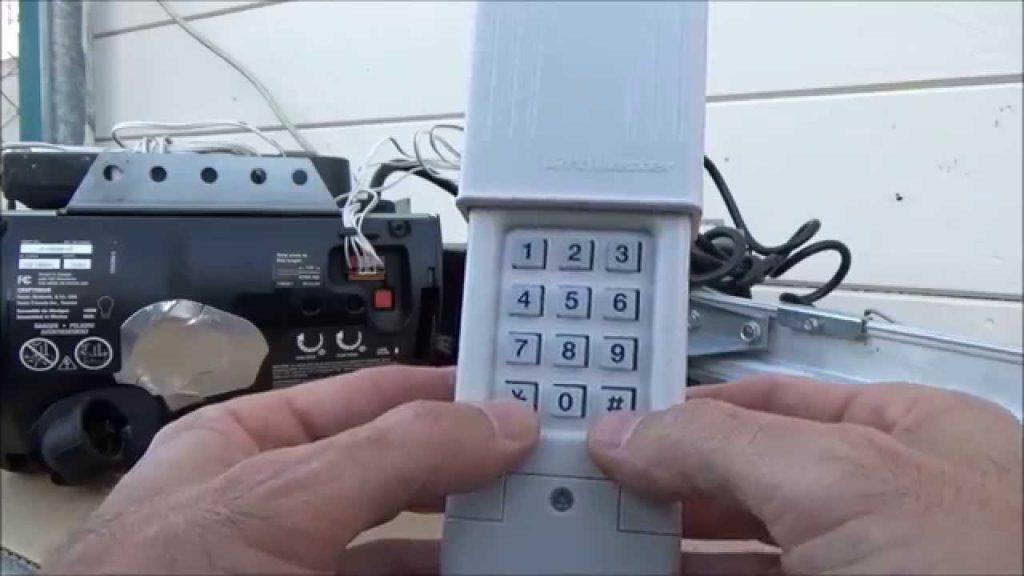
Before diving into the programming steps, it is vital to understand that “Clicker” is a brand name (often associated with Chamberlain/LiftMaster) but is frequently used as a generic term for universal wireless keypads. Reprogramming methods vary significantly between universal clicker keypads and OEM (Original Equipment Manufacturer) keypads.
According to industry data from the International Door Association, over 70% of garage door opener service calls are related to simple programming or battery issues that homeowners could resolve themselves. Understanding your specific model prevents damage to the logic board and ensures secure access.
Universal vs. OEM Keypads: Key Differences
| Feature | Universal Clicker Keypad | OEM Brand Keypad |
|---|---|---|
| Compatibility | Works with multiple brands | Specific to one brand/ecosystem |
| Programming Method | Usually DIP switches or learn button combo | Direct “Learn” button sync |
| Security Protocol | Often older fixed-code or basic rolling | Advanced Security+ 2.0 / Rolling Code |
| Price Point | $15 – $25 | $30 – $60 |
| Reliability | Good for older openers | Optimal for newer smart openers |
Expert Note: Always check the frequency of your opener (e.g., 315 MHz, 390 MHz, or dual-band) before purchasing a replacement clicker keypad. Mismatched frequencies are the #1 cause of programming failure.
Safety First: Pre-Programming Checklist
Garage doors are heavy mechanical systems. Before you attempt to reprogram any device, adhere to these safety protocols endorsed by the U.S. Consumer Product Safety Commission:
- Clear the Area: Ensure no children, pets, or objects are near the door tracks.
- Test Safety Sensors: Wave an object under the photo-eye sensors; the door should reverse immediately. If not, fix this before programming.
- Disconnect Power (If Needed): Only if you are accessing the motor unit’s internal wiring. For keypad programming, power typically stays on.
- Use a Stable Ladder: Never stand on buckets or chairs to reach the motor unit’s learn button.
Step-by-Step: How To Reprogram A Clicker Keypad Garage Door Opener
Below is the definitive tutorial for the most common universal Clicker keypad models (KLIK2U, KLIK3U). Always defer to your specific manual if these steps differ.
Step 1: Clear Old Codes (Factory Reset)
Reprogramming works best when starting fresh.
- Open the keypad cover.
- Press and hold the PROGRAM button until the LED light turns on (usually blue or amber).
- Enter your current PIN followed by the # key.
- Press and hold PROGRAM again until the LED flashes twice. The memory is now cleared.
Step 2: Put the Garage Door Opener in Learn Mode
- Locate the LEARN button on your garage door opener motor unit (usually on the back or side panel).
- Press and release the LEARN button. The indicator LED will illuminate steadily for 30 seconds.
- Note: You have exactly 30 seconds to complete the next step. Have your ladder positioned safely beforehand.
Step 3: Sync the Clicker Keypad
- Within the 30-second window, go to your keypad.
- Enter your desired new 4-digit PIN.
- Press and hold the ENTER (or #) button.
- Watch the motor unit: The LED should flash, or the overhead light should blink twice, confirming successful pairing.
- Release the ENTER button.
Step 4: Test the New Code
Close the keypad cover. Stand at a safe distance and enter your new PIN + ENTER. The door should activate smoothly. Test three times to ensure consistent signal strength.
Troubleshooting: When Reprogramming Fails
Even professionals encounter hiccups. Here are solutions to the most frequent issues:
- LED Doesn’t Light Up During Programming: Replace the 9V battery. Even if the old battery seems functional, low voltage prevents RF transmission. Use a premium alkaline battery rated for -20°F to 140°F.
- Opener Light Blinks But Door Doesn’t Move: This indicates successful programming but a possible travel limit issue. Adjust the force/travel settings on the motor unit per manufacturer specs.
- Code Works Intermittently: Check for RF interference. LED bulbs, Wi-Fi routers, or nearby radio towers can disrupt signals. Try switching to compatible LED garage door bulbs specifically designed for openers.
- Keypad Beeps Repeatedly: This usually means the wrong frequency was selected during initial setup. Refer to the compatibility chart inside the keypad battery compartment and re-select the correct setting.
Maintaining Your Keypad for Long-Term Reliability
Reprogramming shouldn’t be a monthly chore. Extend your keypad’s lifespan with these practices:
- Annual Battery Replacement: Don’t wait for failure. Set a calendar reminder every January.
- Weatherproofing Check: Inspect the rubber gasket around the keypad housing. Cracked seals allow moisture intrusion, corroding circuit boards. Apply silicone sealant if gaps appear.
- Button Cleaning: Use compressed air to remove debris from under buttons. Sticky keys cause double-inputs and failed codes.
- Firmware Updates: Smart-compatible clicker keypads may receive OTA updates via the opener’s hub. Check your manufacturer’s app quarterly.
Frequently Asked Questions (FAQ)
Q1: Can I reprogram a clicker keypad without accessing the motor unit?
Generally, no. Most modern rolling-code systems require pressing the physical LEARN button on the opener to establish a secure handshake. However, some older DIP-switch models allow keypad-only reprogramming by matching switch positions. Always verify your opener’s generation first.
Q2: How many PIN codes can a clicker keypad store?
Most universal clicker keypads store one primary PIN and sometimes a secondary guest code. OEM keypads like LiftMaster’s 887LM can store up to four unique user codes plus temporary access codes. Check your model’s specification sheet for exact capacity.
Q3: Will reprogramming erase my existing remotes and HomeLink?
No. Pressing the LEARN button briefly (for keypad pairing) does not clear other devices. Only holding the LEARN button for 6+ seconds performs a full factory reset that erases all paired accessories. Always press and release—never hold—unless intentionally resetting.
Q4: My clicker keypad works in summer but fails in winter. Why?
Cold temperatures reduce battery output and increase mechanical resistance in the door. First, install a lithium 9V battery rated for extreme cold. Second, lubricate hinges and rollers with silicone-based spray (never grease). Third, adjust the opener’s force sensitivity slightly higher for winter operation.
Q5: Is it safe to use a universal clicker keypad with a Security+ 2.0 opener?
Yes, but only if the keypad explicitly states Security+ 2.0 compatibility. Using an incompatible universal keypad forces the opener into legacy mode, disabling advanced encryption and potentially creating a security vulnerability. Always match security protocols.
Q6: How do I know if my clicker keypad needs replacement instead of reprogramming?
Replace the unit if: buttons feel mushy or unresponsive after cleaning, the LCD display shows missing segments, water damage is visible internally, or reprogramming fails despite confirmed compatibility and fresh batteries. Most keypads last 7–10 years; beyond that, component degradation is expected.
Conclusion
Mastering how to reprogram a clicker keypad garage door opener empowers you to maintain home security and convenience independently. By following the systematic steps outlined above—resetting, syncing within the learn window, and testing thoroughly—you eliminate guesswork and avoid costly technician visits. Remember, safety always precedes speed; never bypass sensor checks or rush ladder positioning.
Your garage is the primary entry point for most American families. Keeping its access system reliable isn’t just about convenience—it’s about peace of mind. Now that you’ve regained control of your keypad, consider sharing this guide with neighbors or friends who might be battling the same frustrating beep-of-denial. A quick social media share could save someone a rainy evening locked outside!
Found this helpful? Tag us on Facebook or X (Twitter) with your success story—we love celebrating DIY wins! Stay safe, stay secure, and keep those doors opening smoothly.



Leave a Reply