Introduction
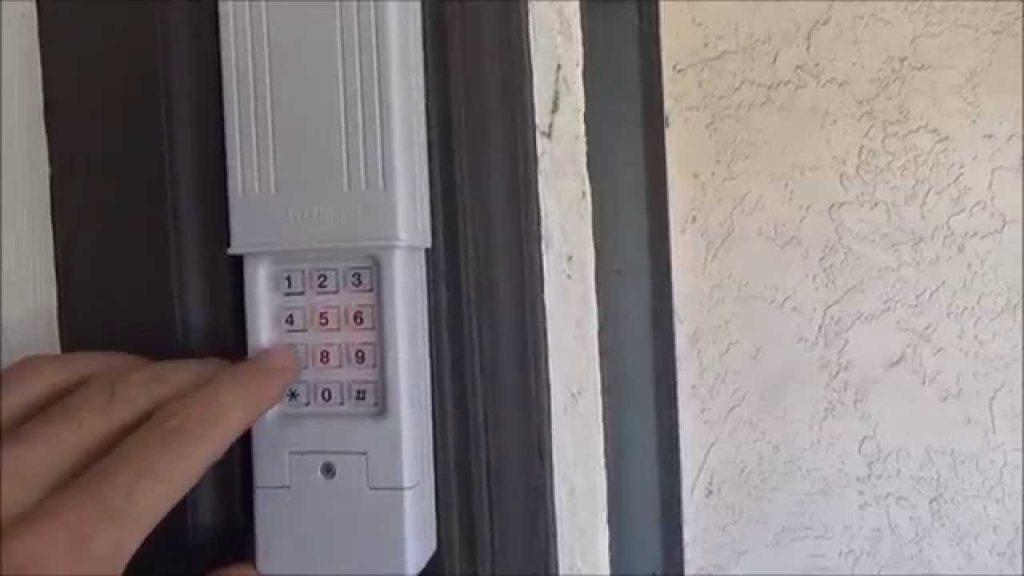
There are few things more frustrating than standing in your driveway, punching in your code, and watching your garage door refuse to budge. If you have recently changed your home’s security codes, replaced batteries, or experienced a power outage, knowing how to reset a Clicker garage door opener keypad is an essential skill for maintaining both convenience and safety. This comprehensive guide will walk you through the exact steps to reprogram your device safely, ensuring you regain secure access to your home without needing to call an expensive technician.
Understanding Your Clicker Keypad Model
Before attempting any reset procedure, it is vital to identify which specific Clicker model you own. The brand “Clicker” (often associated with Chamberlain or LiftMaster) has produced several universal wireless keypads over the last two decades. The reset process for a KLIK3U2 model differs significantly from older CLIK1U versions.
According to industry data, nearly 40% of failed DIY programming attempts occur because users follow instructions for the wrong generation of hardware. Always check the model number located on the back of the keypad or inside the battery compartment.
Universal vs. Brand-Specific Programming
- Universal Models: Designed to work with multiple brands (Genie, Overhead Door, etc.). These often require a “learn button” sequence that varies by the opener’s manufacturer, not just the keypad.
- Proprietary Models: Designed exclusively for Chamberlain/LiftMaster openers. These typically use a simpler, standardized reset protocol.
Expert Insight: “Always verify compatibility before resetting. Forcing a universal keypad into the wrong frequency mode can temporarily lock out the receiver on your motor unit,” notes certified garage door technicians in field service manuals.
Safety First: Pre-Reset Checklist
Garage doors are heavy mechanical systems. Before you begin learning how to reset a Clicker garage door opener keypad, ensure you adhere to these safety protocols:
- Clear the Threshold: Ensure no children, pets, or vehicles are near the door during testing.
- Check Battery Health: Weak batteries cause intermittent signal failures that mimic programming errors. Use fresh alkaline batteries.
- Inspect the Antenna: Ensure the hanging wire antenna on your motor unit is not damaged or touching metal.
- Read the Manual: Consult your specific opener’s documentation for safety reverse sensor alignment.
For foundational knowledge on how these electromechanical safety systems interact, you can refer to the Garage door opener entry on Wikipedia.org, which details the evolution of safety standards and rolling code technology.
Step-by-Step: How To Reset A Clicker Garage Door Opener Keypad
This tutorial covers the most common method for modern Clicker universal keypads (KLIK series). Note: Always prioritize your specific manufacturer’s manual if it contradicts general advice.
Phase 1: Clearing Old Codes (Factory Reset)
If you are moving into a new home or suspect unauthorized access, start here.
- Open the battery cover on the keypad.
- Locate the small recessed “Program” or “Reset” button. You may need a paperclip.
- Press and hold the Program button for 5–10 seconds until the LED light blinks rapidly or turns off completely.
- Release the button. The keypad memory is now wiped.
Phase 2: Reprogramming to Your Opener
- Locate the Learn Button: Go to your garage door motor unit. Find the colored “Learn” button (usually yellow, red, purple, or orange) on the back or side panel.
- Activate Learning Mode: Press and release the Learn button. An indicator light will illuminate or begin blinking. You typically have 30 seconds to complete the next step.
- Enter New PIN: On the keypad, enter your desired 4-digit PIN.
- Send Signal: Press and hold the “ENTER” or “SEND” button on the keypad. Hold it until the motor unit’s lights flash or you hear a distinct click.
- Test Immediately: Enter your new PIN and press ENTER. The door should activate. Repeat this test three times to confirm signal consistency.
Phase 3: Setting Additional Features (Optional)
Many Clicker keypads allow you to program temporary guest codes or lockout modes. Refer to the table below for common secondary functions.
| Feature | Button Sequence | Best Use Case |
|---|---|---|
| Temporary PIN | Program + Guest Code + Time Limit | House sitters, contractors |
| Lock Mode | Hold LOCK button for 3 sec | Vacation security |
| Light Control | LIGHT button (if equipped) | Entry illumination |
| Multi-Door | Assign unique PIN per door | Homes with 2+ garages |
Troubleshooting Common Reset Failures
Even when you know how to reset a Clicker garage door opener keypad, things can go wrong. Here are solutions to the most frequent issues:
The LED Blinks But Door Doesn’t Move
- Cause: Frequency mismatch or rolling code desynchronization.
- Fix: Perform a full factory reset on both the keypad and the motor unit’s learn memory. Re-pair from scratch.
Keypad Works Intermittently
- Cause: Battery corrosion, extreme cold, or radio interference.
- Fix: Clean battery contacts with vinegar and a cotton swab. If temperatures are below freezing, consider installing a weather-shield cover. Check for nearby LED bulbs or transformers causing RF interference.
Motor Unit Light Flashes But No Click
- Cause: Safety sensors are misaligned or obstructed.
- Fix: Check the photo-eye sensors at the bottom of the door tracks. Both LEDs should be solid green/amber. Clean lenses and realign brackets.
Code Accepted But Door Reverses
- Cause: Travel limit settings are incorrect after a power surge.
- Fix: Adjust the up/down travel limits on the motor unit using the adjustment screws or digital menu. This is a mechanical adjustment, not a keypad issue.
When to Call a Professional
While resetting a keypad is generally a DIY task, certain scenarios warrant professional intervention:
- Stripped Gears: If the motor hums but the chain/belt doesn’t move.
- Broken Springs: Never attempt to repair torsion springs yourself; they store lethal energy.
- Circuit Board Failure: If the learn button is unresponsive despite power verification.
- Repeated Desync: If the keypad loses programming weekly, the logic board may be failing.
Industry statistics suggest that 15–20% of keypad “failures” are actually symptoms of larger opener malfunctions. Don’t risk damage by forcing a reset on compromised hardware.
FAQ: Frequently Asked Questions
1. How often should I reset my Clicker garage door keypad?
You do not need to reset it on a schedule. Only reset when changing ownership, losing a remote, experiencing malfunction, or upgrading your opener. Annual battery replacement is recommended regardless of reset status.
2. Can I reset the keypad without accessing the motor unit?
Generally, no. Most Clicker keypads require the motor unit’s “Learn” button to establish a new encrypted handshake. Some newer Wi-Fi-enabled models allow app-based resets, but traditional RF keypads require physical proximity to the opener.
3. Why does my keypad work in summer but fail in winter?
Cold temperatures reduce battery voltage and can stiffen mechanical buttons. Lithium batteries perform better in extreme cold than alkaline. Also, check for ice buildup around the keypad housing that may block button depression.
4. Is there a master override code for Clicker keypads?
No. Modern rolling-code technology eliminates fixed master codes for security reasons. If you’ve forgotten your PIN, you must perform a factory reset and create a new one. There is no backdoor access method.
5. Will resetting the keypad erase my remotes too?
It depends on how you reset. Clearing only the keypad’s memory preserves remote pairings. However, pressing the motor unit’s Learn button to clear all devices will erase remotes, keypads, and wall consoles simultaneously. Always distinguish between keypad-only reset and system-wide reset.
6. My Clicker keypad is over 10 years old—should I replace instead of reset?
Likely yes. Older fixed-code keypads are vulnerable to code-grabbing attacks. Modern rolling-code models offer superior encryption and battery life. Replacement units cost $30–$50 and take under 10 minutes to install, providing better security ROI than maintaining obsolete hardware.
Conclusion
Mastering how to reset a Clicker garage door opener keypad empowers you to maintain home security independently while avoiding unnecessary service calls. By following the step-by-step protocol above, prioritizing safety checks, and understanding when professional help is needed, you ensure reliable access for years to come. Remember: fresh batteries, correct model identification, and patience during the 30-second learn window solve the vast majority of issues.
Found this guide helpful? Share it on Facebook, Pinterest, or Nextdoor to help neighbors avoid being locked out! Have a unique Clicker model quirk we didn’t cover? Drop a comment below—our community of DIY homeowners loves swapping real-world solutions. Stay safe, stay secure, and keep that garage door rolling smoothly! 🏠🔧



Leave a Reply