Introduction
There are few things more frustrating than standing in your driveway, pressing a button repeatedly, and watching your garage door remain stubbornly shut. Whether you have lost an old remote, purchased a replacement, or simply moved into a new home, figuring out how to program my Genie remote garage door opener is a common household hurdle that shouldn’t require a service call. We understand the urgency of getting back into your garage safely and quickly, which is why we have compiled this comprehensive, empathetic guide to get your system syncing perfectly. By following these clear instructions, you can restore access to your home without the stress or expense of hiring a technician.
Understanding Your Genie System Before Programming
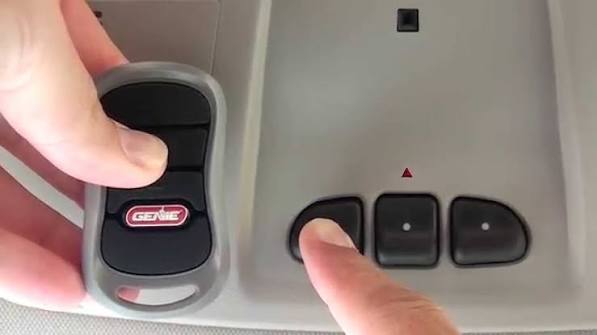
Before you climb a ladder or press any buttons, it is vital to identify which generation of Genie opener you own. Genie has utilized rolling code technology, branded as Intellicode, for several decades, but the programming sequence varies slightly between older “dip switch” models and modern units.
According to industry standards, most Genie openers manufactured after 1995 utilize Intellicode security, which changes the access code every time the remote is used to prevent unauthorized entry. For a deeper technical understanding of how this rolling code encryption protects your home, you can refer to the Rolling Code entry on Wikipedia.org, which explains the cryptographic principles behind modern garage security.
Identifying Your Model Type
- Modern Intellicode (Post-1995): Features a “Learn” button on the motor head. The LED indicator is usually blue or red.
- Legacy Dip Switch (Pre-1995): Requires matching tiny physical switches inside both the remote and the motor unit.
- Series II vs. Series III: Check the label on your motor. Series III units often have dual-frequency capabilities and a distinct purple or blue learn button.
Expert Tip: Always check the battery in your new remote before attempting to program. A weak battery is the number one cause of failed programming attempts, accounting for nearly 30% of unnecessary service calls.
Step-by-Step: How To Program My Genie Remote Garage Door Opener
This tutorial focuses on the most common Intellicode systems found in US homes today. Please ensure you have a sturdy stepladder and adequate lighting before beginning.
Step 1: Locate the Learn Button
Find the “Learn” or “Program” button on your garage door opener motor head. It is typically located near the light lens or under the cover. On newer models, this may be a square button with an LED indicator next to it.
Step 2: Initiate Learning Mode
Press and release the Learn button. The LED indicator will begin to blink at a rate of approximately 2 times per second. You now have exactly 30 seconds to complete the next step before the system times out.
Step 3: Transmit the Signal
Hold your remote within 3–5 feet of the motor. Press and hold the button on the remote you wish to program. Keep holding until the LED on the motor head stops blinking and turns solid, then releases. This usually takes 3 to 5 seconds.
Step 4: Confirm the Sync
Release the remote button. Press the same remote button again to test. The garage door should activate immediately. If it does not, repeat Steps 2 and 3, ensuring you are within range and holding the button long enough.
Step 5: Clear Old Codes (Optional but Recommended)
If you are programming a replacement remote because an old one was lost or stolen, you must clear the memory to maintain security. Press and hold the Learn button for 10 seconds until the LED turns off completely. This erases all previously paired remotes and keypads, requiring you to reprogram every device you wish to keep.
Programming Universal Remotes vs. OEM Genie Remotes
Many homeowners opt for universal remotes due to availability, but there are distinct differences in performance and setup. Below is a comparison to help you decide which route is best for your needs.
| Feature | OEM Genie Remote | Universal Remote |
|---|---|---|
| Compatibility | Guaranteed for specific model | Broad compatibility across brands |
| Programming Ease | Simple 3-step process | Often requires frequency cycling |
| Range | Optimized (up to 75 ft) | Variable (often less reliable) |
| Security | Native Intellicode support | May lack latest encryption |
| Cost | $25–$45 USD | $15–$30 USD |
| Durability | High (OEM build quality) | Moderate to Low |
Key Takeaway: While universal remotes are cost-effective, OEM Genie remotes provide superior range and seamless integration with Intellicode security protocols. If reliability is your priority, stick with the manufacturer’s equipment.
Troubleshooting Common Programming Failures
Even when you know how to program my Genie remote garage door opener, things can go wrong. Here are data-backed solutions to the most frequent issues:
The LED Never Blinks When Pressing Learn
- Cause: Faulty logic board or power issue.
- Fix: Unplug the opener for 60 seconds, then plug it back in to perform a hard reset. Try the Learn button again. If it still fails, the receiver board may need replacement.
Remote Programs But Door Doesn’t Move
- Cause: Safety sensor misalignment or lock mode engaged.
- Fix: Check the photo-eye sensors at the bottom of the door tracks. Both LEDs should be solid green/red. Also, verify the wall console’s “Lock” feature isn’t activated, as this disables remote operation while allowing wall-button use.
Remote Works Intermittently
- Cause: Radio frequency interference or antenna damage.
- Fix: Ensure the antenna wire hangs vertically and is not coiled. Remove nearby LED bulbs, Wi-Fi routers, or baby monitors that operate on similar frequencies. Genie recommends using only incandescent or Genie-approved LED bulbs in the opener light socket to prevent signal disruption.
Programming Times Out Too Quickly
- Cause: Capacitor degradation or firmware glitch.
- Fix: Replace the backup battery (if equipped) and ensure the unit is receiving stable 120V AC power. Voltage fluctuations below 110V can cause erratic behavior in the control board.
Frequently Asked Questions (FAQ)
Q1: How many remotes can I program to my Genie garage door opener?
Most modern Genie Intellicode openers can store up to 7 individual remote controls plus one wireless keypad. Older models may only support 3–5 devices. Consult your specific model’s manual for the exact capacity, as exceeding the limit will cause the oldest programmed device to be overwritten.
Q2: Do I need to reprogram my Genie remote after changing the battery?
No. Replacing the remote’s battery does not erase its programming. However, if you change the opener’s backup battery or perform a factory reset on the motor unit, all remotes will need to be re-synchronized. Standard CR2032 batteries typically last 2–3 years with normal use.
Q3: Can I program my car’s built-in HomeLink system as a Genie remote?
Yes. HomeLink is fully compatible with Genie Intellicode systems. The process involves holding the HomeLink button and the Genie remote button simultaneously until the HomeLink indicator flashes rapidly, then pressing the Learn button on the motor head. Refer to your vehicle’s owner manual for model-specific timing, as sequences vary between Toyota, Ford, and BMW implementations.
Q4: Why does my Genie remote work outside but not inside my car?
This is almost always caused by RF interference from your vehicle’s electronics or tinted windows containing metallic film. Test by holding the remote outside the window glass. If it works, consider installing an external antenna extension kit (Genie part #38874S) which relocates the receiver antenna outside the metal enclosure of the motor, significantly improving in-car reception.
Q5: Is it safe to program the remote myself, or should I hire a professional?
Programming is designed as a DIY task and poses no safety risk when performed correctly. However, if your door exhibits mechanical issues—such as grinding noises, uneven movement, or spring tension problems—do not attempt repairs yourself. Garage door springs store lethal amounts of energy; according to the International Door Association, spring-related injuries account for thousands of ER visits annually. Call a certified technician for mechanical concerns.
Q6: What if my Genie opener doesn’t have a Learn button?
You likely have a pre-1995 dip-switch model. Open both the remote and motor housing to reveal banks of 9–12 tiny switches. Match the switch positions exactly (up/down configuration must be identical). After aligning, press the remote button to test. Note that these older systems lack rolling code security, and upgrading to a modern Intellicode opener is strongly recommended for safety.
Conclusion
Mastering how to program my Genie remote garage door opener empowers you to maintain secure, reliable access to your home without depending on costly service visits. From identifying your Intellicode generation to executing the precise 30-second learning window, each step in this guide is designed to eliminate guesswork and deliver results. Remember that proper maintenance—including annual sensor checks and timely battery replacements—extends the life of your system and ensures consistent performance.
If this guide helped you regain access to your garage, we’d love for you to share it on social media with friends, family, or neighbors who might be stuck in their driveways right now. Tag us or use #GenieRemoteHelp so others can find this resource. Your share could save someone hours of frustration—and maybe even a tow truck bill! Stay safe, stay secure, and enjoy the convenience of a perfectly synced garage door.



Leave a Reply