Introduction
There is nothing quite as frustrating as standing in your driveway with a new or unresponsive remote, wondering why your garage door won’t budge. If you are searching for how to program remote for Python garage door opener, you are likely dealing with a lost fob, a dead battery replacement, or a newly installed system that needs syncing. You are not alone; thousands of US homeowners face this exact issue annually, but the good news is that programming these remotes is typically a quick, tool-free process. This guide will walk you through every step safely and efficiently, ensuring you get back into your garage without needing an expensive service call.
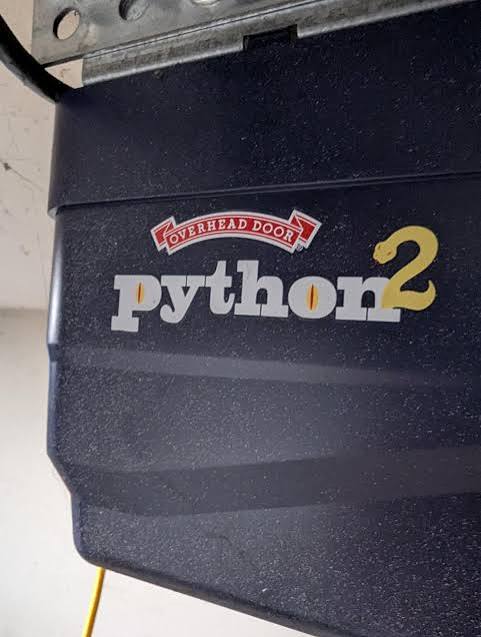
Understanding Your Python Garage Door System
Before diving into button combinations, it is vital to understand what makes Python openers unique. Manufactured primarily by The Chamberlain Group (often sold under brands like LiftMaster or Chamberlain in big-box stores), Python openers utilize specific rolling code technology for security. Unlike older dip-switch systems, modern Python units require a digital handshake between the motor unit and the remote.
According to industry standards documented on Wikipedia, rolling code systems change the transmission signal every time the remote is used, preventing thieves from “grabbing” your frequency. This means you cannot simply copy a signal; you must initiate the learn mode directly on the motor head. Knowing your specific model generation (e.g., Python 1000, 2000, or newer Chain/Belt Drive models) determines which color “Learn Button” you will use.
Identifying Your Learn Button Color
The most critical step in learning how to program remote for Python garage door opener is identifying your learn button. It is usually located on the back or side of the motor unit, near the antenna wire.
| Learn Button Color | Frequency/Type | Typical Era | Compatible Remote Type |
|---|---|---|---|
| Yellow | Security+ 2.0 | 2011–Present | 890MAX, 891LM, 893LM |
| Purple | Security+ | 2006–2014 | 971LM, 973LM |
| Orange/Red | Security+ | 1997–2005 | 970LM, 972LM |
| Green | Fixed Code/Dip | Pre-1997 | Legacy Universal Remotes |
Note: Always verify compatibility on the back of your remote packaging before attempting to program.
Step-by-Step: How To Program Remote For Python Garage Door Opener
Follow this precise tutorial to sync your remote. Ensure you have a sturdy ladder and clear visibility of the motor unit’s LED lights.
Step 1: Prepare the Remote and Motor Unit
Insert fresh batteries into your remote. Weak batteries are the #1 cause of programming failure. Clear the area around the garage door path to prevent accidents during testing. Locate the “Learn” or “Smart” button on your Python motor head.
Step 2: Initiate Learn Mode
Press and release the Learn button on the motor unit. Do not hold it down. A small LED light next to the button will illuminate steadily or begin blinking, indicating the unit is in pairing mode. You typically have 30 seconds to complete the next step before the system times out.
Step 3: Transmit the Signal
Within the 30-second window, press and hold the button on your remote that you wish to program. Hold it for 1–2 seconds, then release. Watch the motor unit’s LED light.
Step 4: Confirm Successful Pairing
If programmed correctly, the LED light on the motor unit will either flash rapidly, turn off completely, or emit two audible clicks. Test the remote immediately by pressing the button again. The door should activate. If the light stays solid and nothing happens, repeat Steps 2–3, ensuring you are within range and holding the remote button firmly.
Step 5: Program Additional Remotes or Keypads
Python openers can typically store up to 8 remotes and 1 keypad. To add more devices, simply repeat the process above. Each device requires its own individual learn cycle; you cannot program multiple remotes simultaneously.
Troubleshooting Common Programming Failures
Even when following instructions perfectly, issues arise. Here are expert-backed solutions for when how to program remote for Python garage door opener doesn’t work on the first try.
- LED Doesn’t Light Up: Check if the motor unit is plugged in and receiving power. Verify the circuit breaker hasn’t tripped. Some models require you to remove the light lens cover to access the learn button.
- Remote Programs But Won’t Open Door: The remote may be synced, but the travel limits need adjustment. Consult your manual for limit setting procedures. Alternatively, check if the safety sensors are aligned; blocked sensors prevent remote operation even if programmed.
- Intermittent Response: Replace the remote battery with a premium brand (avoid dollar-store alkalines). Check for LED bulb interference; some cheap LED bulbs emit RF noise that blocks remote signals. Switch to garage-door-rated LEDs.
- Previous Owner’s Remotes Still Work: Perform a factory reset by holding the Learn button for 6–10 seconds until the LED goes out. This erases all stored codes. Reprogram only your authorized remotes afterward.
Safety First: Critical Warnings Before Programming
Programming involves working near heavy mechanical equipment. Never bypass safety sensors or disable auto-reverse features to make programming easier. According to CPSC guidelines, garage doors cause thousands of injuries annually due to improper maintenance. Always keep hands and tools clear of moving parts during testing. If your opener lacks photo-eye sensors (pre-1993 models), consider upgrading the entire unit rather than just programming a remote—safety should never be compromised for convenience.
Frequently Asked Questions (FAQ)
Can I program a universal remote to my Python garage door opener?
Yes, most major universal remotes (like Chamberlain Clicker or Genie Intellicode) support Python/LiftMaster protocols. However, you must confirm the universal remote lists “Security+” or “Security+ 2.0” compatibility matching your learn button color. Follow the universal remote’s specific instructions, as they often require entering a code sequence before pressing the motor’s learn button.
How many remotes can a Python garage door opener store?
Most modern Python openers support up to 8 remote controls plus one wireless keypad. Older models (pre-2000) may only store 4–5. If you reach capacity, performing a factory reset clears all slots, allowing you to reprogram only active devices.
Why does my remote work intermittently after programming?
Intermittent issues usually stem from three causes: weak batteries, LED light bulb interference, or damaged antenna wires. Try replacing batteries first. If using non-garage-rated LED bulbs in the opener housing, swap them temporarily to test. Inspect the thin copper antenna wire hanging from the motor; if broken or touching metal, signal range drops dramatically.
Do I need to reprogram remotes after changing the opener battery backup?
Generally, no. The memory storing remote codes is non-volatile and survives power loss or battery changes. However, if you perform a full logic board replacement or factory reset, all remotes must be reprogrammed. Battery backup units only maintain operation during outages—they don’t erase stored codes.
Is there a difference between “Learn” and “Smart” buttons?
Functionally, no. Different Python/LiftMaster generations use different terminology, but both serve the same purpose: initiating remote pairing. Yellow buttons are labeled “Learn,” while older purple/orange models may say “Smart.” Treat them identically during programming.
Can I program my car’s built-in HomeLink to a Python opener?
Absolutely. HomeLink is compatible with all Python Security+ systems. Park outside the garage, clear existing HomeLink buttons per your vehicle manual, then follow the standard HomeLink-to-LiftMaster procedure (usually involving holding the HomeLink button while pressing the motor’s learn button). Refer to your vehicle owner’s manual for model-specific sequences.
Conclusion
Mastering how to program remote for Python garage door opener empowers you to maintain home security and convenience without relying on costly technicians. By identifying your learn button color, following the precise 30-second pairing window, and troubleshooting common pitfalls like LED interference or weak batteries, you can resolve most issues in under five minutes. Remember: safety always comes first—never compromise sensor functionality for faster programming.
If this guide helped you regain access to your garage, please share it on social media to help fellow homeowners avoid unnecessary service calls! Tag us or leave a comment below with your Python model number—we love hearing success stories and helping our community stay secure and stress-free. 🏡🔧



Leave a Reply