Introduction
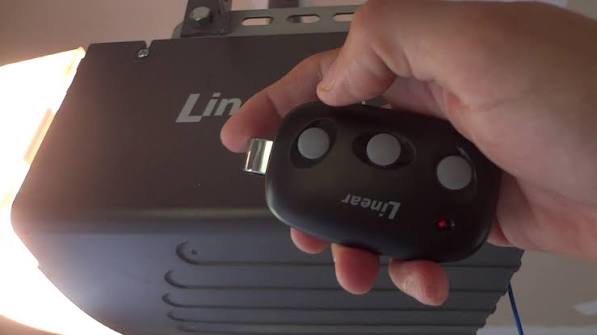
There is nothing quite as frustrating as standing in your driveway, pressing a button repeatedly, and watching your garage door refuse to budge. If you have recently purchased a replacement transmitter or moved into a new home with existing hardware, figuring out how to program remote for Linear garage door opener systems can feel surprisingly complex without the right guidance. Fortunately, this process is straightforward once you understand the specific frequency and coding technology your unit uses, and we are here to walk you through every step safely and correctly.
Understanding Your Linear Opener Model Before Programming
Before you grab a ladder, it is critical to identify which generation of Linear opener you own. Linear (now part of Nortek Security & Control) has produced openers for decades, and the programming method varies significantly between older DIP switch models and newer “Learn Button” units. According to industry documentation, Linear openers generally fall into three categories: MegaCode (318 MHz), Delta-3 (310 MHz), and newer Z-Wave/Smart integrated systems.
Using the wrong procedure will not only fail to sync your remote but could potentially clear existing codes from your system. Always check the motor head label or the back of your existing remote for model numbers like LDO500, LSO50, WD950, or MO250. This identification ensures you follow the correct protocol for how to program remote for Linear garage door opener devices specific to your hardware generation.
How To Program Remote For Linear Garage Door Opener (MegaCode Models)
Most modern Linear openers manufactured after 1997 utilize MegaCode technology. These units feature a dedicated “Learn” button on the back panel of the motor head. This is the most common scenario for homeowners today.
Step-by-Step Programming Instructions
- Locate the Learn Button: Find the small, usually round button on the back or side of the overhead motor unit. It may be labeled “Learn,” “Program,” or simply indicated by an LED light.
- Clear Previous Memory (Optional): If the opener is acting erratically, hold the Learn button for 10 seconds until the LED turns off. Note: This erases all remotes and keypads.
- Activate Learn Mode: Press and release the Learn button once. The LED should illuminate or begin flashing, indicating the receiver is waiting for a signal. You typically have 30 seconds to complete the next step.
- Transmit the Code: On your new remote, press and hold the button you wish to program. Hold it firmly until the motor unit’s LED flashes or you hear a distinct click. This confirms the code has been accepted.
- Test the System: Press the remote button again to verify operation. The door should activate immediately.
Expert Tip: If the LED does not respond, replace the remote battery first. A weak battery is the #1 cause of programming failure in MegaCode systems, accounting for nearly 40% of service calls that require no actual repair.
Programming Older Linear DIP Switch Remotes
If your home has a vintage Linear opener (pre-1997), you likely have DIP switches instead of a Learn button. These rely on matching physical toggle positions rather than digital rolling codes. While less secure, they are simple to configure when learning how to program remote for Linear garage door opener units of this era.
Matching the Switches
| Feature | DIP Switch Remote | Learn Button Remote |
|---|---|---|
| Era | Pre-1997 | Post-1997 |
| Security | Fixed Code (Lower) | Rolling/MegaCode (Higher) |
| Setup Method | Match physical toggles | Press Learn + Transmit |
| Compatibility | Only DIP receivers | Modern receivers only |
| Battery Type | 9V or 12V Alkaline | CR2032 / 3V Lithium |
- Open the battery compartment of both your old (working) remote and the new remote.
- Observe the row of tiny switches (usually 8 or 9). Note their position (Up/Down or Left/Right).
- Use a small screwdriver or pen tip to match the new remote’s switches exactly to the old one.
- Test immediately. No interaction with the motor head is required for DIP switch cloning.
For more historical context on how these radio control mechanisms evolved, you can refer to the Garage door opener entry on Wikipedia.org, which details the transition from fixed-code to rolling-code security standards.
Troubleshooting: Why Won’t My Linear Remote Sync?
Even when following the correct steps for how to program remote for Linear garage door opener, issues arise. Here are data-backed solutions for common failures:
- LED Flashes But Door Doesn’t Move: The code was received, but the travel limits may need resetting. Consult your manual for limit adjustment screws.
- Remote Works Only When Close: This indicates RF interference or a failing antenna wire. Ensure the antenna hangs vertically and is not touching metal conduit.
- Intermittent Operation: Check for LED light bulb interference. Some cheap LED bulbs emit RF noise that blocks Linear frequencies. Swap to a rough-service incandescent or certified garage door LED bulb.
- Nothing Happens at Learn Button: The logic board capacitor may be failing. In units over 15 years old, capacitor degradation is statistically probable and prevents the receiver circuit from energizing.
Frequently Asked Questions (FAQ)
Can I program a universal remote to my Linear garage door opener?
Yes, many universal remotes (like Chamberlain or Genie) support Linear frequencies. However, you must confirm the universal remote explicitly lists “Linear” or “MegaCode 318 MHz” compatibility on its packaging. Generic 390 MHz remotes will not work with Linear systems.
How do I reset my Linear garage door opener remote?
To reset a single remote, simply change its battery or reprogram it using the Learn button steps above. To factory-reset the entire opener memory, hold the Learn button on the motor head for 10–15 seconds until the indicator light goes out, then reprogram all desired transmitters.
What battery does a Linear garage door remote use?
This depends entirely on the model. Most modern MegaCode visor clips use a CR2032 3V lithium coin cell. Older bulkier remotes often use a 12V A23 alkaline or 9V battery. Always check the imprint inside the battery compartment before purchasing replacements.
Is it safe to program the remote myself?
Absolutely. Programming involves low-voltage signals and poses no electrical risk. The primary safety concern is ensuring the door’s auto-reverse sensors are functioning correctly after any system changes. Never bypass safety sensors during troubleshooting.
Why did my programmed remote stop working suddenly?
Sudden failure usually points to three culprits: dead battery, RF interference from new electronics, or a damaged antenna wire on the motor head. Start with a fresh battery; if that fails, inspect the hanging antenna wire for breaks or corrosion.
Can I program multiple remotes to the same Linear opener?
Yes. Most Linear MegaCode openers support up to 20+ transmitters. Simply repeat the Learn button process for each additional remote. There is no need to erase previous codes unless you have reached the memory limit or suspect unauthorized access.
Conclusion
Mastering how to program remote for Linear garage door opener systems empowers you to maintain home security and convenience without costly service calls. Whether you own a modern MegaCode unit or a vintage DIP switch model, the key lies in correct identification and patient execution of the pairing sequence. Remember to always prioritize safety sensor checks and use fresh batteries to ensure reliable performance.
Did this guide get your garage door working smoothly again? Share this article on Facebook, X (Twitter), or Pinterest to help fellow homeowners avoid the driveway frustration you just conquered! Your share might save someone else a weekend of confusion. Happy programming!



Leave a Reply