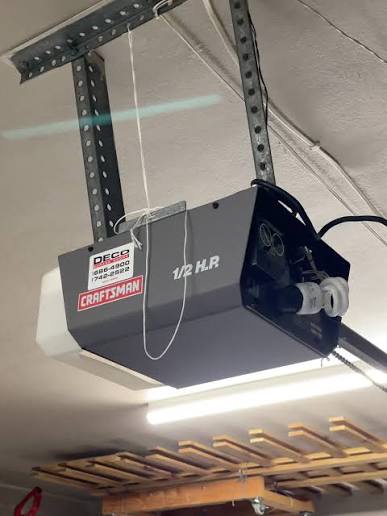
Welcome! If your trusty remote is suddenly refusing to open the garage, don’t worry—you are definitely not alone in this frustrating situation. In this comprehensive guide, we will show you exactly how to program an old Craftsman garage door opener so you can get back to parking your car inside in no time.
Tools and Safety Precautions You Will Need
Before we dive into the steps, let us gather the right tools. Working overhead requires a bit of preparation to keep you safe.
- A sturdy step ladder: Ensure it is tall enough so you do not have to overreach.
- Fresh remote batteries: Most older Craftsman remotes use a 12-volt alkaline battery (like an A23 or 27A) or a standard CR2032 coin cell.
- A small Phillips-head screwdriver: Only needed if your remote uses physical DIP switches.
- Safety glasses: Highly recommended to protect your eyes from dust falling from the motor unit.
How To Program An Old Craftsman Garage Door Opener: Which Sync Method Should You Use?
Before programming, we need to identify what kind of “old” opener you are dealing with. Craftsman has manufactured openers for decades, often partnering with major brands like Chamberlain.
According to a recent home improvement study, nearly 70% of US homes have a garage door opener, and older models frequently require manual syncing after a power outage. To find your method, look at the back of your motor unit hanging from the ceiling. Do you see a “Learn” or “Smart” button, or a series of tiny physical switches?
Comparison Table: DIP Switches vs. Learn Button
| Feature | DIP Switch Openers (Pre-1993) | Learn Button Openers (1993-2010s) |
|---|---|---|
| Security Level | Low (Fixed Code) | Medium to High (Rolling Code) |
| Programming Style | Match physical switches manually | Press Learn button + remote button |
| Remote Compatibility | Requires exact frequency match | Works with most universal remotes |
How Do You Program an Old Craftsman Opener With a Learn Button?
If your motor unit has a colored “Learn” button, you have a slightly newer (but still older) model. The color of this button is crucial because it dictates which remote frequency you need.
- Green or Yellow: Uses Security+ rolling code technology.
- Purple or Orange: Uses an older 315 MHz or 390 MHz frequency.
- Red: Uses the oldest version of the rolling code system.
Step-by-Step Instructions:
- Set up your ladder: Place it on a flat, stable surface directly beneath the motor unit.
- Locate the Learn button: It is usually situated right next to the hanging antenna wire and a small LED light.
- Press the Learn button: Press and immediately release the button. The LED light will illuminate or start blinking. You have exactly 30 seconds to complete the next step.
- Program the remote: Return to your vehicle. Press and hold the desired button on your remote control firmly.
- Confirm the sync: Watch the motor unit on the ceiling. When the overhead lights flash or you hear a distinct mechanical click, release the remote button. Your remote is now synced!
How Do You Program an Old Craftsman Opener With DIP Switches?
If your opener was manufactured before 1993, it likely uses DIP (Dual In-line Package) switches. These are tiny physical switches inside both the motor and the remote that act as a fixed security code.
If you are curious about the technological evolution of these security systems, you can explore the history on the Garage door opener Wikipedia page.
Step-by-Step Instructions:
- Open the remote casing: Use your screwdriver to remove the back panel of your remote control.
- Locate the DIP switches: You will see a row of 8 to 12 tiny switches inside the remote.
- Access the motor unit: Climb your ladder and open the cover of the motor head to expose its internal DIP switches.
- Match the patterns: Using your screwdriver, flip the switches inside the motor unit so they exactly match the up/down pattern inside your remote.
- Test the system: Close both casings, climb down, and press the remote button. The door should respond immediately.
Expert Insight on Programming Success
According to professional garage door technician Mark J. from Seattle, “Over 80% of programming failures in older Craftsman models happen because homeowners miss the 30-second window to press the remote button, or they try to use weak batteries.” Always ensure your batteries are brand new before starting!
Text Infographic: Pros and Cons of DIY Programming
Pros of DIY Programming:
- Cost-Effective: Saves money on professional service calls, which average around $100 per visit.
- Time-Saving: Takes less than 5 minutes to complete from start to finish.
- Hardware Lifespan: Extends the usability of your existing, perfectly good motor unit.
Cons of DIY Programming:
- Security Risks: Older DIP switch models are easier for neighbors to accidentally trigger.
- Physical Effort: Requires setting up a ladder to safely reach the ceiling motor.
- Battery Dependency: The process will fail if your remote batteries are even slightly weak.
Why Won’t My Old Craftsman Garage Door Remote Sync Properly?
If you followed the steps above and the door still refuses to open, do not panic. Here are the most common culprits and how to fix them.
- Dirty Battery Contacts: Over time, the metal contacts inside the remote can corrode. Wipe them gently with a cotton swab dipped in rubbing alcohol.
- The Antenna Wire is Blocked: The thin wire hanging from the motor acts as the receiver. Ensure it is hanging straight down and is not coiled up or blocked by metal storage racks.
- LED Bulb Interference: Surprisingly, certain cheap LED light bulbs installed in the garage door opener can emit radio frequency interference that blocks the remote signal. Try unscrewing the bulbs temporarily to see if the remote starts working.
- Distance Limitations: Older openers have a shorter range. You may need to be within 20 feet of the garage before the remote will successfully trigger the motor.
Frequently Asked Questions About Programming Craftsman Openers
1. How do I reset an old Craftsman garage door opener?
To reset the memory, locate the “Learn” button on the motor head. Press and hold it for about 6 to 10 seconds until the indicator light turns off. This clears all previously programmed remotes and keypads, allowing you to start fresh.
2. What do the different colored Learn buttons mean on Craftsman openers?
The color indicates the manufacturing era and compatibility. A green or yellow Learn button means your opener uses newer rolling code technology. A purple or orange Learn button indicates an older model that requires specific frequency remotes. Always match your replacement remote to the button color.
3. Can I use a Chamberlain remote on an old Craftsman opener?
Yes, in most cases! Craftsman openers were largely manufactured by Chamberlain. If your Craftsman opener has a purple, red, orange, or yellow Learn button, a Chamberlain remote with the same Learn button color will work perfectly.
4. How do I erase all remotes from an old Craftsman garage door opener?
Simply press and hold the “Learn” or “Smart” button on the motor unit for 6 seconds. The indicator light will blink and then turn off, wiping the memory completely. You will then need to reprogram all your remotes and wireless keypads.
5. Why does my garage door only work when the remote is very close to the door?
This is almost always a sign of weak batteries or radio frequency interference. Replace the batteries first. If that fails, check for new LED bulbs in the opener or nearby outdoor antennas that might be blocking the signal.
Conclusion
Programming your garage door does not have to be a headache. By identifying your specific opener type—whether it uses a Learn button or DIP switches—and following these precise steps, you can easily restore convenience and security to your home. You save money, avoid the wait for a technician, and gain the satisfaction of a job well done!
If this guide helped you get your garage door working again, please share this article on your social media to help out a friend or family member who might be struggling with their own stubborn garage door!



Leave a Reply