Introduction
There is nothing quite as frustrating as pressing your remote and watching your garage door remain stubbornly closed, especially when you are rushing to get to work or returning home with groceries in hand. If you are struggling with this exact issue, learning how to program Town and Country garage door opener systems is the essential first step toward restoring convenience and security to your daily routine. This comprehensive guide is designed to walk you through the process with empathy and clarity, ensuring you can sync your remotes and keypads without needing to call an expensive technician.
Understanding Your Town and Country System Before Programming
Before you begin pressing buttons, it is vital to understand that “Town and Country” often refers to specific regional models or rebranded units that may share internal components with major manufacturers like LiftMaster, Chamberlain, or Genie. Identifying the correct frequency and technology type prevents wasted effort. According to industry standards documented on Wikipedia, modern openers typically operate on 315 MHz or 390 MHz frequencies and utilize either DIP switches (older models) or rolling code technology (newer models).
Identify Your Opener Type
- Rolling Code (Security+): Features a “Learn” button that is usually yellow, purple, orange, or red. The code changes every time the remote is used.
- DIP Switch (Legacy): Contains a bank of tiny sliding switches inside both the motor head and the remote. These must match physically.
- Fixed Code: An older technology where the remote sends the same signal repeatedly. Less secure and increasingly rare.
Expert Tip: Always check the manufacturer label on the back or side of the motor unit. The model number and FCC ID are your most reliable sources for determining the exact programming protocol required for your specific Town and Country unit.
How To Program Town And Country Garage Door Opener Remotes
This is the most common search intent for homeowners. Whether you have a new replacement remote or are adding a second car’s transmitter, the process generally follows a standardized sequence for rolling-code units.
Step-by-Step Remote Programming Guide
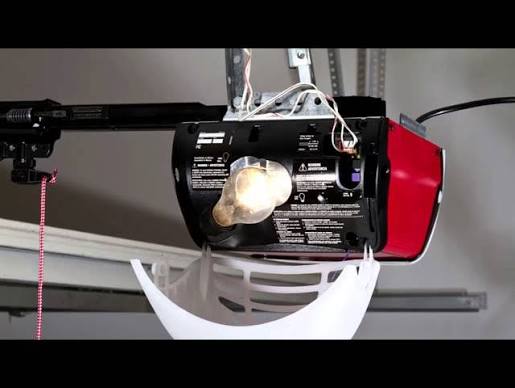
- Locate the Learn Button: Find the colored square or circular button on the back panel of the garage door opener motor. You may need to remove a light lens cover to access it.
- Clear Previous Codes (Optional but Recommended): Press and hold the Learn button for approximately 6–10 seconds until the indicator LED turns off. This wipes all previously paired remotes, ensuring a clean slate. Note: Skip this if you only want to add a remote without deleting existing ones.
- Initiate Learning Mode: Briefly press and release the Learn button. The indicator light will illuminate solidly or begin blinking, signaling the unit is ready to receive a signal. You typically have 30 seconds to complete the next step.
- Transmit the Signal: Press and hold the button on your remote that you wish to program. Hold it until the motor unit’s lights flash or you hear two distinct clicks. This confirms successful synchronization.
- Test Immediately: Press the remote button again to verify the door activates. If it does not respond, repeat steps 3 and 4, ensuring you are within 3 feet of the motor during programming.
Programming Legacy DIP Switch Models
If your Town and Country opener lacks a Learn button, you are dealing with a DIP switch system:
- Open the remote’s battery compartment to reveal the switch bank.
- Match the switch positions exactly to those inside the motor unit.
- Slide each switch to the corresponding Up, Down, or Center position.
- Test the remote; no “learning” phase is required for these analog systems.
Syncing Wireless Keypads and Smart Accessories
Many users searching for how to program Town and Country garage door opener also need to set up external keypads. These devices provide keyless entry for family members or service providers.
Keypad Programming Sequence
- Enter your desired 4-digit PIN on the keypad.
- Press and hold the “Enter” or “Program” button on the keypad until the light blinks.
- Within 30 seconds, press the Learn button on the motor unit.
- Return to the keypad and press “Enter” again. The keypad lights should flash, confirming the PIN is stored.
| Feature | Standard Remote | Wireless Keypad | Smart Wi-Fi Hub |
|---|---|---|---|
| Primary Use | Vehicle access | Keyless exterior entry | App control & monitoring |
| Programming Time | < 1 minute | 2–3 minutes | 5–10 minutes |
| Battery Life | 2–5 years | 1–2 years | N/A (Hardwired/USB) |
| Security Level | High (Rolling Code) | High (Rolling Code) | Highest (Encryption + Alerts) |
Troubleshooting Common Programming Failures
Even professionals encounter hiccups. When your attempts to program fail, systematic diagnosis saves time and money. Industry data suggests that over 60% of “broken” opener issues are actually simple maintenance or interference problems rather than hardware failure.
Why Won’t My Remote Program?
- Weak Batteries: Replace remote batteries even if they seem functional. Low voltage can transmit a signal too weak for the receiver to register during the learning window.
- LED Bulb Interference: Certain LED bulbs emit radio frequency noise that blocks opener signals. Try programming with the opener’s light bulbs removed to test this theory.
- Range Issues: Always program while standing directly under the motor unit. Distance-related failures during setup are extremely common.
- Memory Full: Most openers support only 8–12 remotes. Clearing memory (Step 2 above) resolves this instantly.
Safety Sensor Alignment Check
If the remote programs successfully but the door reverses immediately after closing, the issue is not programming-related. It indicates misaligned safety sensors. Ensure both sensor eyes are lit steadily (usually green and amber) and that nothing obstructs the beam path between them.
Frequently Asked Questions (FAQ)
Q1: Can I program a universal remote to my Town and Country opener?
Yes, most universal remotes are compatible with Town and Country systems, especially if they list compatibility with major brands like LiftMaster or Chamberlain. Consult the universal remote’s compatibility chart before purchasing, and follow the universal remote’s specific learning instructions rather than the opener’s manual.
Q2: How do I reset my Town and Country garage door opener to factory settings?
Press and hold the Learn button on the motor unit for 10 full seconds until the indicator light goes out completely. This erases all remotes, keypads, and smart accessories. You will need to reprogram every device afterward, so gather all transmitters before performing a factory reset.
Q3: Why does my remote work intermittently after programming?
Intermittent operation usually points to three causes: dying batteries, LED bulb interference in the opener fixture, or a damaged antenna wire hanging from the motor unit. Extend the antenna wire fully downward and ensure it is not touching metal surfaces. Replace batteries with fresh alkaline cells, and temporarily remove LED bulbs to isolate the variable.
Q4: Is there a limit to how many remotes I can program?
Most residential Town and Country openers support between 8 and 12 individual remote controls plus one wireless keypad. Exceeding this limit requires clearing memory and reprogramming only the devices you actively use. Commercial-grade units may support higher capacities.
Q5: Do I need to reprogram after a power outage?
Generally, no. Modern openers store codes in non-volatile memory that survives power loss. However, if your unit uses backup battery systems or experienced a surge, reprogramming may be necessary. Test all remotes after any extended outage to confirm functionality.
Q6: Can I program my car’s built-in Homelink system?
Absolutely. Locate the Homelink buttons in your vehicle’s visor or mirror. Press and hold the desired Homelink button while simultaneously pressing your handheld remote button until the Homelink indicator flashes rapidly. Then, press the Learn button on the garage motor and return to the vehicle to press the Homelink button twice more to complete pairing. Refer to your vehicle’s owner manual for model-specific variations.
Conclusion
Mastering how to program Town and Country garage door opener systems empowers you to maintain your home’s security and convenience independently. By correctly identifying your opener type, following precise programming sequences, and applying systematic troubleshooting, you can resolve most issues in under ten minutes without professional assistance. Remember that regular battery replacement and sensor alignment checks prevent the majority of future failures.
Found this guide helpful? Share it on Facebook, X (Twitter), or Pinterest to help fellow homeowners regain control of their garage doors. Your share might save someone else from a cold evening locked outside! Bookmark this page for future reference, and don’t hesitate to revisit the troubleshooting section whenever your system acts up. Safe and smooth opening!



Leave a Reply