Introduction
There is nothing quite as frustrating as pulling into your driveway after a long day, only to realize you cannot get your new vehicle to communicate with your home’s security system. If you are struggling to sync your car, understanding how to set up Toyota Highlander garage door opener functions is the first step toward seamless, keyless entry. This guide eliminates the guesswork, providing clear, empathetic instructions to get your HomeLink system working safely and correctly today.
Understanding Your Toyota Highlander HomeLink System
Before diving into buttons and remotes, it is vital to understand what you are actually programming. Most modern Toyota Highlanders come equipped with the HomeLink Universal Transceiver. Unlike older vehicles that used simple radio frequency repeaters, newer models utilize sophisticated rolling-code technology.
According to automotive electronics standards referenced on Wikipedia, rolling-code systems generate a unique encryption signal every time the button is pressed. This prevents thieves from “grabbing” your signal and opening your garage later. Because of this security feature, the setup process for a 2024 Highlander differs significantly from a 2015 model. Knowing your specific generation ensures you follow the correct protocol, saving you hours of failed attempts.
Rolling Code vs. Fixed Code: A Quick Comparison
| Feature | Fixed Code (Older) | Rolling Code (Newer/Standard) |
|---|---|---|
| Security Level | Low (Signal can be cloned) | High (Encryption changes per use) |
| Programming Steps | Simple hold-and-release | Requires “Learn Button” sync at motor |
| Compatibility | Pre-2000s openers | Post-1996 openers (Most US homes) |
| Indicator Light | Solid when programmed | Rapid flash during sync, solid after |
Prerequisites Before You Start Programming
Success depends on preparation. Gather these items before sitting in your driver’s seat:
- Your Original Handheld Remote: Even if you don’t plan to keep it, you need it for the initial handshake.
- A Stepladder: Required to access the “Learn” button on the garage door motor unit.
- Fresh Batteries: Weak batteries in your handheld remote cause 80% of programming failures.
- Vehicle Owner’s Manual: Specifically the section on HomeLink for your exact trim year.
- Clear Line of Sight: Ensure no large metal objects block the signal between the car and the opener motor.
Expert Tip: Always replace the battery in your handheld remote before starting. A weak signal mimics a programming error, leading users to believe their car’s receiver is faulty when it is simply not receiving a strong enough transmission.
Step-by-Step: How To Set Up Toyota Highlander Garage Door Opener
Follow this precise sequence. Do not skip steps, as the timing windows are calibrated to specific millisecond tolerances.
Step 1: Clear Previous Memory (If Applicable)
If you purchased a used Highlander or previously attempted programming, clear the slots first. Press and hold the two outer HomeLink buttons simultaneously for approximately 10 seconds. Wait until the indicator light flashes rapidly. Release immediately upon flashing. Note: Do not hold longer than necessary, as this resets all three channels.
Step 2: Position Your Vehicle Correctly
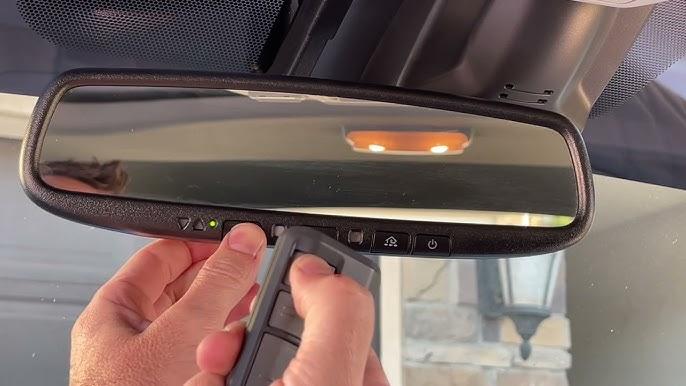
Park outside the garage with the engine running. The ignition must be in the ON/RUN position (or ACC mode for some years). Keep the vehicle at least 3 feet away from the garage door to prevent accidental activation during testing. Point your handheld remote directly at the HomeLink buttons on your rearview mirror or overhead console.
Step 3: Train the HomeLink Button
- Press and hold your chosen HomeLink button.
- Simultaneously press and hold the button on your handheld remote.
- Hold both firmly. Watch the HomeLink indicator light.
- It will flash slowly at first, then transition to a rapid flash (usually within 10–20 seconds).
- Once rapid flashing begins, release both buttons immediately.
Step 4: Sync with the Garage Door Motor (Rolling Code Only)
This is the step most users miss. Within 30 seconds of completing Step 3:
- Go to your garage door motor unit.
- Locate the “Learn” or “Smart” button (usually yellow, purple, orange, or red).
- Press and release it once. The LED near the button should illuminate or blink.
- Return to your vehicle within 30 seconds.
- Press and hold the programmed HomeLink button for 2 seconds, release, and repeat up to 3 times.
- On the third press, the garage door should activate, confirming successful synchronization.
Step 5: Test All Functions
Test the button from various distances (10ft, 25ft, 50ft). Verify that the door opens and closes completely. If the range is poor, check for aftermarket window tint containing metallic particles, which can block RF signals.
Troubleshooting Common Setup Issues
Even professionals encounter hiccups. Here are data-backed solutions for persistent problems:
- Light Flashes but Door Won’t Move: The frequency matched, but the rolling code didn’t sync. Repeat Step 4, ensuring you press the motor’s Learn button after training the car button, not before.
- No Light Response During Training: Your handheld remote may operate on an incompatible frequency (e.g., 315MHz vs. 390MHz). Check your opener’s manual for frequency specs. Some Canadian/European remotes are incompatible with US-spec Highlanders.
- Works Intermittently: Usually caused by LED bulb interference. Modern LED bulbs in garage openers can emit RF noise. Swap to an incandescent bulb temporarily to test.
- Button Works Only When Very Close: Indicates signal degradation. Inspect your rearview mirror wiring harness for damage, or consult a Toyota dealer about potential antenna module replacement.
Safety Considerations During Programming
Never program your garage door opener while the vehicle is inside the closed garage. Carbon monoxide buildup occurs faster than most drivers realize. Additionally, always ensure the garage door’s auto-reverse safety sensors are functional before relying on HomeLink. Test by placing a 2×4 board under the door; it should reverse immediately upon contact. Programming convenience should never compromise household safety.
FAQ: Toyota Highlander Garage Door Opener Setup
Can I program my Toyota Highlander without the original handheld remote?
Generally, no. The handheld remote acts as the authentication token for the rolling-code handshake. However, some newer Chamberlain/LiftMaster openers allow direct Wi-Fi-based programming through the MyQ app, bypassing the need for a physical remote. Check your opener manufacturer’s website for “remote-free” compatibility.
Why does my HomeLink work for the garage but not my front gate?
Gates often use fixed-code transmitters or different frequencies than residential garage doors. Your Highlander’s HomeLink may have successfully learned the gate’s signal, but the gate receiver might require a separate “repeater” device to bridge the frequency gap. Consult your gate operator’s manual for HomeLink-specific accessories.
Will disconnecting my car battery erase my HomeLink settings?
No. HomeLink memory is stored in non-volatile flash memory, similar to a USB drive. Disconnecting the battery, replacing it, or even jump-starting your Highlander will not delete your programmed buttons. You only lose settings if you manually perform the factory reset procedure.
Is there a difference between programming a 2020 vs. 2025 Highlander?
Yes. While the core rolling-code process remains consistent, button placement has shifted. Older models feature HomeLink on the rearview mirror; newer trims integrate it into the overhead console near the SOS button. Additionally, 2024+ models may support HomeLink Cloud, allowing smartphone integration. Always reference your specific year’s owner’s manual for location diagrams.
My indicator light stays solid during training instead of flashing. What does this mean?
A solid light typically indicates the channel is already programmed to a different device. Perform the full factory reset (hold outer buttons for 10 seconds until rapid flash) before attempting to retrain. If the light remains stubbornly solid after reset, the HomeLink module itself may have failed and require dealership diagnosis.
Can I program multiple garage doors to one Highlander?
Absolutely. Your Toyota Highlander has three programmable channels. You can store your home garage, office parking structure, and a parent’s house simultaneously. Each channel operates independently, so programming Channel 2 will never overwrite Channel 1. Simply repeat the full setup process using a different HomeLink button.
Conclusion
Mastering how to set up Toyota Highlander garage door opener functions transforms your daily routine from fumbling with remotes to effortless, secure entry. By following the rolling-code protocol precisely, preparing your equipment, and respecting safety guidelines, you achieve reliable performance that lasts for years. Remember, patience during the 30-second sync window is the single biggest factor in success.
Did this guide save you a trip to the dealership? Share this article on Facebook or X (Twitter) to help fellow Toyota owners conquer their garage door setup! Tag a friend who just bought a Highlander—they’ll thank you later. Safe driving and smooth entries ahead!



Leave a Reply