Introduction
There are few things more frustrating than pulling into your driveway after a long day, only to realize you cannot get your vehicle’s built-in transmitter to communicate with your garage. If you are currently searching for how to set garage door opener in Nissan Pathfinder, you are likely dealing with this exact synchronization issue, and we completely understand the annoyance. This guide is designed to walk you through the programming process with empathy and precision, ensuring you can open your garage seamlessly without fumbling for a separate remote ever again.
Understanding Your Nissan Pathfinder’s HomeLink System
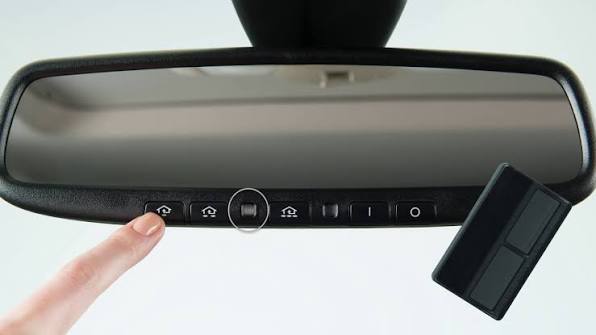
Before diving into the buttons, it is vital to understand what you are actually programming. Most modern Nissan Pathfinder models (2013–present) come equipped with the HomeLink Universal Transceiver. This is not merely a “garage door button”; it is a sophisticated radio frequency (RF) bridge that replaces your handheld remote.
According to automotive technology standards, HomeLink operates on frequencies ranging from 288 to 398 MHz. When you ask how to set garage door opener in Nissan Pathfinder, you are essentially teaching your car’s transceiver to mimic the specific rolling code or fixed code of your existing garage motor. Understanding this distinction matters because older Pathfinders may require a different sequence than newer ones equipped with “Rolling Code” security features.
Expert Note: Always check your overhead console first. If you see the HomeLink logo, you have the integrated system. If you only see a compass or temperature display without programmable buttons, your specific trim level may lack this feature, requiring an aftermarket module instead.
Preparation: What You Need Before Programming
Success rates for programming increase dramatically when you prepare correctly. Do not attempt this while rushing or in poor lighting. Gather the following items and ensure your environment is safe:
- Your Original Handheld Remote: Essential for transferring the signal.
- Fresh Batteries in Handheld Remote: Weak batteries are the #1 cause of programming failure. Replace them even if they seem functional.
- Vehicle Owner’s Manual: Specific button sequences vary slightly by model year.
- A Stepladder: For accessing the garage motor’s “Learn” button safely.
- Clear Line of Sight: Park outside the garage, facing the door, with the engine running (to prevent battery drain during extended programming).
Safety First Checklist
| Safety Item | Why It Matters |
|---|---|
| Engine Running | Prevents 12V battery depletion during multiple sync attempts |
| Clear Area | Ensures no people/pets are near moving garage door parts |
| Fresh Remote Battery | Guarantees strong RF signal transmission to vehicle |
| Parking Brake Engaged | Prevents accidental vehicle movement while focused on overhead console |
Step-by-Step: How To Set Garage Door Opener In Nissan Pathfinder
This tutorial covers the most common Rolling Code programming method used in Nissan Pathfinders from 2013 onward. If your garage opener was manufactured before 1995, refer to the Fixed Code section below.
Phase 1: Clear Previous Codes (If Applicable)
If you purchased a used Pathfinder or previously programmed a different door, clear the memory first:
- Press and hold both outer HomeLink buttons simultaneously.
- Hold for approximately 10 seconds until the indicator LED flashes rapidly.
- Release both buttons. The system is now factory-reset and ready for new programming.
Phase 2: Program the Vehicle Button
- Turn your ignition to ACC/ON position (engine running recommended).
- Hold your handheld remote 1–3 inches away from the HomeLink buttons on your overhead console.
- Simultaneously press and hold the desired HomeLink button AND your handheld remote button.
- Watch the HomeLink indicator light. It will flash slowly at first, then rapidly once the signal is captured. This typically takes 5–15 seconds.
- Release both buttons once rapid flashing occurs.
Phase 3: Sync With the Garage Motor (Rolling Code Only)
This is the step most users miss when learning how to set garage door opener in Nissan Pathfinder:
- Locate the “Learn” or “Smart” button on your garage door motor unit (usually on the back or side panel, often colored yellow, purple, orange, or red).
- Press and release the Learn button. You typically have 30 seconds to complete the next step.
- Return to your vehicle and press the newly programmed HomeLink button firmly three times, holding each press for 2 seconds.
- Test the button. The garage door should activate. If it does not, repeat Phase 3, ensuring you are within the 30-second window.
Technical Context: Rolling code technology changes the access code every time the door is operated, preventing signal theft. This is why the extra “Learn button” synchronization at the motor is mandatory. For deeper technical background on rolling code cryptography, you can reference Wikipedia’s article on Rolling Code.
Troubleshooting Common Programming Failures
Even professionals encounter hiccups. Here are data-backed solutions to the most frequent issues:
- LED Never Flashes Rapidly: Your handheld remote battery is weak, or you are holding it too far from the HomeLink buttons. Try angling the remote differently; RF signals are directional.
- Door Opens but Won’t Close via HomeLink: This usually indicates a safety sensor misalignment rather than a programming issue. Check that your garage floor sensors are clean and properly aligned.
- Works Intermittently: You may be experiencing RF interference from LED bulbs in your garage fixture. According to industry studies, certain LED drivers emit frequencies that disrupt HomeLink signals. Try removing garage LEDs temporarily to test.
- Nothing Happens After All Steps: Verify your garage opener isn’t too old. HomeLink supports most openers from 1995 onward. Pre-1995 units may require a HomeLink Compatibility Bridge adapter.
FAQ: Your Top Questions Answered
Can I program my Nissan Pathfinder garage opener without the original remote?
Generally, no. The HomeLink system requires cloning an existing signal. However, if your garage motor has a “Learn” button and you can access it directly, some newer systems allow direct pairing without a handheld remote. Consult your garage motor manufacturer’s manual for “direct learn” procedures specific to your unit.
How many devices can my Nissan Pathfinder HomeLink store?
Most Nissan Pathfinder HomeLink systems support up to three separate devices. This means you can program your primary garage door, a secondary garage or gate, and even home lighting or security systems using the same three buttons.
Will programming HomeLink erase my car’s key fob memory?
Absolutely not. HomeLink operates on a completely independent circuit from your vehicle’s keyless entry system. Programming your garage door opener has zero impact on your door locks, alarm, or push-to-start functionality.
My HomeLink worked before but suddenly stopped. What happened?
This is typically caused by one of three factors: (1) Your garage motor’s memory was reset during a power outage or maintenance, (2) LED bulb interference was introduced, or (3) Your vehicle’s 12V battery was recently replaced/disconnected. Re-run Phase 3 (motor sync) to restore functionality.
Does the Nissan Pathfinder HomeLink work with smart garage openers like MyQ or Tailwind?
Yes, but with caveats. HomeLink communicates via traditional RF signals, while smart openers use Wi-Fi/Z-Wave. Many smart openers include a HomeLink-compatible receiver that bridges this gap. Check your smart opener’s specifications for “HomeLink compatibility” before purchasing.
Is there a difference between 2013-2019 and 2020+ Pathfinder HomeLink programming?
The core programming sequence remains consistent, but 2020+ models feature an updated HomeLink 5.0 module with improved range and faster sync times. Additionally, 2022+ redesigned Pathfinders relocated the HomeLink buttons to the rearview mirror assembly rather than the overhead console. Always verify button location in your specific model year’s manual.
Conclusion
Learning how to set garage door opener in Nissan Pathfinder doesn’t have to be a source of stress or expensive dealership visits. By following this structured approach—preparing properly, executing the three-phase programming sequence, and troubleshooting methodically—you can achieve reliable, hands-free garage access in under 15 minutes. The convenience of seamless entry is well worth the initial setup effort, especially during inclement weather or when carrying groceries.
Did this guide help you successfully program your HomeLink? Share this article with fellow Nissan owners on Facebook, Twitter, or your favorite Pathfinder forum! Helping others avoid programming frustration is the best way to give back to the community. Safe driving and smooth entries ahead! 🚗🏠



Leave a Reply