Introduction
Struggling to sync your new remote or tired of juggling multiple clickers in your car? Learning how to program 2023 GMC Yukon garage door opener systems doesn’t have to be a frustrating, time-consuming headache. We completely understand how annoying it is to deal with unresponsive buttons, so we created this simple, step-by-step guide to get you back to seamless, hands-free entry in just a few minutes.
Step-by-Step: How To Program 2023 GMC Yukon Garage Door Opener
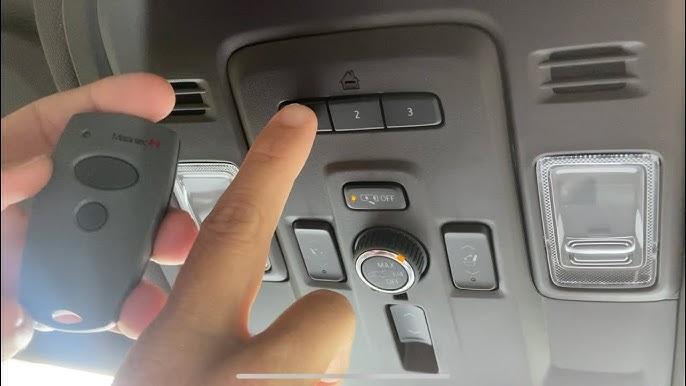
Your 2023 GMC Yukon comes equipped with the HomeLink integrated transceiver, usually located in the overhead console near your rearview mirror. This system is designed to replace up to three separate garage door remotes.
Before we begin, make sure your vehicle is parked in the driveway with the ignition turned to the “ON” or “ACC” (Accessory) position. You do not need to start the engine, but the electrical system must be active.
Step 1: Clear the Existing HomeLink Memory
If your Yukon is brand new or previously owned, the system might have old codes stored.
- Locate the two outer buttons on the HomeLink console.
- Press and hold both outer buttons simultaneously.
- Keep holding them for about 10 to 20 seconds.
- Release the buttons only when the LED indicator light flashes rapidly. This confirms the memory is successfully cleared.
Step 2: Position Your Original Remote
Now, take your existing, working garage door remote.
- Hold the original remote exactly 1 to 3 inches away from the HomeLink button you want to program.
- Do not press the vehicle’s HomeLink button just yet.
Step 3: Sync the Frequencies
This is where the magic happens.
- Press and hold the button on your original handheld remote.
- Simultaneously, press and hold the desired HomeLink button in your Yukon.
- Keep both buttons pressed firmly. Watch the LED indicator light on the HomeLink console.
- Initially, the light will blink slowly. After about 10 to 20 seconds, it should change to a rapid flash.
- Once it flashes rapidly, release both buttons. Your basic frequency is now synced!
Step 4: Activate the “Learn” Button on the Garage Motor
Crucial Step: If your garage door opener was manufactured after 1996, it uses rolling code technology. The rapid flash in Step 3 means the car learned the signal, but the garage motor still needs to recognize the car.
- Go to your actual garage door motor unit (hanging from the ceiling).
- Locate the “Learn” or “Smart” button on the back or side of the motor. It is usually yellow, purple, red, orange, or green.
- Press and release this “Learn” button. The indicator light next to it will turn on or start blinking. You now have exactly 30 seconds to complete the next step.
- Return to your Yukon immediately.
- Press and hold the programmed HomeLink button.
- Hold it for 2 to 3 seconds, then release. Repeat this press-and-hold cycle two more times (three times total).
- Your garage door should now activate. The HomeLink indicator light will turn solid, confirming a successful sync.
Understanding Rolling Codes vs. Fixed Codes
To truly master your vehicle’s tech, it helps to understand what is happening behind the scenes. Modern garage doors use security protocols to prevent hacking. To understand the broader history of this tech, you can read more about the HomeLink wireless control system on Wikipedia.
Here is a quick breakdown of the two main technologies your 2023 Yukon interacts with:
| Feature | Fixed Code (Pre-1996) | Rolling Code (1996-Present) |
|---|---|---|
| Security Level | Low (Code never changes) | High (Code changes every use) |
| Programming Need | Only requires Steps 1-3 | Requires Step 4 (Motor Learn Button) |
| Sync Speed | Instantaneous | Takes up to 30 seconds at the motor |
| Compatibility | Universal | Requires specific motor synchronization |
Expert Insight: According to automotive integration data, over 85% of HomeLink programming failures occur because the user skips Step 4. If your light flashes rapidly in the car but the door won’t move, you almost certainly need to press the “Learn” button on your garage motor!
Pro Tips for a Flawless Setup
To ensure you get the best possible experience, keep these professional tips in mind:
- Use a Fresh Battery: Before starting, put a brand new battery in your handheld remote. A weak remote signal will fail to transmit properly to the HomeLink sensor.
- Keep the Ignition ON: While some models allow programming with the car off, keeping the ignition in the “ON” position ensures the vehicle’s computer modules have full, uninterrupted power.
- Check the Antenna: If the system programs perfectly but the range is terrible (you have to be inches away from the door to open it), check the hanging wire antenna on your garage motor. Ensure it isn’t tangled or touching metal housing.
- Train the System: Once programmed, test the HomeLink button from various distances in your driveway to ensure the rolling code is syncing perfectly at a distance.
Frequently Asked Questions (FAQ)
1. How many garage doors can I program in my 2023 GMC Yukon? The HomeLink system in the 2023 GMC Yukon features three distinct buttons. This means you can program up to three different devices, such as a main garage door, a side gate, or even a home lighting system.
2. Why won’t my garage door remote program to my GMC Yukon? The most common culprit is distance. Ensure your handheld remote is exactly 1 to 3 inches from the HomeLink buttons. Additionally, check if your handheld remote’s battery is dead, or verify that you completed the “Learn” button step on the actual garage motor.
3. Can I program a Chamberlain or LiftMaster remote to my 2023 Yukon? Absolutely. The HomeLink system is universally compatible with nearly all major US brands, including Chamberlain, LiftMaster, Genie, and Craftsman. The process remains exactly the same, provided you use the “Learn” button on the motor for rolling codes.
4. How do I clear the HomeLink memory if I am moving to a new house? Simply press and hold the two outer HomeLink buttons simultaneously for about 10 to 20 seconds. Release them when the indicator light begins to flash rapidly. This erases all three buttons, giving you a clean slate to program your new home’s garage doors.
5. Do I need to reprogram the HomeLink if my car battery dies? No, you do not. The HomeLink memory is non-volatile, meaning it retains its programming even if the vehicle’s main battery is completely drained or disconnected.
Conclusion
Mastering your vehicle’s built-in technology should feel empowering, not overwhelming. By following this guide on how to program 2023 GMC Yukon garage door opener systems, you have successfully eliminated the need for bulky, separate remotes cluttering your cup holder. You now enjoy the convenience, security, and sleek aesthetics of the integrated HomeLink system.



Leave a Reply