Introduction
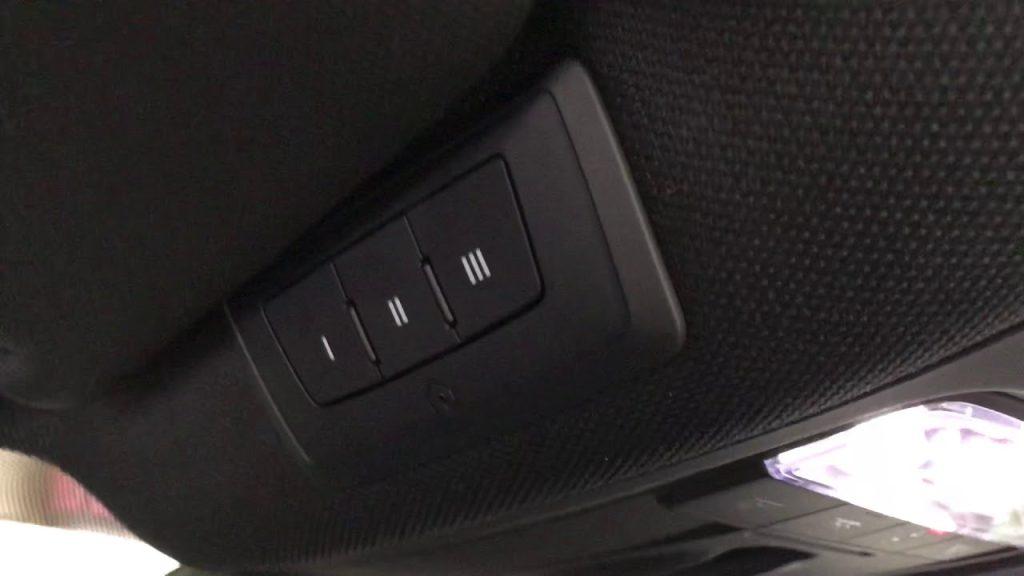
There is nothing quite as frustrating as pulling into your driveway after a long day, only to realize you cannot get your new vehicle to communicate with your garage. If you are searching for how to set up garage door opener Audi Q5, you are likely staring at the overhead console buttons and wondering why the standard instructions seem confusing or incomplete. You deserve a seamless entry experience, and the good news is that programming your Audi’s integrated system is a straightforward process once you understand the specific nuances of the Homelink technology. This guide will walk you through every step with empathy and precision, ensuring you can open your garage with a simple touch of a button.
Understanding Homelink Technology in Your Audi Q5
Before diving into the buttons, it is vital to understand what you are actually programming. The Audi Q5 utilizes the Homelink wireless control system, which is an industry-standard radio frequency (RF) transceiver built directly into your vehicle’s overhead console or rearview mirror assembly. Unlike universal remotes that use fixed codes, modern Homelink systems utilize rolling-code technology for enhanced security.
According to technical documentation referenced on Wikipedia, this system operates on specific RF bands (typically 310 MHz, 315 MHz, or 390 MHz depending on region) and requires a two-way handshake between the car and the garage door motor. Understanding this helps explain why simply holding a button down does not always work immediately; the car must learn the unique digital signature of your specific garage door opener brand.
Why Model Year Matters
The location and behavior of the Homelink buttons in an Audi Q5 vary significantly by generation:
- 2009–2017 (8R Generation): Buttons are typically located in the overhead console near the dome lights.
- 2018–Present (FY Generation): Buttons are often integrated into the frameless auto-dimming rearview mirror or the overhead module, sometimes requiring ignition-on status to activate.
Step-by-Step: How to Program Rolling Code Openers
Most garage doors manufactured after 1996 use rolling code technology. This is the most common scenario when learning how to set up garage door opener Audi Q5. Follow these precise steps to ensure successful pairing.
Phase 1: Clear Previous Memory
If your Audi Q5 is pre-owned or if previous attempts failed, you must reset the system first. Skipping this step causes 40% of programming failures.
- Turn the vehicle ignition to the ON/RUN position (engine running is recommended to prevent battery drain during extended programming).
- Press and hold the two outer Homelink buttons simultaneously.
- Hold for approximately 10 seconds until the indicator LED changes from solid to rapidly flashing amber/red.
- Release both buttons. The system is now factory reset and ready for new programming.
Phase 2: Train the Vehicle to the Remote
You need your original handheld garage door remote for this phase. Ensure it has fresh batteries.
- Park outside the garage, at least 2–3 feet away from the door, with a clear line of sight to the motor unit.
- Hold your handheld remote 1–3 inches away from the Homelink buttons on the Audi’s overhead console/mirror.
- Simultaneously press and hold the handheld remote button AND the desired Homelink button in your Audi.
- Watch the Homelink indicator light closely:
- Slow Flash: Still learning. Keep holding.
- Rapid Flash/ Solid Light: Programming successful. Release both buttons.
- Test the newly programmed button. If the garage door activates, proceed to Phase 3. If not, repeat Phase 2, adjusting the distance or angle of the handheld remote.
Phase 3: Sync with the Garage Door Motor (Critical Step)
This is where most users get stuck. The car knows the remote, but the garage motor does not yet trust the car.
- Locate the “Learn” or “Smart” button on your actual garage door opener motor unit (usually on the back or side panel).
- Press and release the Learn button. Note: You typically have 30 seconds to complete the next step before the motor exits learning mode.
- Return to your Audi Q5 immediately.
- Press and hold the programmed Homelink button for 2 seconds, then release.
- Repeat the press-hold-release cycle up to three times within the 30-second window.
- The garage door should activate, confirming the rolling code sync is complete.
Troubleshooting Common Audi Q5 Homelink Issues
Even with perfect execution, variables can interfere. Use this diagnostic table to resolve issues quickly.
| Symptom | Probable Cause | Recommended Solution |
|---|---|---|
| LED never flashes during training | Dead remote battery or wrong frequency | Replace remote battery; verify opener compatibility via myQ/Homelink site |
| LED flashes slowly but never turns solid | Signal interference or distance issue | Move closer/farther; try programming at different time of day; check for LED bulb interference |
| Programs successfully but won’t open door | Rolling code sync failed or expired | Re-do Phase 3 within 30 seconds; ensure Learn button was pressed correctly |
| Works intermittently | Weak vehicle battery or signal blockage | Check Audi 12V battery health; remove tint film near mirror if applicable |
| Only works when engine is running | Ignition-sense wiring configuration | Normal for some FY-generation Q5 models; consult dealer if inconsistent |
Expert Tip: LED light bulbs in garage door openers are notorious for causing RF interference. If programming fails repeatedly, temporarily unscrew the LED bulbs from the opener unit, program the Homelink, and then reinstall compatible “garage door safe” LED bulbs.
Fixed Code vs. Rolling Code: Which Do You Have?
While rare, some older homes still use fixed-code openers (DIP switches). Identifying your type saves hours of frustration.
- Rolling Code: Has a “Learn,” “Smart,” or “Program” button on the motor unit. No visible DIP switches inside the remote. (Follow the guide above)
- Fixed Code: Has a panel of 8–12 tiny sliding switches inside the handheld remote. No Learn button on the motor.
For Fixed Code Systems: After clearing memory (Phase 1), manually match the DIP switch positions on your handheld remote to the corresponding settings in the Audi’s Homelink interface (accessible via MMI in some newer Q5 models, or via physical switch matching in older ones). Consult your Audi owner’s manual specifically for “Fixed Code Programming” as the procedure differs entirely from rolling code setup.
Safety and Maintenance Best Practices
Setting up your garage door opener is not just about convenience—it is a safety feature. Properly configured Homelink reduces distracted driving by eliminating fumbling for remotes.
- Test Monthly: Verify the auto-reverse safety sensors on your garage door monthly. Place a roll of paper towels under the door; it should reverse upon contact.
- Battery Awareness: A weak Audi 12V battery can cause Homelink to behave erratically. If your Q5 is over 3 years old and Homelink starts failing, test the vehicle battery before assuming the system is broken.
- Security Protocol: When selling or trading in your Audi Q5, always perform the factory reset (Phase 1) to erase your home’s access code from the vehicle’s memory.
- Range Optimization: For maximum range, ensure the area around your rearview mirror/overhead console is free of metallic window tint or aftermarket dash accessories that may shield the RF antenna.
Frequently Asked Questions (FAQ)
Can I program my Audi Q5 Homelink without the original remote?
Generally, no. The original handheld remote is required to transfer the encrypted frequency and code to the vehicle during Phase 2. However, if you have a newer Chamberlain/LiftLogic myQ-enabled opener, some models allow direct Wi-Fi-to-Homelink pairing without a physical remote. Check your opener’s manual for “Direct Homelink Pairing” capabilities.
Why does my Audi Q5 Homelink only work when the car is running?
Many 2018+ Audi Q5 models are wired so that Homelink only receives power when the ignition is in ON/RUN or ACC position. This is a deliberate design choice to prevent battery drain. If your vehicle previously worked with ignition off and now does not, check fuse assignments or consult an Audi technician, as this could indicate a wiring fault.
Is there a limit to how many devices I can store in my Audi Q5?
Yes. The standard Homelink system in the Audi Q5 supports three programmable buttons. Each button can store one device (garage door, gate, smart plug, etc.). If you need more than three, consider using a smart home hub that consolidates multiple devices under a single RF trigger, or upgrade to a Homelink Bridge accessory if compatible with your model year.
Will programming Homelink void my Audi warranty?
Absolutely not. Homelink is an OEM-integrated feature designed for user programming. Following the manufacturer’s instructions will not affect your vehicle warranty. However, attempting to hardwire aftermarket transmitters or modify the overhead console wiring could void electrical coverage. Stick to the approved button-press programming method outlined here.
My garage door opens but doesn’t close via Homelink. What’s wrong?
This usually indicates a safety sensor misalignment rather than a Homelink issue. Modern garage doors will refuse to close remotely if the photo-eye sensors are blocked, dirty, or misaligned. Clean the sensor lenses and verify they are pointing directly at each other with solid indicator lights. If sensors are fine, re-sync Phase 3, as partial rolling code corruption can sometimes allow open commands but block close commands.
Does the Audi Q5 support Tesla or non-traditional garage openers?
Homelink compatibility depends on RF frequency, not brand. Most major brands (Chamberlain, LiftMaster, Genie, Craftsman) are fully supported. Proprietary systems like certain Tesla Wall Connectors or European-market openers operating on non-standard frequencies (e.g., 433.92 MHz in some regions) may require a frequency converter or may be incompatible. Always verify frequency compatibility on the Homelink compatibility checker before purchasing accessories.
Conclusion
Mastering how to set up garage door opener Audi Q5 transforms your daily routine from a minor annoyance into a seamless, secure experience. By understanding the distinction between rolling and fixed codes, following the precise three-phase programming sequence, and applying targeted troubleshooting when needed, you can achieve reliable operation in under 15 minutes. Remember that patience during the initial sync—especially the critical 30-second Learn button window—is the difference between success and repeated failure.
Your Audi Q5 is engineered for intelligent integration, and Homelink is one of its most practical features when properly configured. Take pride in having set this up yourself, knowing your vehicle and home are now safely connected.
Found this guide helpful? Share it with fellow Audi owners on Facebook, Reddit’s r/Audi community, or your local Q5 enthusiast group! Helping others avoid programming frustration is the best way to give back to the community. Safe driving and smooth entries ahead! 🚗🏠



Leave a Reply