Introduction
Owning a luxury SUV like the 2023 Porsche Cayenne comes with numerous conveniences, including the integrated HomeLink garage door opener system. However, many new owners find themselves puzzled when trying to sync their vehicle with their home garage door. If you’re wondering how to program 2023 Porsche Cayenne garage door opener, you’re not alone—this is one of the most common questions among Porsche owners. This comprehensive guide will walk you through the entire process, ensuring you can open your garage door effortlessly from your car’s comfort.
Understanding the HomeLink System in Your 2023 Porsche Cayenne
Before diving into the programming steps, it’s essential to understand what you’re working with. The 2023 Porsche Cayenne features the third-generation HomeLink system, which is compatible with approximately 95% of garage door openers manufactured since 1985. This universal transceiver allows your vehicle to communicate with various radio-controlled devices, including garage doors, gates, and even home lighting systems.
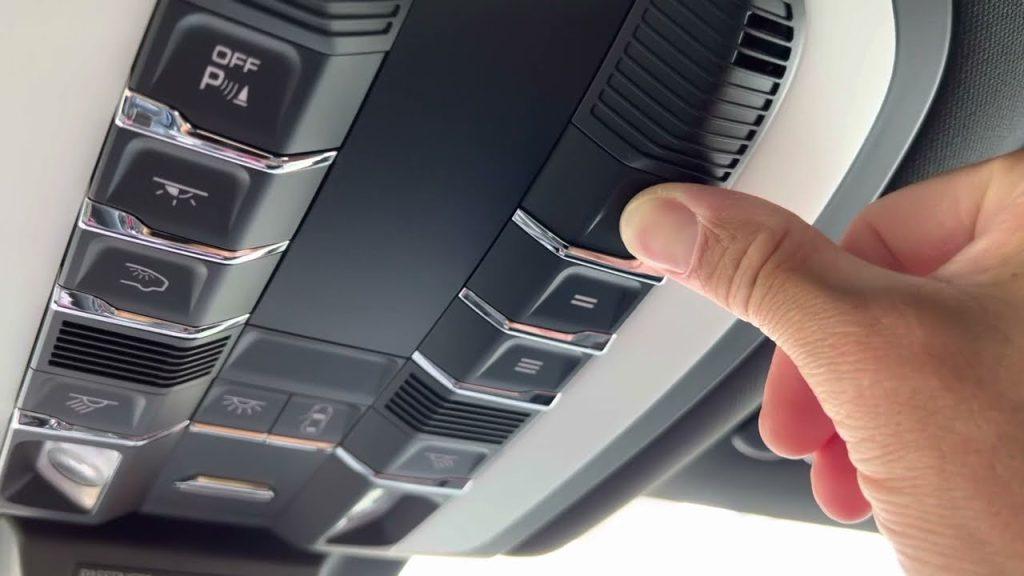
The HomeLink buttons are typically located on the overhead console near the rearview mirror or integrated into the sun visor, depending on your specific trim level. According to HomeLink’s official documentation, this technology has been licensed to over 40 vehicle manufacturers worldwide, making it one of the most widely adopted automotive convenience features.
Key Components You’ll Need
- Your 2023 Porsche Cayenne with a functioning battery
- Access to your garage door opener motor unit
- A stable ladder (if needed to reach the motor unit)
- Approximately 10-15 minutes of uninterrupted time
Step-by-Step Guide: How to Program 2023 Porsche Cayenne Garage Door Opener
Step 1: Prepare Your Vehicle and Garage Door Opener
Park your Porsche Cayenne outside your garage with the engine running or in accessory mode. Ensure all windows are closed and the garage door is fully closed. Locate your garage door opener’s “Learn” or “Smart” button—this is usually found on the motor unit hanging from your garage ceiling. The button color varies by manufacturer but is commonly yellow, purple, red, or orange.
Important: Clear any previously programmed HomeLink buttons if this is your first time setting up or if you’re reprogramming. To do this, press and hold the two outer HomeLink buttons simultaneously for about 20 seconds until the indicator light begins to flash rapidly.
Step 2: Initiate the Programming Mode
Choose which HomeLink button you want to program (there are typically three available). Press and hold your chosen button while watching the indicator light. After approximately 20 seconds, the light will change from slow blinking to rapid flashing. This indicates that the HomeLink system has cleared previous codes and is ready to learn a new signal.
Release the button once you see the rapid flashing pattern.
Step 3: Transmit the Signal from Your Garage Door Opener
Within 30 seconds of completing Step 2, locate the “Learn” button on your garage door opener motor unit. Press and release this button—you typically have only 30 seconds to complete the next action. Return to your Porsche and press and hold the same HomeLink button you selected earlier for two seconds, then release it. Repeat this press-hold-release cycle up to three times.
Watch for the garage door to move slightly or hear a click from the motor unit, indicating successful code transmission. The HomeLink indicator light should change from rapidly flashing to solid, confirming successful programming.
Step 4: Test the Connection
Press the programmed HomeLink button firmly and hold it for 2-3 seconds. Your garage door should activate. Test this multiple times to ensure consistent operation. If the door doesn’t respond, repeat Steps 2 and 3, ensuring you work within the 30-second window between pressing the Learn button and transmitting the signal.
Troubleshooting Common Programming Issues
Even with careful following of instructions, you might encounter some challenges. Here are solutions to the most frequent problems:
Problem: HomeLink Light Doesn’t Flash Rapidly
Solution: Ensure you’re holding both outer buttons simultaneously for the full 20 seconds. If your vehicle battery is weak, the system may not respond properly. Consider charging your battery or connecting a battery maintainer during programming.
Problem: Garage Door Opener Doesn’t Respond
Solution:
- Verify you pressed the Learn button on the motor unit before transmitting the signal
- Check that you’re within range (park within 10-15 feet of the garage door)
- Ensure no obstructions block the signal path
- Try reprogramming using a different HomeLink button
Problem: Intermittent Operation
Solution: This often occurs with older garage door openers using rolling code technology. You may need to complete an additional synchronization step:
- Press and hold the programmed HomeLink button
- While holding, press and release the Learn button on your garage motor
- Continue holding the HomeLink button for another 10 seconds
- Release and test
| Issue | Likely Cause | Solution |
|---|---|---|
| No response from garage | Out of range | Move closer to garage door |
| Inconsistent operation | Rolling code mismatch | Complete additional sync step |
| Light won’t reset | Insufficient hold time | Hold buttons for full 20 seconds |
| Multiple attempts fail | Wrong Learn button | Consult opener manual for correct button |
Advanced Tips for Optimal Performance
Maximizing Signal Strength
For best results, program your HomeLink system with your vehicle positioned where you typically park when entering or exiting your garage. This ensures optimal signal strength during daily use. Avoid programming while parked far from the garage or behind obstacles that might interfere with radio frequency transmission.
Programming Multiple Devices
Your 2023 Porsche Cayenne can store up to three different garage door opener codes or other compatible devices. Follow the same programming procedure for each additional device, selecting a different HomeLink button each time. This is particularly useful if you have multiple properties or need to control both a garage door and a gate.
Security Considerations
Modern garage door openers use rolling code technology, which changes the access code with each use to prevent unauthorized entry. When you program your Porsche’s HomeLink system, it synchronizes with this security feature automatically. However, if you sell your vehicle, remember to clear all HomeLink memory by performing the reset procedure mentioned in Step 1.
Frequently Asked Questions
Q1: Can I program my 2023 Porsche Cayenne HomeLink without accessing the garage door motor unit?
A: Unfortunately, no. Initial programming requires physical access to the garage door opener’s Learn button to establish the connection. However, once programmed, you can operate the door remotely without accessing the motor unit. Some newer smart garage door openers offer app-based programming alternatives, but these still require initial setup through the manufacturer’s specific process.
Q2: How long does the HomeLink programming last in my Porsche Cayenne?
A: The HomeLink memory is permanent and doesn’t require reprogramming unless you manually clear it, replace the vehicle battery with improper disconnection procedures, or experience a significant electrical system reset. Under normal conditions, your programmed codes will remain intact for the life of the vehicle.
Q3: Why won’t my HomeLink work with my Chamberlain or LiftMaster garage door opener?
A: Chamberlain and LiftMaster openers use Security+ 2.0 rolling code technology, which sometimes requires the additional synchronization step outlined in the troubleshooting section. Ensure you’re pressing the correct colored Learn button (typically yellow or purple) and completing the full press-hold-release cycle. If problems persist, consult your garage door opener’s manual for model-specific instructions.
Q4: Can I program my HomeLink to work with a MyQ-enabled smart garage door opener?
A: Yes, but the process differs slightly. For MyQ-enabled openers, you may need to use the MyQ app to enable compatibility mode or generate a temporary PIN code. Check the Chamberlain MyQ documentation for specific vehicle integration instructions. The standard HomeLink programming method works with most MyQ openers, but smart features require app configuration.
Q5: What should I do if I accidentally clear my HomeLink memory?
A: Don’t worry—simply repeat the entire programming process from Step 1. There’s no penalty for clearing and reprogramming, though you’ll need access to your garage door motor unit again. Consider documenting your successful programming steps for future reference.
Q6: Is there a difference between programming HomeLink in different Porsche models?
A: The fundamental programming process remains consistent across Porsche models equipped with HomeLink, including the Cayenne, Macan, Panamera, and 911. However, button locations and interface designs may vary slightly. Always refer to your specific vehicle’s owner’s manual for model-year-specific details, as minor variations can occur between generations.
Conclusion
Learning how to program 2023 Porsche Cayenne garage door opener doesn’t have to be complicated. By following this comprehensive guide, you can successfully integrate your vehicle with your home garage system in just minutes. Remember the key points: clear existing codes first, work within the 30-second window when transmitting signals, and don’t hesitate to use the additional synchronization step for rolling code openers.
The convenience of opening your garage door directly from your Porsche Cayenne enhances both security and comfort, especially during inclement weather. With proper programming, you’ll enjoy seamless operation every time you arrive home.
Did you find this guide helpful? Share it with fellow Porsche owners on social media who might be struggling with their HomeLink setup. Your experience could save someone else time and frustration!



Leave a Reply