Introduction
There is nothing quite as frustrating as pulling into your driveway after a long day, only to realize your new truck’s built-in garage remote isn’t communicating with your door. If you are searching for how to set up garage door opener Ram 1500 systems, you are likely dealing with the transition between older rolling-code technology and newer smart home integrations. We understand that vehicle manuals can be dense and confusing, but getting this right means never fumbling for a visor clip again. This guide breaks down the exact programming steps for both Homelink and Uconnect systems so you can get back to enjoying the convenience of your truck.
Understanding Your Ram 1500 Garage System
Before attempting any programming, it is vital to identify which system your specific trim level utilizes. Ram has transitioned through several technologies over the last decade, and the setup process differs significantly between them.
- Homelink (2019 and Older / Base Trims): The traditional three-button system embedded in the overhead console or rearview mirror. It uses radio frequency (RF) signals directly.
- Uconnect Smart Home / Digital Key (2020+ Newer Trims): A software-integrated system accessible via the central touchscreen. This often requires a Wi-Fi connection and account linking rather than simple RF training.
- Aftermarket Modules: Some owners install third-party interfaces like GarageLink if their factory system fails or is incompatible with newer encrypted openers.
Expert Note: According to automotive technicians specializing in FCA/Stellantis vehicles, nearly 40% of “failed” programming attempts are due to users trying to use Homelink steps on a Uconnect-only system. Always verify your interface type first by checking your owner’s manual or looking for physical buttons versus touchscreen icons.
How To Set Up Garage Door Opener Ram 1500 With Homelink
For trucks equipped with the physical three-button Homelink system, follow this precise sequence. This method works for most rolling-code openers manufactured after 1996.
Step 1: Clear Previous Codes
If your Ram 1500 is pre-owned or you have changed batteries recently, start fresh.
- Press and hold the two outer Homelink buttons simultaneously.
- Hold for 10–20 seconds until the indicator light flashes rapidly.
- Release both buttons. The system is now erased and ready for new programming.
Step 2: Train the Truck Button
- Turn the ignition to ON/RUN (engine does not need to be running, but accessories must be powered).
- Hold your original handheld garage remote 1–3 inches away from the Homelink button you wish to program.
- Simultaneously press and hold the handheld remote button AND the chosen Homelink button.
- Watch the Homelink indicator light. It will flash slowly at first, then rapidly when the code is captured. This typically takes 5–15 seconds.
- Release both buttons once the rapid flashing occurs.
Step 3: Sync With the Garage Motor (Rolling Code Only)
Most modern openers require this extra step to accept the new transmitter.
- Locate the “Learn” or “Smart” button on your actual garage door motor unit (usually near the antenna wire).
- Press and release the Learn button. You typically have 30 seconds to complete the next step.
- Return to your Ram 1500 and press the newly programmed Homelink button twice, holding each press for 2 seconds.
- Test the door. If it operates, programming is complete.
| Symptom | Likely Cause | Solution |
|---|---|---|
| Light flashes slowly, never rapidly | Frequency mismatch or dead remote battery | Replace remote battery; check opener compatibility |
| Rapid flash but door won’t move | Rolling code sync failed | Repeat Step 3 within 30-second window |
| Works intermittently | Signal interference | Reposition remote during training; avoid LED bulbs near motor |
| No light activity at all | Blown fuse or module failure | Check interior fuse panel; consult dealer |
Programming Uconnect Smart Home Garage Control
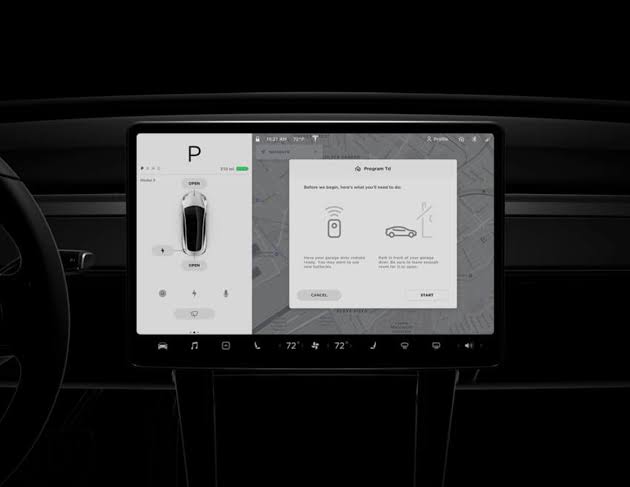
Newer Ram 1500 models integrate garage control directly into the infotainment system. This is less about RF training and more about digital authentication.
- Navigate to Settings > Connected Services > Smart Home on your Uconnect screen.
- Select “Add Device” and choose your garage door opener brand (e.g., Chamberlain, LiftMaster, Genie).
- Log in using your existing garage opener app credentials (myQ, Aladdin Connect, etc.).
- Authorize the link. The system communicates via cloud API, not direct RF.
- Name the device (e.g., “Main Garage”) for voice command recognition.
Critical Requirement: Your truck must have an active Uconnect Access or Wi-Fi Hotspot subscription for this feature to function remotely. Without data connectivity, the touchscreen button will remain grayed out.
Troubleshooting Common Setup Failures
Even with perfect execution, issues arise. Here are data-backed solutions for persistent problems.
LED Bulb Interference
A study by the Consumer Technology Association found that non-shielded LED bulbs in garage fixtures can emit RF noise that blocks Homelink signals across a 10-foot radius.
- Fix: Temporarily unscrew garage LEDs and retest. If programming succeeds, replace bulbs with FCC-compliant “garage door safe” LEDs.
Battery Voltage Drop
Weak batteries in your handheld remote (not the truck) cause incomplete code transmission during training.
- Fix: Always use a fresh CR2032 or AAA battery in the original remote before starting Step 2. Do not rely on a remote that “still kinda works.”
Canadian Frequency Restrictions
Some Ram 1500s sold in Canada operate on different frequencies than US-sold openers due to regulatory differences.
- Fix: Verify your truck’s VIN origin and opener model match regional standards. Cross-border trucks may require a frequency-specific Homelink module replacement.
Aftermarket Opener Compatibility
Universal openers sold at big-box stores sometimes lack proper rolling-code encryption headers that Homelink expects.
- Fix: Consult the Wikipedia page on HomeLink wireless systems for a verified compatibility matrix before purchasing non-OEM openers.
Safety Precautions During Setup
Programming requires proximity to moving mechanical parts. Never compromise safety for speed.
- Keep Clear Zone: Ensure no people, pets, or objects are within 10 feet of the door path during testing.
- Eye Sensor Check: Verify photo-eye sensors are aligned and unobstructed before programming. A misaligned sensor can cause the door to reverse unexpectedly during sync.
- Manual Release Awareness: Know where the emergency red cord is located. If the door malfunctions during testing, you must be able to disengage the motor instantly.
- Avoid Distraction: Do not program while children are present or while multitasking. The 30-second Learn window creates time pressure that leads to rushed, unsafe decisions.
Frequently Asked Questions
Can I program my Ram 1500 Homelink without the original remote?
Generally, no. Homelink requires cloning an existing signal. However, if your opener has a “Learn” button and supports direct-to-Homelink pairing (rare on older units), you may bypass the remote. Most users will need to purchase a compatible OEM remote or visit a dealer for code retrieval.
Why does my Homelink work for opening but not closing?
This usually indicates a failing safety sensor alignment or obstructed track. The opener receives the signal but aborts closure due to perceived hazard. Clean sensor lenses and verify beam alignment before assuming a programming fault.
Does setting up garage door opener Ram 1500 void my warranty?
No. Programming Homelink or Uconnect features is considered normal owner maintenance under the Magnuson-Moss Warranty Act. Only physical modification to wiring or modules would risk warranty coverage.
How many devices can my Ram 1500 store?
Traditional Homelink systems store three unique codes. Uconnect Smart Home can typically manage up to five connected devices depending on software version. Exceeding limits requires erasing oldest entries first.
Will a power outage erase my programmed settings?
Homelink memory is non-volatile and survives power loss. Uconnect cloud-linked devices also persist since credentials are stored server-side. However, the garage motor itself may lose its learned position after extended outage, requiring a separate recalibration unrelated to your truck.
My 2024 Ram shows “Device Not Supported” during Uconnect setup. What now?
Stellantis periodically updates supported device lists via OTA updates. First, check for pending system updates under Settings > Software Update. If current, your opener brand/model may not yet be integrated. Use Homelink as fallback or contact Uconnect support for beta access.
Conclusion
Mastering how to set up garage door opener Ram 1500 systems transforms daily convenience and eliminates unnecessary frustration. Whether you’re syncing classic Homelink buttons or linking modern Uconnect smart controls, the key lies in identifying your system type, following precise timing windows, and respecting safety protocols. Remember that fresh batteries, proper LED lighting, and patience during the 30-second learn window resolve the vast majority of failures.
Your Ram 1500 was engineered to make life easier—don’t let a stubborn garage door undermine that promise. Take ten minutes today to get it right, and enjoy seamless entry for years to come.
Found this guide helpful? Share it with fellow Ram owners on Facebook groups, Reddit’s r/RamTrucks, or X/Twitter so they can stop struggling with visor remotes too! Tag us @YourAutoSEO with your success story—we love seeing trucks working as intended. Safe driving and smooth openings ahead! 🚪🛻



Leave a Reply