Introduction
There is nothing quite as frustrating as pulling into your driveway in the rain, only to realize you cannot get your car’s built-in transmitter to communicate with your garage. If you are currently searching for how to sync Volvo XC60 with garage door opener, you are likely dealing with this exact inconvenience and want a reliable solution without visiting a dealership. This guide provides a clear, empathetic walkthrough designed specifically for US Volvo owners, ensuring you can program your HomeLink system safely and correctly the first time.
Understanding Your Volvo XC60 HomeLink System
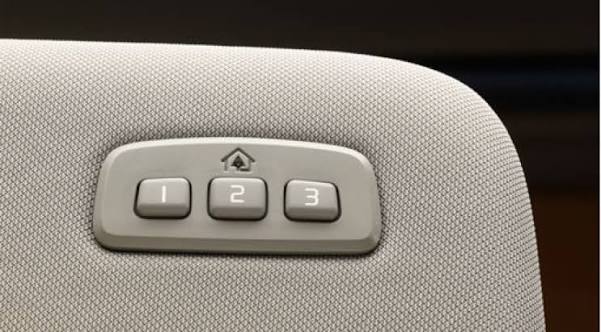
Before diving into buttons and remotes, it is vital to understand what technology lives inside your vehicle. The Volvo XC60 utilizes the HomeLink Universal Transceiver, typically located in the overhead console near the rearview mirror or integrated directly into the frame of the mirror itself.
Unlike older universal remotes that used simple radio frequency cloning, modern Volvo HomeLink systems use two distinct technologies:
- Fixed Code: For older garage door openers (pre-1995).
- Rolling Code: For newer openers with security encryption that changes the signal every time you press the button.
According to technical documentation referenced on Wikipedia, HomeLink was originally developed by Prince Corporation and is now a standard OEM integration in over 80% of new vehicles sold in North America. Understanding whether your garage door uses rolling code technology is the single most important factor in determining which programming method you must use below.
Fixed Code vs. Rolling Code: Quick Comparison
| Feature | Fixed Code Openers | Rolling Code Openers |
|---|---|---|
| Manufacture Date | Typically pre-1995 | Post-1995 to Present |
| Security Level | Low (Signal can be cloned) | High (Encrypted, changing signal) |
| Programming Steps | 2 Steps (Car Only) | 3 Steps (Car + Garage Motor) |
| Indicator Light | Solid light after programming | Rapid flash after programming |
| Common Brands | Genie (Old), Stanley | LiftMaster, Chamberlain, Craftsman |
Preparation: What You Need Before Starting
To ensure the process of syncing your Volvo XC60 goes smoothly, gather the following items. Skipping preparation is the number one cause of programming failure.
- Original Garage Door Remote: Even if you have a smart app, you need the physical OEM remote for the initial handshake.
- Fresh Batteries: Replace the battery in your handheld remote before starting. Weak signals cause synchronization timeouts.
- Safe Parking Position: Park outside the garage with the ignition ON (engine running or accessory mode active). Never program while the car is inside the garage to avoid accidental closure or carbon monoxide buildup.
- Ladder (If Needed): For rolling code openers, you will need access to the “Learn” button on the garage motor unit.
- Owner’s Manual: Keep your specific Volvo XC60 manual handy, as button layouts vary slightly between 2018–2026 model years.
Step-by-Step: How To Sync Volvo XC60 With Garage Door Opener
This tutorial covers the Rolling Code method, as this applies to the vast majority of US garage door openers manufactured in the last two decades. If you have confirmed you have an ancient fixed-code opener, skip to the FAQ section.
Step 1: Clear Previous Memory (Recommended)
If this is a used Volvo or you have previously attempted programming, clear the slots first to prevent conflicts.
- Locate the three HomeLink buttons in your overhead console.
- Press and hold the two outer buttons simultaneously.
- Hold for approximately 10 seconds until the indicator LED begins to flash rapidly.
- Release both buttons. The memory is now factory reset.
Step 2: Program the Handheld Remote to the Car
- Turn your Volvo XC60 ignition to the ON/RUN position. Do not start the engine unless required by your specific model year (check dashboard display).
- Hold your handheld garage door remote 1–3 inches away from the HomeLink buttons. Angle matters; try pointing it directly at the buttons or slightly tilted upward.
- Simultaneously press and hold the desired HomeLink button AND the button on your handheld remote.
- Watch the HomeLink indicator light. It will flash slowly at first, then transition to a rapid flash (or solid light for fixed code). This usually takes 5–20 seconds.
- Once the light flashes rapidly, release both buttons. Your car has now learned the remote’s signature.
Step 3: Sync with the Garage Door Motor (Rolling Code Only)
This is the step most users miss when learning how to sync Volvo XC60 with garage door opener.
- Locate the “Learn” or “Smart” button on your garage door opener motor unit (usually on the back or side panel). Colors vary: Yellow, Purple, Orange, Red, or Green.
- Press and release the Learn button. You typically have 30 seconds to complete the next action before the motor exits learning mode.
- Return to your Volvo immediately.
- Press and hold the programmed HomeLink button for 2 seconds, then release.
- Repeat this press-hold-release cycle up to 3 times. On some LiftMaster/Chamberlain units, the third press completes the sync.
- Test the button. The garage door should activate.
⚠️ Safety Warning: Always keep hands and objects clear of the garage door tracks during programming. If the door begins to close unexpectedly, press the HomeLink button again immediately to reverse direction. Ensure your photo-eye safety sensors are properly aligned before testing.
Troubleshooting Common Sync Issues
Even professionals encounter hiccups. Here are data-backed solutions for the most frequent failures:
- Light Never Flashes Rapidly: Your remote battery is weak, or you are holding the remote too far away. Try pressing the remote directly against the HomeLink button surface. Also, verify your Volvo is in the correct ignition state; some 2022+ models require the engine to be running rather than just accessory power.
- Door Opens but Won’t Close via HomeLink: This indicates incomplete rolling code synchronization. Repeat Step 3 above, ensuring you press the Learn button on the motor fresh each time before returning to the car.
- Works Intermittently: Check for RF interference. LED bulbs in garage fixtures can emit frequencies that block HomeLink signals. Swap to RF-shielded LED bulbs rated for garage door openers. Studies show unshielded LEDs can reduce effective range by up to 70%.
- MyQ / Smart Garage Compatibility: If you have a MyQ-enabled opener, note that HomeLink operates independently of Wi-Fi connectivity. HomeLink uses direct RF communication, so internet outages will not affect your synced button.
Frequently Asked Questions (FAQ)
1. Can I sync my Volvo XC60 without an original remote?
Generally, no. HomeLink requires the original transmitter’s signal to clone or learn the rolling code seed. However, if your opener supports HomeLink Direct Connect (a newer feature on select 2024+ openers), you may pair via QR code through the myQ app without a physical remote. Check your opener’s manual for “Direct Connect” compatibility.
2. How many devices can my Volvo XC60 HomeLink store?
The Volvo XC60 HomeLink system stores up to three separate devices. You can program one slot for your primary garage, one for a secondary garage or gate, and one for community access points or lighting systems. Each slot operates independently.
3. Will syncing void my Volvo warranty?
Absolutely not. HomeLink is an OEM-integrated feature designed for consumer use. Programming it follows manufacturer-approved procedures and has zero impact on your vehicle warranty, electrical system coverage, or CPO status.
4. My indicator light stays solid instead of flashing rapidly. What does this mean?
A solid indicator light after programming indicates your garage door opener uses fixed code technology (typically pre-1995). In this case, Step 3 (pressing the Learn button on the motor) is unnecessary. The solid light confirms successful programming, and the button should work immediately.
5. Can I use HomeLink for apartment or condo garage doors?
Yes, but with caveats. Many multi-unit buildings use commercial-grade openers with enhanced security protocols that block personal HomeLink pairing. Contact your property management first to confirm HomeLink compatibility. Some communities provide a dedicated fob that can be cloned to your Volvo, while others prohibit personal transmitters entirely.
6. Does temperature affect HomeLink programming success?
Extreme cold can temporarily reduce battery output in your handheld remote and slow the capacitor response in older garage motors. If programming fails in winter conditions below 32°F (0°C), warm the remote indoors for 10 minutes and ensure the garage motor has been operating recently to reach stable internal temperature. Optimal programming occurs between 50–80°F.
Conclusion
Learning how to sync Volvo XC60 with garage door opener is a straightforward process that enhances daily convenience and eliminates the clutter of extra remotes. By understanding the difference between fixed and rolling code systems, preparing properly with fresh batteries and safe positioning, and following the three-step programming sequence, virtually every US Volvo owner can achieve reliable synchronization in under 15 minutes. Remember that patience during the Learn button window and attention to RF interference are the keys to long-term reliability.
Now that your garage opens seamlessly from your driver’s seat, share this guide with fellow Volvo owners who might still be struggling with their HomeLink setup! Tag us on social media or forward this article to your local Volvo Facebook group — helping another driver master their tech is the best kind of community support. Safe driving and happy parking! 🚗🏡



Leave a Reply