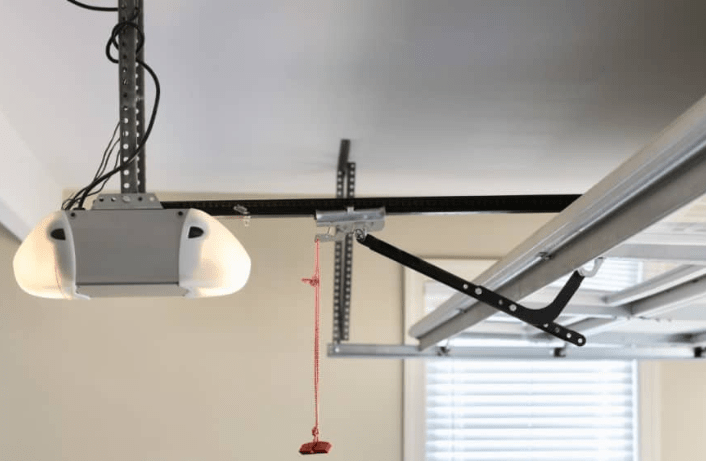
Introduction
Is your garage door opener light staying on longer than necessary, driving up your electricity bill or keeping you awake at night? You are not alone; many homeowners struggle with overly bright or persistent lights that seem impossible to manage. Learning how to turn off light on garage door opener units is simpler than you might think, and it can save you both energy and frustration in the long run.
Whether you have a modern smart opener or an older model, this guide will walk you through the exact steps to regain control. We will cover manual overrides, programming adjustments, and hardware fixes to ensure your garage remains functional without the unnecessary glare.
Why Do Garage Door Lights Stay On?
Before diving into the solutions, it helps to understand why this happens. Most garage door openers are designed with a built-in timer that keeps the light on for 1.5 to 4.5 minutes after operation. This feature is intended for safety, allowing you to see your surroundings when entering or exiting the vehicle.
However, several factors can cause the light to malfunction or stay on indefinitely:
- Incorrect Timer Settings: The duration may be set to “Always On” by accident.
- Sensor Issues: Motion detection sensors might be too sensitive or dirty.
- Wiring Faults: Loose connections between the motor unit and the light socket.
- Remote Control Glitches: A stuck button on your remote or wall console.
According to the U.S. Department of Energy, lighting accounts for about 15% of a typical home’s electricity use. While a single garage bulb seems minor, inefficient usage adds up over time. For more details on residential energy consumption patterns, you can refer to Wikipedia’s page on Home Energy Use.
Method 1: Adjusting the Light Timer via Wall Console
The most common way to manage your light is through the wall-mounted control panel. This method works for most major brands like Chamberlain, LiftMaster, and Craftsman.
Step-by-Step Instructions:
- Locate the Wall Console: Find the button panel installed inside your garage, usually near the entry door.
- Identify the Light Button: Look for a button labeled “Light,” often represented by a lightbulb icon.
- Press and Hold: Press and hold the “Light” button for approximately 10 seconds.
- Note: On some models, you may need to press it twice quickly.
- Observe the Indicator: The LED on the console should blink, indicating the mode has changed.
- Test the Function: Open and close your garage door. The light should now turn off after the default interval (usually 1.5 minutes) instead of staying on.
If holding the button doesn’t work, consult your specific model’s manual, as sequences can vary. For example, some Genie models require you to press the “Program” button first.
Method 2: Using the Remote Control
Did you know you can often toggle the light directly from your car? This is useful if you want to turn the light off immediately after parking, rather than waiting for the timer.
Quick Toggle Technique:
- Single Press: Typically opens/closes the door.
- Double Press: Often activates the light only.
- Long Press: On newer smart remotes, holding the light button for 3–5 seconds may toggle the “Always On” feature off.
Check your remote’s user guide for specific button combinations. If your remote has a dedicated “Light” button, pressing it once while the door is closed should manually turn the light off if it was left on.
Method 3: Disabling the Light Entirely (Hardware Fix)
If software adjustments fail, or if you prefer a permanent solution, you can physically disconnect the light. Warning: Always prioritize safety when dealing with electrical components.
Tools Needed:
- Stepladder
- Screwdriver (Phillips head)
- Voltage tester (optional but recommended)
Steps:
- Unplug the Opener: Disconnect the power source to prevent accidental activation.
- Access the Light Bulb: Climb the ladder and locate the light socket on the motor unit.
- Remove the Bulb: Unscrew the current bulb. If you want to keep the fixture but never use it, you can replace it with a dummy plug or simply leave it empty.
- Disconnect Wiring (Advanced): If you are comfortable with basic wiring, you can disconnect the two wires leading to the light socket. Cap them with wire nuts for safety.
- Restore Power: Plug the unit back in and test the door operation. The motor should work, but the light will remain off.
Pro Tip: If you remove the bulb, consider covering the socket with electrical tape to prevent dust accumulation, which can cause short circuits over time.
Comparison: Software vs. Hardware Solutions
| Feature | Software Adjustment (Timer/Remote) | Hardware Fix (Remove Bulb/Wire) |
|---|---|---|
| Reversibility | Easy to reverse anytime | Requires reinstallation |
| Difficulty Level | Low (Beginner friendly) | Medium (Requires tools) |
| Cost | Free | Minimal (cost of tools) |
| Flexibility | Can change duration later | Permanent off state |
| Safety Risk | None | Low (if power is disconnected) |
Troubleshooting Common Issues
Even after following the steps above, you might encounter persistent problems. Here are some expert-backed troubleshooting tips.
Light Flickers Before Turning Off
This often indicates a loose bulb or a failing socket. Tighten the bulb securely. If it persists, the socket contacts may be corroded. Clean them with a dry cloth after unplugging the unit.
Remote Control Doesn’t Respond
Replace the batteries in your remote. Weak batteries can send incomplete signals, causing the opener to misinterpret commands. Use high-quality alkaline batteries for better longevity.
Sensor Interference
Modern openers use motion sensors to keep the light on when activity is detected. If the sensor lens is dirty, it may false-trigger. Wipe the sensor window (usually located near the light bulb) with a microfiber cloth.
FAQ Section
Q1: Can I set the light to stay on for less than 1 minute?
Most standard garage door openers have a minimum timer setting of 1.5 minutes. However, some high-end models allow customization down to 30 seconds via smartphone apps or advanced programming modes. Check your manufacturer’s app settings if available.
Q2: Why does my light turn on randomly at night?
This is likely due to the motion sensor detecting movement, such as pets, insects, or even shadows from passing cars. Try adjusting the sensitivity settings if your model allows it, or clean the sensor lens to improve accuracy.
Q3: Is it safe to leave the garage door opener light on all night?
While generally safe, leaving any electrical device on continuously increases the risk of overheating, especially with incandescent bulbs. LED bulbs generate less heat and are safer for extended use. However, turning it off saves energy and extends bulb life.
Q4: My opener is old and has no digital settings. How do I turn off the light?
For older mechanical models, your best option is the hardware fix. Simply unscrewing the bulb is the most effective way to disable the light without altering the internal wiring of the motor unit.
Q5: Will turning off the light affect the garage door’s operation?
No, the light circuit is independent of the motor mechanism. Disabling the light will not impact the opening, closing, or safety sensors of your garage door.
Q6: Can I replace the standard bulb with a smart bulb?
Yes, but ensure the socket type matches (usually E26 base). Note that some smart bulbs may not respond well to the rapid power cuts caused by the opener’s timer. It’s better to use the opener’s native controls or a smart plug compatible with garage environments.
Conclusion
Learning how to turn off light on garage door opener systems empowers you to take control of your home’s efficiency and comfort. Whether you choose to adjust the timer via the wall console, use your remote for quick toggles, or opt for a permanent hardware fix, each method offers distinct benefits.
By implementing these strategies, you can reduce unnecessary energy consumption, extend the lifespan of your bulbs, and eliminate the annoyance of a perpetually lit garage. Remember, small adjustments lead to significant long-term savings.
If you found this guide helpful, please share it with friends or neighbors who might be struggling with their garage lighting. Your simple tip could save them hours of frustration!



Leave a Reply