Introduction
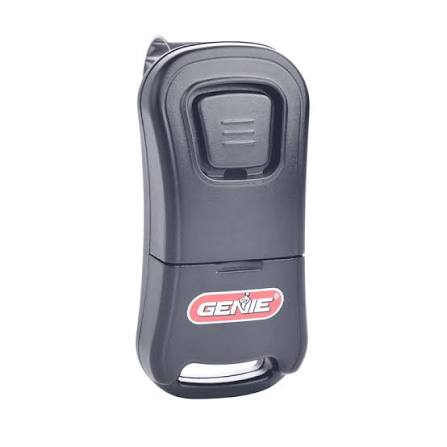
Locked out of your own garage? It can be incredibly frustrating when your remote stops syncing, but you are not alone. Learning how to program Genie Intellicode garage door opener remote systems is actually a quick and straightforward process that you can master in just a few minutes. Whether you just bought a new remote or your old one suddenly lost its connection, this comprehensive guide will walk you through everything you need to know to get back on track.
Understanding Your Genie Intellicode System
Before diving into the buttons and blinking lights, it helps to understand what makes your garage door secure. Genie’s Intellicode technology utilizes a rolling code system.
Unlike older, fixed-code remotes that broadcast the same signal every time, a rolling code system generates a new, randomized access code every single time you press the button. This advanced security feature prevents “code grabbers” from copying your signal and gaining unauthorized access to your home. Because of this sophisticated technology, the programming process requires a specific sequence to synchronize the remote’s transmitter with the opener’s receiver.
What You Need Before You Start
To ensure a smooth programming experience, gather these items before you begin:
- A stable step ladder: This allows you to safely reach the motor head mounted on your garage ceiling.
- Your Genie Intellicode remote: Ensure it has fresh batteries (typically a 3V CR2032 coin cell).
- Access to the garage door opener motor unit: You will need to locate the “Learn” or “Program” button on the device.
- About 5 to 10 minutes of uninterrupted time: Rushing can cause the programming sequence to time out.
Safety First: Always ensure the garage door is fully closed before starting the programming process to prevent accidental movement.
Step-by-Step: How To Program Genie Intellicode Garage Door Opener Remote
Follow these concrete, step-by-step instructions to successfully sync your remote.
Step 1: Locate the Learn Button
Climb your step ladder and inspect the back or side of the garage door opener motor unit. The Learn button is typically colored purple, red, or green, depending on your model. It is usually located near the hanging antenna wire.
Step 2: Clear Old Codes (Optional but Recommended)
If you are troubleshooting a faulty remote, it is best to clear the opener’s memory first. Press and hold the Learn button for approximately 10 seconds until the indicator LED turns off. This erases all previously programmed remotes and keypads, giving you a clean slate.
Step 3: Initiate Programming Mode
Press the Learn button once and release it immediately. The indicator LED will either turn solid or begin to blink (for example, a solid purple light indicates Intellicode 2 mode). You now have a 30-second window to complete the next step.
Step 4: Program the Remote
Within those 30 seconds, point your Genie remote toward the motor unit. Press and hold the desired button on the remote for 2 to 3 seconds, then release it. Immediately press the same button again briefly. The motor unit’s LED will blink or flash to confirm it has received and saved the new code.
Step 5: Test the Connection
Step down from the ladder and stand about 10 feet away from the garage door. Press the programmed button on your remote. The door should activate immediately. If it does, congratulations—you have successfully programmed your remote!
Genie Intellicode 1 vs. Intellicode 2: A Quick Comparison
Not all Genie openers are the same. Knowing which generation you have can save you time. Use this quick reference table to identify your system:
| Feature | Genie Intellicode 1 | Genie Intellicode 2 |
|---|---|---|
| Security Level | 1 billion+ unique codes | 4 billion+ unique codes |
| Learn Button Color | Usually Red or Green | Usually Purple |
| Operating Frequency | 390 MHz | 315 MHz or 390 MHz |
| Model Year | Older models (pre-2011) | Newer models (2011 and later) |
| Remote Compatibility | GM3T, G3T-R, etc. | G3T-R, G1T-R, Universal remotes |
Note: Intellicode 2 remotes are generally backward compatible with Intellicode 1 openers, but the reverse is not always true.
Troubleshooting: Why Is My Genie Remote Not Programming?
Even with careful steps, things can go wrong. Here are the most common culprits and how to fix them:
- Depleted Batteries: This is the most frequent cause of failure. Replace the battery with a high-quality 3V CR2032, ensuring the positive (+) side is facing up.
- Signal Interference from LED Bulbs: Some non-shielded LED light bulbs emit electromagnetic frequency (EMF) noise that blocks the remote’s signal. If your remote only works when you are very close to the motor, try replacing the opener’s light bulb with a Genie-approved LED or a standard incandescent bulb.
- Timeout Error: If you wait longer than 30 seconds after pressing the Learn button, the opener exits programming mode. Simply press the Learn button again to restart the 30-second window.
- Expert Insight: According to industry data from the International Door Association (IDA), nearly 40% of remote programming failures stem from simple, easily fixable issues like depleted batteries or signal interference from non-shielded lighting. Always rule out the basics first.
Frequently Asked Questions (FAQ)
Q1: How do I know if my Genie remote is Intellicode?
A: Look at the back of the remote or inside the battery compartment. If it says “Intellicode” or “Intellicode 2,” you have the rolling code technology. Additionally, if your opener’s Learn button is purple, red, or green, it is an Intellicode system.
Q2: Can I program a universal remote to a Genie Intellicode opener?
A: Yes, most modern universal remotes (like those from LiftMaster or generic brands) are designed to be compatible with Genie Intellicode systems. You will follow a similar process: press the universal remote’s learn button, then press the motor unit’s Learn button.
Q3: How do I reset my Genie garage door opener memory completely?
A: To factory reset the opener, press and hold the Learn button on the motor unit for 10 to 15 seconds until the indicator light turns off. Keep in mind this will erase all paired remotes and wireless keypads, requiring you to reprogram them.
Q4: Why does my Genie remote blink but not open the door?
A: A blinking light on the remote usually indicates that the battery is too weak to send a strong signal, or the remote is not properly synced. Try replacing the battery first. If the issue persists, reprogram the remote using the steps above.
Q5: Can I program my Genie remote to my car’s HomeLink system?
A: Absolutely. Most vehicles equipped with HomeLink can be synced with a Genie Intellicode opener. You will need to press the HomeLink button in your car, then immediately press the Learn button on your garage door motor unit to complete the rolling code handshake. Consult your vehicle’s manual for the exact HomeLink procedure.
Conclusion
Learning how to program Genie Intellicode garage door opener remote devices does not have to be a stressful experience. By understanding your system, gathering the right tools, and following a clear, step-by-step process, you can restore convenience and security to your home in under ten minutes. Remember to always check your batteries and be mindful of potential light bulb interference if you run into snags.
Did this guide help you get your garage door back on track? Share this article on Facebook, Twitter, or Pinterest to help a friend or family member who might be struggling with their own garage door remote setup!



Leave a Reply