Programming your Chamberlain garage door opener remote is a straightforward task, but it’s essential to follow the correct steps to ensure proper functionality. Whether you’ve purchased a new remote, replaced an old one, or reset your system, understanding how do you program a Chamberlain garage door opener remote will save time and avoid frustration.
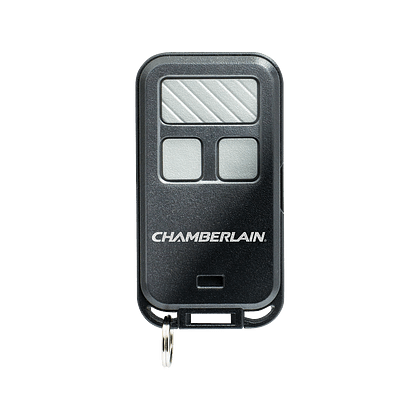
This comprehensive guide provides step-by-step instructions, tips, and troubleshooting advice for programming your Chamberlain remote.
Why Program Your Chamberlain Garage Door Opener Remote?
A well-programmed remote ensures smooth and convenient access to your garage. Here are a few reasons to program your Chamberlain garage door opener remote:
- Enhanced Convenience: Open and close your garage door effortlessly.
- Improved Security: Resetting and reprogramming helps prevent unauthorized access.
- Integration with New Remotes: Program multiple remotes for family members or backups.
Read too: The Complete Guide to Tighten Chain On Garage Door Opener for Smooth Operation
Tools You’ll Need
Before you begin, gather the following items:
- Your Chamberlain garage door opener remote.
- A ladder (if the opener is mounted high).
- The owner’s manual for reference (optional).
How Do You Program A Chamberlain Garage Door Opener Remote?
Step 1: Locate the Learn Button
The Learn button is the key to programming your Chamberlain remote.
- Find the Garage Door Opener Unit:
- Look for the motor housing, usually installed on the garage ceiling.
- Identify the Learn Button:
- The Learn button is typically located on the back or side of the opener.
- It may be yellow, orange, red, or purple, depending on your model.
Step 2: Prepare the Remote
Ensure the remote is functional and has fresh batteries. Check the battery compartment and replace the batteries if needed.
Step 3: Activate the Learn Mode
- Press the Learn Button:
- Use a ladder to reach the opener if necessary.
- Press and release the Learn button.
- A small LED light next to the button will illuminate or blink, indicating that the opener is in Learn mode.
- Act Quickly:
- Once the Learn mode is activated, you typically have 30 seconds to complete the next step.
Step 4: Program the Remote
- Press the Remote Button:
- On your Chamberlain remote, press and hold the button you want to program.
- The garage door opener’s light will blink or click to indicate successful programming.
- Test the Remote:
- Press the programmed button to check if the garage door opens or closes.
Reprogramming an Existing Remote
If you’re replacing an old remote or resetting your system, follow these additional steps:
- Clear the Opener’s Memory:
- Hold down the Learn button until the LED light turns off (approximately 6-10 seconds).
- This action erases all previously programmed remotes from the system.
- Program the Remote Again:
- Follow the programming steps above to pair the remote with the opener.
Adding Multiple Remotes
To program additional remotes, repeat the same process for each remote. Chamberlain openers can typically support multiple remotes, making it easy to provide access for family members or roommates.
Troubleshooting Common Issues
Even after following the steps, you may encounter challenges. Here’s how to resolve common issues:
Problem: Remote Doesn’t Work After Programming
Solution:
- Ensure the batteries in the remote are fresh.
- Verify you pressed the correct Learn button.
- Check the garage door opener’s manual for compatibility.
Problem: The Opener Doesn’t Enter Learn Mode
Solution:
- Ensure the opener has power and the LED indicator is functioning.
- Reset the opener by unplugging it for 30 seconds.
Problem: Multiple Remotes Interfere with Each Other
Solution:
- Reprogram each remote one at a time.
- Clear the memory and start fresh if interference persists.
Understanding Rolling Code Technology
Chamberlain remotes often feature rolling code technology, which enhances security by changing the code transmitted to the opener each time you use the remote. This prevents unauthorized access and ensures a secure connection.
Benefits of Learning How to Program a Chamberlain Garage Door Opener Remote
- Save Time and Money: Avoid hiring a technician for a simple task.
- Flexibility: Easily program new or replacement remotes as needed.
- Peace of Mind: Ensure your garage is secure and accessible.
Frequently Asked Questions
Can I Program a Universal Remote to a Chamberlain Opener?
Yes, Chamberlain supports many universal remotes. Follow the same Learn button process to program a compatible universal remote.
How Many Remotes Can I Program to One Opener?
Most Chamberlain openers can handle up to 8 remotes, but this varies by model.
What Should I Do If I Lose My Remote?
Clear the opener’s memory using the Learn button and program new remotes to prevent unauthorized access.
Is Programming the Same for Older Chamberlain Models?
The process is similar, but the location of the Learn button and remote compatibility may differ. Refer to your opener’s manual for specifics.
Maintenance Tips for Your Chamberlain Remote
To keep your Chamberlain garage door opener remote in top condition:
- Replace Batteries Annually: Weak batteries can reduce range and reliability.
- Clean the Remote: Wipe the buttons and casing with a damp cloth to prevent dust buildup.
- Store Remotes Safely: Avoid dropping or exposing remotes to extreme temperatures.
Conclusion
Programming your Chamberlain garage door opener remote is an essential skill that offers convenience and security. By following the steps outlined in this guide, you can quickly and effectively program your remote, troubleshoot common issues, and maintain your system for long-term reliability.
Whether you’re adding a new remote, replacing an old one, or resetting the system, this guide provides everything you need to know about how do you program a Chamberlain garage door opener remote.



Leave a Reply