Setting up a smart garage system can feel confusing at first—especially if you’re unsure how the hub communicates with your opener. If you’re searching How To Pair MyQ Hub To Garage Door Opener, you likely want a simple, clear walkthrough that actually works.
The good news? Pairing a MyQ Smart Garage Hub takes about 10–20 minutes when done correctly. This guide explains every step in plain English, including compatibility checks, LED signals, troubleshooting, and security best practices.
Read too: Mastering the Art of Adjusting a Chamberlain Garage Door Opener for Smooth Operation and Safety
How To Pair MyQ Hub To Garage Door Opener (Step-by-Step Guide)
Before starting How To Pair MyQ Hub To Garage Door Opener, understand how the system works:
- The MyQ Hub connects to your home Wi-Fi.
- It communicates with your garage door opener via radio frequency.
- It uses rolling code security to send open/close signals.


4
Most MyQ hubs are compatible with garage openers manufactured after 1993 that use safety sensors.
For background on rolling code technology used in garage systems, see:
https://en.wikipedia.org/wiki/Rolling_code
Step 1: Check Compatibility
Before installation, confirm:
- Your opener has photo-eye safety sensors.
- It includes a “Learn” or “Program” button.
- It operates on 315 MHz or 390 MHz frequency (most modern models do).
Common compatible brands include:
- LiftMaster
- Chamberlain
- Craftsman
- Genie (most models after 1995)
If unsure, check the motor unit label.
Step 2: Install the MyQ Hub and Door Sensor
Hub Placement
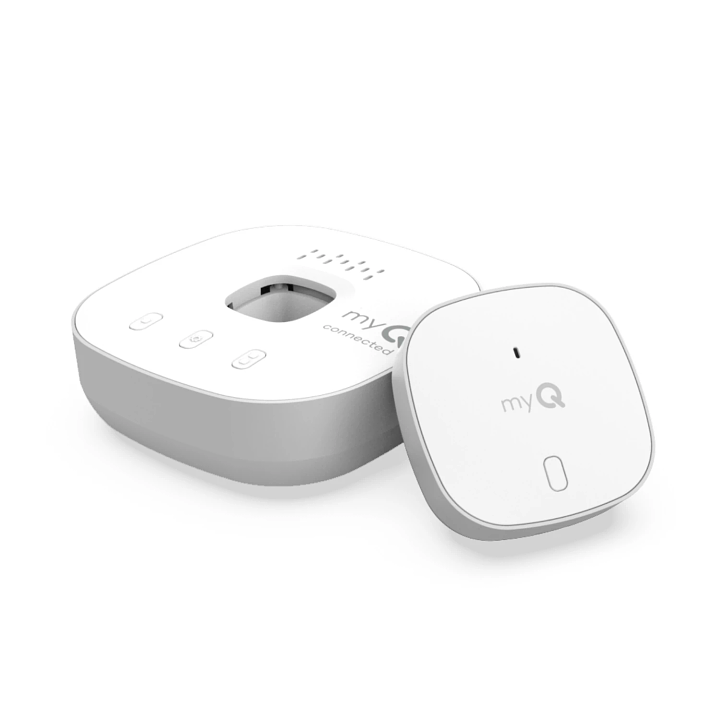
- Mount hub on ceiling or wall within 50 feet of opener.
- Position away from metal interference.
- Plug into power outlet.
Door Sensor Installation
- Attach sensor to top panel of garage door.
- Ensure arrow points upward.
- Use included adhesive or screws.
- Install battery (usually CR2450).
Sensor placement ensures accurate open/close status tracking.
Step 3: Download and Set Up the MyQ App
- Download the MyQ app (iOS or Android).
- Create or log into account.
- Select “Add Device.”
- Choose “Smart Garage Hub.”
- Follow Wi-Fi setup instructions.
Use a 2.4 GHz Wi-Fi network for best compatibility.
Step 4: Pair the Hub With the Garage Door Opener
This is the core of How To Pair MyQ Hub To Garage Door Opener.
Pairing Process
- In the MyQ app, select your hub.
- Choose “Program.”
- Press the Learn button on your garage opener.
- LED on opener will light up.
- Wait for MyQ hub to beep.
- Test door operation via app.
The entire process must be completed within the 30-second Learn window.
Understanding LED Indicators
| LED Color | Meaning |
|---|---|
| Blue blinking | Wi-Fi connecting |
| Green solid | Connected to internet |
| Yellow blinking | Programming mode |
| Red blinking | Error or signal issue |
If red LED persists, move hub closer to opener.
How Long Does Pairing Take?
- Wi-Fi setup: 5–10 minutes
- Opener pairing: 1–3 minutes
- Total setup: 10–20 minutes
Over 70% of pairing failures are due to weak Wi-Fi signal or pressing the Learn button too early or too late.
Common Problems and Fixes
1. Hub Won’t Connect to Wi-Fi
- Ensure 2.4 GHz network.
- Move router closer.
- Restart router.
2. Hub Won’t Pair With Opener
- Confirm compatibility.
- Clear opener memory (hold Learn 6–10 seconds).
- Retry programming within 30-second window.
3. Door Opens but Doesn’t Close
- Check safety sensors alignment.
- Ensure sensor battery is installed correctly.
4. Hub Beeps but Door Doesn’t Move
- Move hub closer to opener.
- Remove metal interference nearby.
Can You Pair Multiple Doors?
Yes. Most MyQ hubs support:
- 1–2 doors (depending on model)
- Additional door sensors (sold separately)
Repeat pairing steps for each door.
Security Benefits of MyQ Hub
MyQ uses encrypted rolling codes.
Advantages include:
- Changing access code after every use
- Reduced hacking risk
- Activity notifications
- Remote access monitoring
Smart notifications allow you to close the door remotely if left open.
MyQ Hub vs Built-In MyQ Opener
| Feature | MyQ Hub | Built-In MyQ Opener |
|---|---|---|
| Wi-Fi required | Yes | Yes |
| External hardware | Yes | No |
| Works with older openers | Yes | No |
| App control | Yes | Yes |
| Installation complexity | Moderate | Low |
The hub is ideal if your opener doesn’t have built-in Wi-Fi.
Advanced Tips for Stable Connection
- Keep hub within 20–30 feet of opener.
- Avoid mounting behind metal shelving.
- Replace sensor battery annually.
- Use surge protector to prevent power damage.
Safety Reminders
Garage doors can weigh 150–300 pounds.
Always:
- Keep children clear during testing.
- Ensure safety sensors are aligned.
- Never disable auto-reverse function.
- Test door reversal monthly using 2×4 board method.
FAQ – How To Pair MyQ Hub To Garage Door Opener
1. Why won’t my MyQ hub connect to my opener?
Usually due to compatibility issues, weak signal, or mistimed Learn button press.
2. Does MyQ work without Wi-Fi?
No. The hub requires Wi-Fi for app control.
3. Can I use MyQ with Genie openers?
Yes, most Genie models after 1995 are compatible.
4. How do I reset MyQ hub?
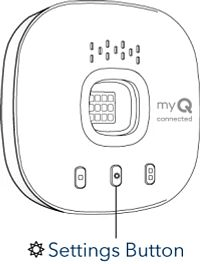
Press and hold settings button until LED flashes blue.
5. Can multiple users access the garage?
Yes. You can invite family members via the app.
6. Is MyQ secure?
Yes. It uses encrypted rolling code technology and secure cloud authentication.
Conclusion
Now you know exactly How To Pair MyQ Hub To Garage Door Opener—from installation and Wi-Fi setup to Learn button synchronization and troubleshooting.
When paired correctly, the MyQ hub provides:
- Remote smartphone access
- Real-time door status
- Activity alerts
- Enhanced rolling code security
Most setups take under 20 minutes when done carefully. If this guide helped you successfully connect your smart garage system, share it with others who may be upgrading their garage to smart technology.



Leave a Reply