Introduction
There is nothing quite as frustrating as sitting in your driveway, pressing the button on your car’s sun visor, and watching your garage door remain stubbornly closed. It disrupts your routine and breaks the seamless convenience that modern luxury vehicles like the Audi Q5 are designed to provide. If you are wondering how to program 2023 Audi Q5 garage door opener functions correctly, you are not alone; many new owners face this initial setup hurdle.
This guide is designed to walk you through the process with clarity and precision. We will eliminate the guesswork, ensuring you can integrate your vehicle with your home security system efficiently. By the end of this article, you will have a fully functional HomeLink® system, restoring the comfort and ease of entry you expect from your Audi.
Understanding the HomeLink® System in Your 2023 Audi Q5
Before diving into the buttons and lights, it is essential to understand what technology you are working with. The 2023 Audi Q5 utilizes the HomeLink® system, a universal transceiver built into the overhead console or sun visor area. This system is designed to replace up to three separate handheld remote controls for your garage door, gate, or even home lighting systems.
Unlike older analog remotes, HomeLink® uses rolling code technology. This is a critical security feature that changes the access code every time you use the remote, preventing hackers from intercepting and replicating your signal. According to HomeLink® official documentation, this encryption standard is widely adopted across the automotive industry to ensure user safety.
Why Programming Might Fail Initially
Many users attempt to program their garage door opener only to find it unresponsive. This is rarely a defect in the Audi. Instead, it is usually due to one of two reasons:
- Interference: Other electronic devices nearby may be blocking the signal during the learning phase.
- Incorrect Mode: Modern garage door openers operate on different frequencies (315 MHz, 390 MHz, or 433 MHz). Your Audi needs to “learn” the specific frequency and protocol of your garage motor.
Step-by-Step: How To Program 2023 Audi Q5 Garage Door Opener
Follow these instructions carefully. Ensure your vehicle is parked outside the garage with the engine running or in ignition mode to maintain consistent power to the electronics.
Phase 1: Clearing Previous Settings (If Necessary)
If your HomeLink® buttons have been used before, or if you are troubleshooting a failed attempt, you must clear the memory first.
- Locate the two outer HomeLink® buttons on your overhead console.
- Press and hold both buttons simultaneously for approximately 20 seconds.
- Watch the indicator light. It will begin to flash slowly, then rapidly.
- Once the light flashes rapidly, release the buttons. The memory is now cleared.
Phase 2: Training the Audi to Recognize Your Remote
This is the most critical phase. You will need your original handheld garage door remote for this step.
- Sit in your driver’s seat with all doors closed.
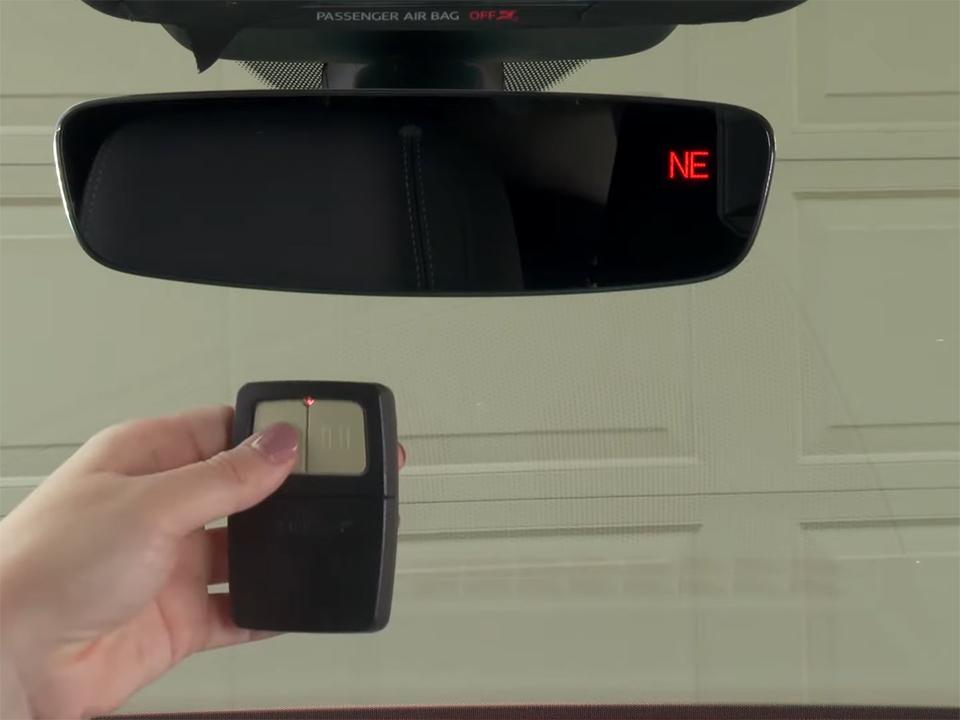
- Hold your original garage remote 1 to 3 inches away from the HomeLink® buttons on the Audi’s overhead console.
- Choose the HomeLink® button you wish to program (e.g., Button 1).
- Press and hold the chosen HomeLink® button and the button on your handheld remote simultaneously.
- Keep holding both. Do not release them yet.
- Observe the HomeLink® indicator light. It will change from a slow flash to a rapid flash. This indicates that the Audi has successfully captured the frequency and code from your handheld remote.
- Release both buttons once the rapid flashing begins.
Note: For some newer garage door openers (especially LiftMaster or Chamberlain models with yellow learn buttons), you may need to repeat this step up to three times to ensure the rolling code is fully synchronized.
Phase 3: Syncing with the Garage Door Motor
Now that the car knows the remote’s signal, the garage door motor must recognize the car.
- Exit your vehicle and locate the “Learn” or “Smart” button on your garage door motor unit (usually hanging from the ceiling).
- Press the “Learn” button on the motor unit. The indicator light on the motor will typically turn on or blink.
- You have approximately 30 seconds to complete the next step.
- Return to your Audi.
- Press and hold the programmed HomeLink® button in your car for 2–3 seconds, then release.
- Repeat this press-and-release action two more times.
- Your garage door should activate (open or close). If it does, the programming is successful.
Troubleshooting Common Issues
Even with careful execution, technology can be finicky. Here is a breakdown of common issues and their solutions.
| Issue | Possible Cause | Solution |
|---|---|---|
| Light flashes but door doesn’t move | Rolling code mismatch | Perform Phase 3 again, ensuring you press the car button within 30 seconds of hitting the motor’s Learn button. |
| No light response at all | Battery issue or fuse | Check your vehicle’s battery health. Ensure the HomeLink® fuse is intact (consult your owner’s manual for fuse box location). |
| Door moves partially then stops | Safety sensor obstruction | Check the infrared sensors at the bottom of your garage door tracks. Ensure they are aligned and clean. |
| Intermittent operation | Signal interference | Try reprogramming in a different location, away from other strong radio signals or LED lights which can cause frequency noise. |
Specific Advice for Chamberlain/LiftMaster Openers
If you have a Chamberlain or LiftMaster opener manufactured after 2011, you may encounter a “Security+” feature. These units require a specific procedure:
- After Phase 2, press the Learn button on the motor.
- Immediately return to the car and press the HomeLink® button once.
- Wait for the motor light to blink twice.
- Press the HomeLink® button again. This confirms the rolling code encryption.
Expert Tips for Long-Term Reliability
To ensure your 2023 Audi Q5 garage door opener continues to work flawlessly for years, consider these professional insights:
- Keep the Original Remote: Never discard your original handheld remote. Store it in a safe place inside your home. If the car’s battery dies completely or the HomeLink® module fails, you will need this backup.
- Update Firmware: While rare, some high-end garage door motors allow firmware updates via Wi-Fi. Keeping your motor updated ensures compatibility with newer car protocols.
- Avoid Metal Interference: When programming, ensure no large metal objects are between the car’s windshield and the garage motor. Metal can reflect or block radio frequencies.
FAQ Section
1. Can I program multiple garage doors to my 2023 Audi Q5?
Yes. The HomeLink® system in the 2023 Audi Q5 supports up to three different devices. You can program a garage door, a gate, and a home lighting system simultaneously. Simply repeat the programming steps for each device using a different HomeLink® button.
2. What if I don’t have the original handheld remote?
Programming without the original remote is difficult but sometimes possible. You will need to access the garage door motor unit directly. Some motors allow you to put them into “learning mode” and then press the HomeLink® button in the car repeatedly until the motor accepts the signal. However, having the original remote is highly recommended for the most reliable setup.
3. Why does my garage door reverse immediately after closing?
This is usually a safety sensor issue, not a programming error. Check the photo-eye sensors located near the floor on both sides of the garage door. If they are misaligned, dirty, or blocked by debris, the door will reverse to prevent injury. Clean the lenses and ensure the indicator lights on both sensors are solid (not blinking).
4. Does programming the garage door opener void my Audi warranty?
No. Using the built-in HomeLink® system is a factory-installed feature. Programming it to work with your home devices is considered normal use and does not affect your vehicle’s warranty coverage.
5. My HomeLink® light stays solid green. What does this mean?
A solid green light typically indicates that the button has been programmed and is ready to use. If you press the button and the light stays solid while the door operates, the system is functioning correctly. If the light flashes red, it indicates an error or that the memory has been cleared.
6. Can I reset just one button without clearing all three?
Unfortunately, no. The HomeLink® system requires you to clear all memory slots simultaneously. If you want to reprogram one button, you must clear all three and then reprogram the ones you still need, along with the new device.
Conclusion
Learning how to program 2023 Audi Q5 garage door opener systems is a straightforward process when you break it down into manageable phases. By understanding the rolling code technology and following the precise steps for clearing memory, training the remote, and syncing with the motor, you can achieve a seamless integration between your car and your home.
Remember, patience is key during the synchronization phase. If it doesn’t work on the first try, double-check your timing and ensure you are within the required distance. Once set up, you will enjoy the luxury of hands-free entry every time you pull into your driveway.
If you found this guide helpful, please share it with fellow Audi owners on social media. Helping others master their vehicle’s tech features builds a stronger, more informed community of drivers. Safe travels!



Leave a Reply