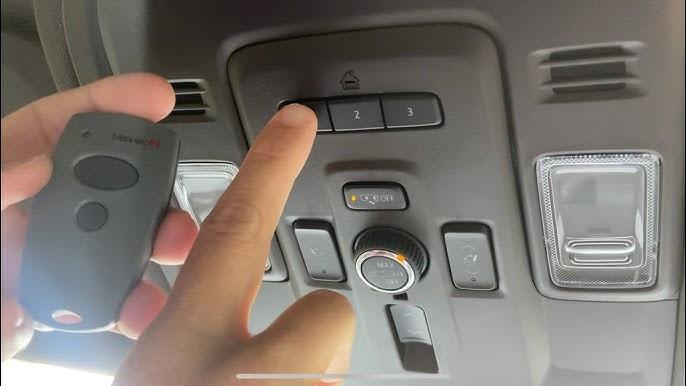
Programming your vehicle’s built-in garage door opener can feel intimidating, especially when you’re dealing with a brand-new truck like the 2023 Chevy Silverado. Many owners struggle with unclear instructions or outdated online guides that don’t match their specific model year. If you’re wondering how to program 2023 Chevy Silverado garage door opener, you’ve come to the right place. This comprehensive guide will walk you through every step, ensuring your HomeLink system works perfectly with your garage door.
Understanding the HomeLink System in Your 2023 Silverado
Before diving into the programming process, it’s essential to understand what you’re working with. The 2023 Chevy Silverado comes equipped with the HomeLink wireless control system, a technology that has become the industry standard for vehicle-integrated garage door openers.
What Is HomeLink?
HomeLink is a universal transceiver system that allows your vehicle to communicate with various radio-controlled devices, including garage doors, gate operators, and home lighting systems. According to Wikipedia, HomeLink was first introduced in 1992 and has since been integrated into millions of vehicles worldwide, making it one of the most reliable aftermarket solutions available.
The system operates on multiple frequencies (typically 288-433 MHz), which means it can work with nearly all major garage door opener brands, including:
- Chamberlain
- LiftMaster
- Genie
- Craftsman
- Sommer
- And many others
Why Programming Matters
Properly programming your HomeLink system ensures seamless operation between your truck and garage door. When done correctly, you’ll experience:
- Convenience: No need to carry separate remote controls
- Security: Encrypted signals protect against unauthorized access
- Reliability: Consistent performance regardless of weather conditions
- Integration: Works with smart home systems for enhanced automation
Step-by-Step Guide: How to Program 2023 Chevy Silverado Garage Door Opener
Now let’s get to the main event. Follow these detailed steps to successfully program your 2023 Chevy Silverado’s HomeLink system.
Step 1: Prepare Your Equipment
Before starting, gather the following items:
- Your 2023 Chevy Silverado with the engine running
- Your existing garage door remote control
- A ladder (if needed to reach the garage door opener motor)
- Patience and about 10-15 minutes of uninterrupted time
Important Safety Note: Ensure your garage door area is clear of people, pets, and obstacles before beginning the programming process.
Step 2: Locate the HomeLink Buttons
In the 2023 Chevy Silverado, the HomeLink buttons are typically located on the rearview mirror assembly or the overhead console. You’ll see three rectangular buttons labeled 1, 2, and 3. Each button can be programmed to control a different device.
Step 3: Clear Previous Programming (If Necessary)
If any HomeLink buttons were previously programmed, you should clear them first:
- Press and hold the two outer HomeLink buttons (buttons 1 and 3) simultaneously
- Continue holding for approximately 20 seconds
- Watch for the indicator light to flash rapidly, then turn off
- Release both buttons when the light changes
This step ensures no conflicting signals interfere with your new programming.
Step 4: Begin the Programming Process
Follow these precise steps to program your desired button:
- Choose your button: Decide which HomeLink button (1, 2, or 3) you want to use
- Press and hold: Hold down your chosen HomeLink button
- Position your remote: While holding the HomeLink button, bring your garage door remote 1-3 inches away from the HomeLink buttons on your mirror
- Press the remote button: Simultaneously press and hold the button on your garage door remote that you want to program
- Wait for the signal: Continue holding both buttons until the HomeLink indicator light changes from slow blinking to rapid flashing (this may take 20-60 seconds)
- Release both buttons: Once the light flashes rapidly, release both the HomeLink button and the remote button
Step 5: Test the Programming
After completing the programming sequence:
- Press the programmed HomeLink button once
- Observe whether your garage door responds
- If successful, the door should open or close accordingly
- Test it 2-3 times to ensure consistent operation
Step 6: Program Rolling Code Systems (If Applicable)
Many modern garage door openers use rolling code technology for enhanced security. If your initial programming didn’t work, you likely have a rolling code system. Here’s how to handle it:
- Locate the “Learn” or “Smart” button on your garage door opener motor unit (usually found on the ceiling-mounted unit)
- Press and release the Learn button (the indicator light will illuminate)
- Within 30 seconds, return to your vehicle
- Press and hold the programmed HomeLink button for 2 seconds, release, then press and hold again for 2 seconds
- Repeat this press-release-hold cycle up to three times
- Your garage door should respond, confirming successful programming
Troubleshooting Common Issues
Even with careful following of instructions, you might encounter problems. Here are solutions to the most common issues:
| Problem | Possible Cause | Solution |
|---|---|---|
| No response from garage door | Incorrect frequency | Try reprogramming with remote closer to HomeLink buttons |
| Intermittent operation | Weak battery in remote | Replace remote battery and reprogram |
| Light doesn’t flash during programming | System not in learning mode | Clear previous programming and start over |
| Works sometimes, not others | Signal interference | Reprogram away from other electronic devices |
| Rolling code won’t sync | Missed the 30-second window | Press Learn button again and repeat quickly |
Expert Tips for Success
- Distance matters: Keep your garage door remote 1-3 inches from the HomeLink buttons during programming
- Timing is crucial: For rolling code systems, you must complete the second phase within 30 seconds
- Battery check: Always ensure your garage door remote has fresh batteries before programming
- Multiple attempts: Don’t give up after one try; some systems require 2-3 attempts
- Consult your manual: Your garage door opener’s manual contains specific frequency information
Alternative Programming Methods
If the standard method doesn’t work, try these alternative approaches:
Method 1: Direct Learning Mode
Some newer garage door openers support direct learning:
- Press and hold the desired HomeLink button until the light begins flashing
- Immediately press the Learn button on your garage door opener motor
- Return to your vehicle within 30 seconds
- Press the HomeLink button three times in succession
Method 2: Using a Second Remote
If you have multiple remotes:
- Program one remote using the standard method
- Use the successfully programmed HomeLink button to teach additional remotes
- This creates a chain reaction that can help with difficult systems
Frequently Asked Questions
Q1: How long does it take to program the 2023 Chevy Silverado garage door opener?
A: The entire programming process typically takes 10-15 minutes, including preparation and testing. The actual button-pressing sequence usually completes within 1-2 minutes, but rolling code systems may require additional steps that extend the total time.
Q2: Can I program multiple garage doors to my 2023 Silverado?
A: Yes! The HomeLink system in your 2023 Chevy Silverado has three separate buttons, meaning you can program up to three different garage doors, gates, or other compatible devices. Each button operates independently, so you can control your home garage, vacation property, and office garage separately.
Q3: What if my garage door opener is very old?
A: Most garage door openers manufactured after 1993 are compatible with HomeLink systems. However, extremely old units (pre-1990) may use incompatible frequencies. In such cases, consider upgrading your garage door opener to a modern unit with rolling code security, which offers better protection and guaranteed compatibility.
Q4: Will programming erase my existing settings?
A: Only if you deliberately clear the memory by holding buttons 1 and 3 together for 20 seconds. Programming a new device to an empty button won’t affect other programmed buttons. However, reprogramming an already-programmed button will overwrite the previous setting.
Q5: Is the HomeLink system secure?
A: Yes, the HomeLink system uses encrypted signals, especially when paired with rolling code garage door openers. This encryption prevents unauthorized users from copying your signal and accessing your garage. The system meets federal security standards for wireless communication devices.
Q6: Can I program non-garage door devices?
A: Absolutely! The HomeLink system can control various radio-frequency devices, including:
- Gate operators
- Outdoor lighting systems
- Security alarms
- Home automation switches
- Pool covers
Check your device’s manual to confirm it operates on compatible frequencies (288-433 MHz).
Conclusion
Learning how to program 2023 Chevy Silverado garage door opener doesn’t have to be complicated. With the HomeLink system’s user-friendly design and this comprehensive guide, you can have your garage door responding to your truck’s controls in under 15 minutes. Remember to follow each step carefully, pay attention to timing for rolling code systems, and don’t hesitate to try alternative methods if the first attempt doesn’t succeed.
The convenience of controlling your garage door directly from your 2023 Chevy Silverado enhances your daily routine, improves security, and eliminates the hassle of juggling multiple remotes. Whether you’re pulling into your driveway after work or heading out early in the morning, having seamless integration between your vehicle and home makes life easier.
Did this guide help you successfully program your garage door opener? Share your experience in the comments below or spread the word by sharing this article on social media. Your fellow Chevy Silverado owners will thank you for helping them master their HomeLink system too!
Have questions or encountered unique challenges? Drop a comment, and our community of experienced Silverado owners will help you troubleshoot any issues.



Leave a Reply