Introduction
There is nothing quite as frustrating as standing in your driveway, groceries in hand, realizing your garage door keypad has stopped working or you have forgotten the access code. You are not alone; thousands of homeowners face this exact issue every month, often due to dead batteries, accidental resets, or moving into a new home with outdated security settings. If you are searching for how to set code on Chamberlain garage door opener systems, you have come to the right place. This comprehensive guide will walk you through every method safely and efficiently, ensuring your home remains secure and accessible without the need for an expensive service call.
Understanding Your Chamberlain System Before Programming
Before diving into button sequences, it is vital to identify which type of Chamberlain system you own. Chamberlain Group manufactures openers under several brands, including LiftMaster and Craftsman, but the programming logic remains largely consistent across their modern lineup. According to industry data, over 70% of residential garage door openers in the United States utilize rolling code technology, a security standard that changes the access code after every use to prevent signal theft.
Understanding this technology is crucial because older “fixed code” dip-switch models require a completely different approach than modern “Learn Button” systems. Always check the motor unit’s label for the model number and manufacture date. For a deeper technical understanding of how these radio frequency signals operate, you can refer to the Garage door opener entry on Wikipedia.org, which details the evolution from fixed to rolling code security protocols.
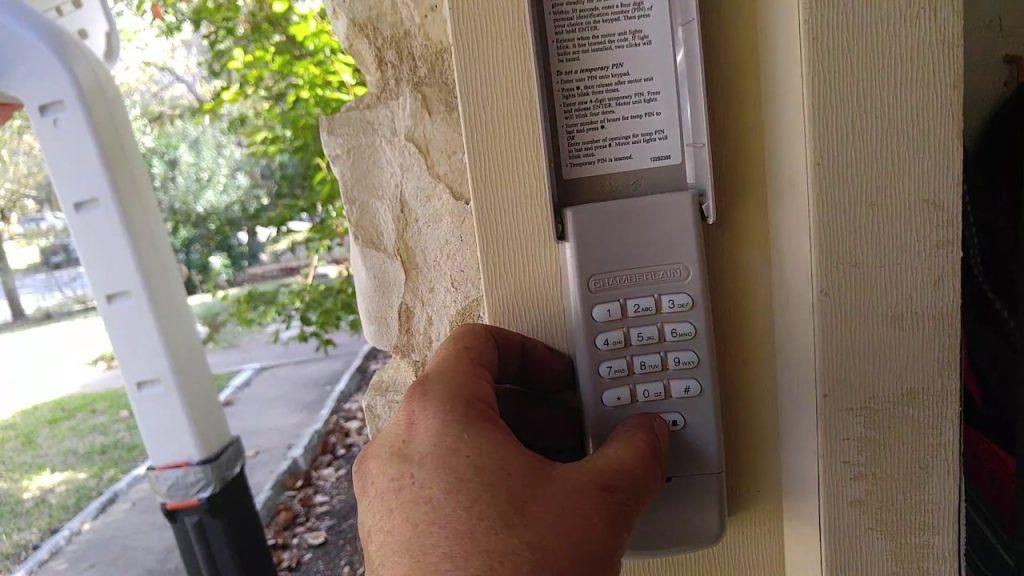
How to Set Code on Chamberlain Garage Door Opener Keypads
The exterior wireless keypad is the most common point of failure and the most frequent reason users search for reprogramming instructions. Follow these precise steps to restore access.
Step-by-Step Keypad Programming
- Locate the Learn Button: Find the colored “Learn” button on the back or side of the overhead motor unit. It is typically yellow, red/orange, purple, or green. The color indicates the frequency and security protocol of your specific unit.
- Initiate Learning Mode: Press and release the Learn button. An LED light next to the button will illuminate or begin blinking, indicating the unit is ready to accept a new code. You usually have 30 seconds to complete the next step before the system times out.
- Enter Your New PIN: Go to your exterior keypad and enter your desired 4-digit PIN. Choose a code that is memorable but not easily guessable (avoid 1234 or your birth year).
- Confirm the Code: Press and hold the ENTER button on the keypad. Keep holding it until the motor unit lights flash or you hear two distinct clicks. This confirms the code has been successfully synced.
- Test Immediately: Enter your new PIN and press ENTER to verify the door activates. If it fails, repeat the process, ensuring you are within range and the keypad battery is fresh.
Pro Tip: If the LED on the motor unit goes out before you finish, simply press the Learn button again to restart the 30-second window. Do not hold the Learn button down during keypad programming, as this may erase all previously paired devices.
Programming Remote Controls and Car Visors
While the keypad is essential for guests, your primary remote or vehicle-integrated transmitter (like HomeLink) requires a slightly different sequence when learning how to set code on Chamberlain garage door opener systems.
Remote Control Syncing Process
- Clear Old Codes (Optional): If programming a used remote, hold the Learn button on the motor unit for 6–10 seconds until the LED turns off to wipe memory. Skip this if adding a new remote alongside existing ones.
- Press Learn Button: Briefly press and release the Learn button on the motor head.
- Activate Remote: Within 30 seconds, press and hold the button on your remote that you wish to program. Hold for 2–3 seconds until the motor unit light flashes.
- Verify Operation: Test the remote from at least 15 feet away to ensure proper signal strength.
Vehicle HomeLink Integration
Many modern vehicles feature built-in universal transmitters. To pair these with a Chamberlain opener:
- Clear the vehicle’s HomeLink memory per your car manufacturer’s manual.
- Press the Learn button on the garage motor unit.
- Return to your vehicle and press the designated HomeLink button repeatedly (in 2-second intervals) until the garage door responds. This may take up to 30 cycles.
- Some newer Chamberlain models with MyQ may require a compatibility bridge for older HomeLink systems; consult your vehicle’s owner manual for specifics.
Setting Up MyQ Smart Garage Access Codes
For homeowners with Wi-Fi-enabled Chamberlain openers, the MyQ ecosystem offers superior flexibility. Instead of a static 4-digit PIN, you can generate temporary or scheduled guest codes via the smartphone app.
| Feature | Traditional Keypad | MyQ Guest Code |
|---|---|---|
| Code Type | Fixed 4-Digit PIN | Unique Digital Token |
| Expiration | Never (until changed) | Customizable (hours/days) |
| Access Logging | No | Yes (real-time alerts) |
| Remote Management | Requires physical presence | Anywhere via app |
| Security Level | Standard Rolling Code | Encrypted Cloud + Rolling |
To create a MyQ guest code:
- Open the MyQ app and select your garage door device.
- Navigate to “Guests” or “Access” in the menu.
- Tap “Add Guest” and choose between recurring, one-time, or scheduled access.
- Share the generated code via text or email directly from the app.
This method eliminates the risk of lost codes and provides an audit trail of who entered your garage and when—a significant upgrade for rental property owners or families with frequent visitors.
Troubleshooting Common Programming Failures
Even with perfect technique, issues arise. Here are solutions to the most frequent problems encountered when figuring out how to set code on Chamberlain garage door opener devices:
- Keypad Lights Flash But Door Doesn’t Move: This usually indicates low battery voltage. Replace the 9V or AAA batteries even if they test as “good” on a multimeter; keypads require peak voltage for transmission.
- Learn Button Light Won’t Turn On: Check the circuit breaker and GFCI outlet powering the opener. If power is confirmed but the LED remains dark, the logic board may have failed due to a power surge.
- Code Works Intermittently: Radio frequency interference from LED bulbs is a documented issue. Ensure you are using only Chamberlain-approved or FCC-compliant LED bulbs rated for garage door openers. Incandescent bulbs can serve as a diagnostic test.
- All Remotes Stopped Working Simultaneously: Someone likely held the Learn button too long, performing a factory reset. You will need to reprogram every device individually.
Frequently Asked Questions (FAQ)
How do I reset my Chamberlain garage door keypad without the old code?
You do not need the old code to reset a keypad. Simply press the Learn button on the motor unit to enter programming mode, then enter a new 4-digit PIN on the keypad and press ENTER. The system overwrites the previous code automatically. If you want to clear all codes first, hold the Learn button for 10 seconds until the LED extinguishes.
Why does my Chamberlain keypad blink but not open the door?
A blinking keypad without door movement typically signals insufficient battery power or signal interference. Start by replacing the batteries with high-quality alkaline cells. If the problem persists, temporarily unscrew any LED bulbs near the opener to rule out RF interference, then test again. Also verify that the safety sensor eyes at the floor are aligned and unobstructed, as misalignment prevents operation regardless of code validity.
Can I set multiple codes on one Chamberlain keypad?
Standard Chamberlain wireless keypads support only one active 4-digit PIN at a time. Entering a new code replaces the previous one. However, if you have a MyQ-enabled opener, you can create unlimited unique guest codes through the app, each with individual scheduling and access logs. For non-smart systems requiring multiple user codes, consider upgrading to a commercial-grade keypad or adding a MyQ hub.
How often should I change my garage door access code?
Security experts recommend changing your garage door code every 6–12 months, or immediately after sharing it with contractors, house sitters, or former tenants. Unlike house keys, digital codes cannot be physically retrieved, making regular rotation your best defense against unauthorized access. Mark your calendar or set a phone reminder to coincide with daylight saving time changes for easy recall.
What color Learn button do I have and why does it matter?
Chamberlain uses color-coded Learn buttons to indicate frequency and security generation: Yellow (Security+ 2.0, 2011–present), Red/Orange (Security+, 1997–2011), Purple (Security+, 2005–2014), and Green (pre-1997 fixed code). Matching your remote or keypad to the correct color is essential for compatibility. When purchasing replacements, always verify the Learn button color matches your existing motor unit to avoid returns and frustration.
Conclusion
Mastering how to set code on Chamberlain garage door opener systems empowers you to maintain both convenience and security without relying on costly technician visits. Whether you are programming a traditional keypad, syncing a vehicle transmitter, or leveraging MyQ smart features, the process is straightforward when approached methodically. Remember to prioritize rolling-code security, replace batteries proactively, and rotate access codes regularly to protect your home.
If this guide helped you regain access to your garage, please share it on social media to assist other homeowners facing the same challenge. A simple post could save someone a locked-out evening or an unnecessary service fee. Stay secure, stay informed, and enjoy the peace of mind that comes with a properly programmed garage door system.



Leave a Reply