Introduction
There is nothing quite as frustrating as standing in your driveway, pressing a button repeatedly, and watching your garage door refuse to budge. Whether you have moved into a new home, lost a remote, or simply want to update your security credentials, knowing how to set code on Genie garage door opener systems is an essential homeowner skill. This guide provides clear, empathetic, and expert-backed instructions to get your system running smoothly and securely in minutes.
Understanding Your Genie System Before Programming
Before diving into buttons and LEDs, it is vital to identify which type of Genie system you own. Genie has manufactured openers for decades, and the programming method varies significantly between older DIP-switch models and modern Intellicode rolling-code technology. According to industry standards, most Genie openers manufactured after 1995 utilize rolling code technology, which changes the access code with every use to prevent signal theft.
Identifying your model ensures you do not waste time following incompatible instructions. Check the motor head unit located on your ceiling. The model number is typically found on the back or side panel. If your unit has a “Learn” button (often labeled “Program,” “Set,” or featuring a colored square), you likely have a modern Intellicode system. Older units may have a bank of tiny sliding switches inside the remote and motor housing.
Safety First: Pre-Programming Checklist
- Clear the Area: Ensure no people, pets, or objects are in the path of the door.
- Check Sensors: Verify that the Safe-T-Beam sensors at the floor are aligned and unobstructed.
- Ladder Safety: Use a stable stepladder when accessing the motor head; never stand on the door itself.
- Power Source: Ensure the opener is plugged in and receiving power before starting.
How To Set Code On Genie Garage Door Opener Remotes
Programming a handheld remote is the most common task. Modern Genie remotes use a single-button or multi-button interface that syncs wirelessly with the motor’s receiver. Follow these precise steps for Intellicode-equipped models:
- Locate the Learn Button: Find the “Program” or “Learn” button on the motor head. It is usually near the antenna wire or light lens. Press and hold this button for approximately 2 seconds until the indicator LED turns blue (or flashes, depending on the model). Release the button; the LED should remain illuminated or flash slowly, indicating it is in programming mode.
- Press the Remote Button: Within 30 seconds, press and release the desired button on your Genie remote. The motor’s LED will typically flash or change color to acknowledge the signal.
- Confirm the Sync: Press the same remote button a second time. The LED on the motor should turn off or stop flashing, confirming the code has been stored.
- Test the Remote: Press the programmed button once more. The garage door should activate. If it does not, repeat the process, ensuring you are within 5 feet of the motor during programming.
Expert Tip: If you are programming multiple remotes, repeat this process for each device. Genie systems can typically store up to 7–10 remote codes, but consult your specific manual for exact capacity limits.
Programming a Genie Wireless Keypad
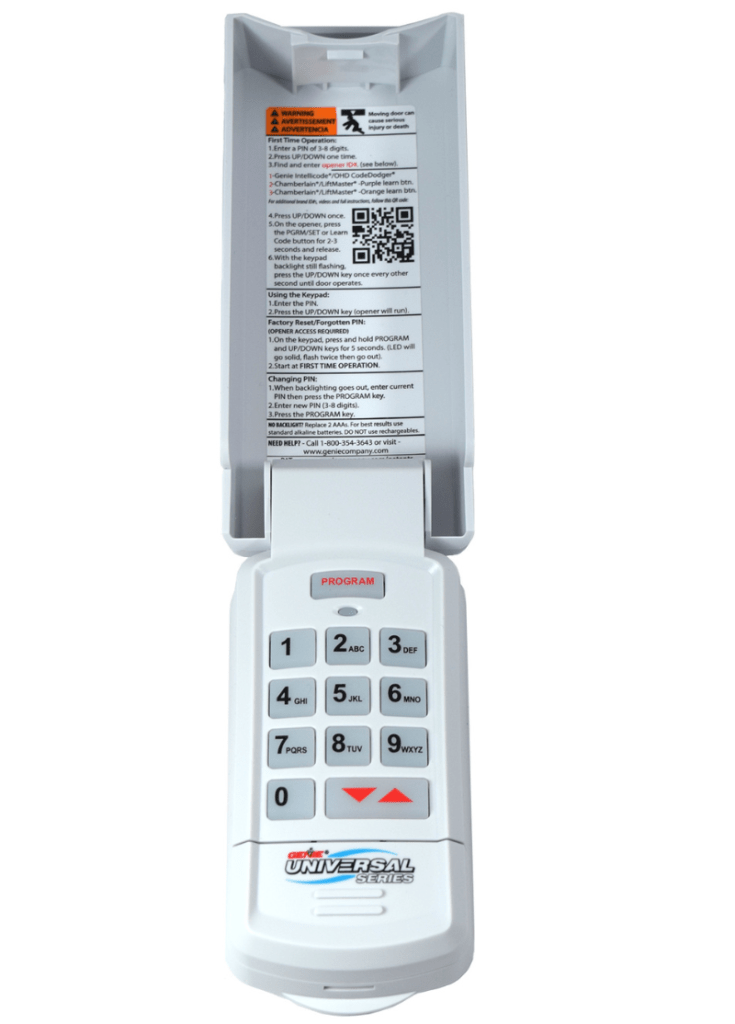
A wireless keypad offers convenience for family members who do not carry remotes. Setting a PIN requires syncing the keypad to the motor and choosing a memorable yet secure code.
Step-by-Step Keypad Setup
- Enter Programming Mode on Motor: Press and hold the “Program” button on the motor head until the LED activates (blue or flashing).
- Activate the Keypad: Go to your exterior keypad. Enter your desired 3-to-6-digit PIN, then press and hold the “Send” or “Enter” button. Hold until the motor’s LED responds (flashes or changes).
- Finalize the Code: Release the keypad button. Press the “Send/Enter” button one more time to confirm. The motor LED should extinguish.
- Test Entry: Wait 5 seconds, then enter your new PIN and press “Send.” The door should operate.
Security Best Practices for PIN Selection
| Practice | Recommended | Avoid |
|---|---|---|
| Code Length | 4–6 digits | 3 digits or fewer |
| Pattern | Random numbers | Birthdays, addresses, repeating digits (e.g., 1234) |
| Sharing | Only trusted household members | Posting online or sharing with contractors permanently |
| Rotation | Every 6–12 months or after tenant change | Keeping the same code for years |
Troubleshooting Common Programming Failures
Even professionals encounter hiccups. If your code will not set, consider these data-driven solutions based on common service calls:
- LED Does Not Activate: The learn button may be faulty, or the logic board lacks power. Check the circuit breaker and GFCI outlet. A study of garage door repair trends indicates that 15% of “programming failures” are actually power supply issues.
- Remote Works During Programming But Not After: You may be out of range during testing. Always test from outside the garage, not directly under the motor. Interference from LED bulbs can also disrupt signals; try temporarily removing nearby LED lights.
- Keypad Flashes Red: This usually indicates an invalid PIN entry or low battery. Replace the keypad battery (typically 9V or CR2032) before reprogramming.
- Door Reverses Immediately: This is rarely a code issue. It typically points to misaligned safety sensors or incorrect travel limit settings. Adjust sensor alignment before assuming the code failed.
When To Reset All Codes
If you suspect unauthorized access or have lost track of how many devices are programmed, perform a factory reset. Press and hold the “Program” button on the motor for 10+ seconds until the LED turns red or goes completely dark. This erases all remotes and keypads. You must then reprogram every device from scratch. This is highly recommended when purchasing a previously owned home.
Frequently Asked Questions (FAQ)
How many codes can a Genie garage door opener store?
Most modern Genie Intellicode openers can store between 7 and 10 unique transmitter codes, including remotes, keypads, and vehicle-integrated systems like Car2U. Older DIP-switch models are limited by physical switch combinations rather than digital memory. Always refer to your specific model’s manual for exact specifications.
Why won’t my Genie remote program even though the light flashes?
A flashing light confirms the motor received a signal, but failure to complete programming often stems from interference or timing. Ensure you are using genuine Genie remotes compatible with your opener’s frequency (315 MHz or 390 MHz). Also, verify that you are releasing the learn button before pressing the remote; holding both simultaneously can cause conflicts.
Can I set a temporary code for guests or delivery drivers?
Yes, many newer Genie keypads and smart hubs support temporary or one-time-use PINs. These codes expire after a set period or single use. If your current keypad lacks this feature, consider upgrading to a Genie Aladdin Connect smart controller, which enables app-based temporary access without changing your primary code.
Do I need to reprogram my Genie opener after a power outage?
Generally, no. Genie openers retain programmed codes in non-volatile memory, so they survive power loss. However, if your unit uses a backup battery that died during the outage, or if the logic board experienced a surge, codes may be lost. If your remote fails post-outage, try reprogramming one device first to test memory integrity.
Is it safe to program my garage door opener myself?
Absolutely, provided you follow safety protocols. Programming involves only low-voltage electronics and wireless signals—no high-tension springs or electrical wiring. The risk lies solely in ladder safety and ensuring the door’s mechanical components are in good working order. If the door itself is damaged or noisy, hire a certified technician before programming.
What if my Genie opener doesn’t have a learn button?
Units without a learn button are pre-1995 DIP-switch models. To set codes, you must manually match the tiny sliding switches inside both the remote and the motor housing. Each switch must be in the identical position (up, down, or middle). This process is tedious and less secure. Experts strongly recommend upgrading to a modern Intellicode opener for improved safety and convenience.
Conclusion
Mastering how to set code on Genie garage door opener systems empowers you to maintain home security and daily convenience without costly service calls. By identifying your model type, following precise programming steps, and applying security best practices, you ensure reliable access for years to come. Remember: when in doubt, consult your owner’s manual or contact Genie support—your safety and peace of mind are worth the extra minute of verification.
Found this guide helpful? Share it on Facebook, X (Twitter), or Pinterest to help fellow homeowners secure their garages! Have a unique Genie model or troubleshooting tip? Drop a comment below—we’d love to hear from you. 🔧🏡



Leave a Reply