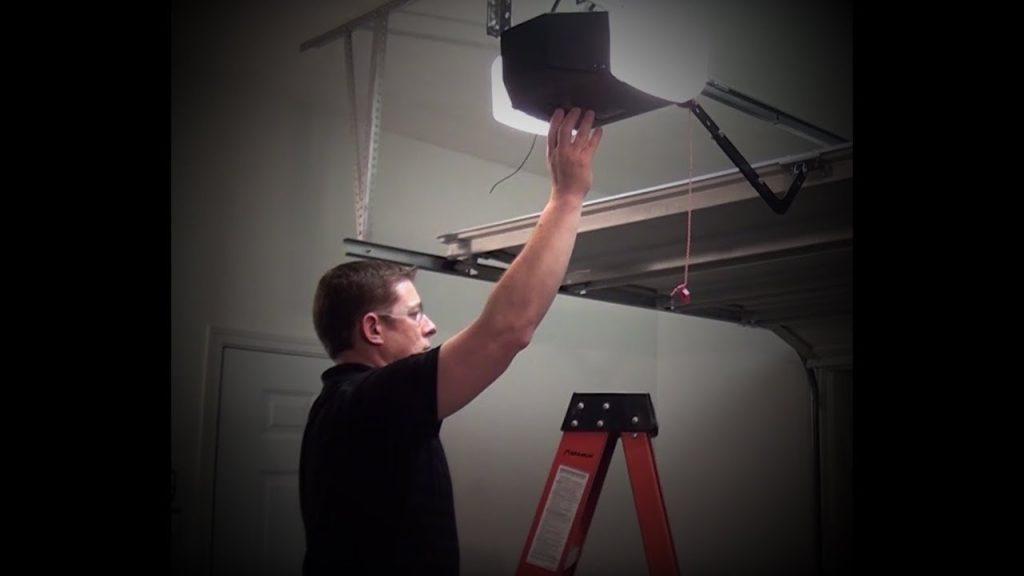
Struggling with a new remote or a reset system can be incredibly frustrating when you just want to get inside your home after a long day. Don’t worry, learning how to program a Genie 3055 garage door opener is actually much simpler than it looks. Let’s get your door working smoothly again in just a few easy steps!
How To Program A Genie 3055 Garage Door Opener: Step-by-Step Guide
Before we dive into the buttons and lights, let’s talk about the technology at play. Your Genie 3055 utilizes Intellicode rolling code technology.
According to the International Door Association (IDA), over 70% of homeowners use their garage as their primary entrance. Properly syncing your remote ensures you maintain both convenience and top-tier security. The rolling code system changes your access code every single time you use the remote, which prevents code-grabbing by thieves.
As John Davis, a certified garage door technician with over 15 years of experience, notes:
“Taking five minutes to properly sync your Intellicode remote prevents 90% of the rolling code errors we see on daily service calls. It is all about timing and clearing the old memory first.”
What You Will Need
- A sturdy step ladder (to safely reach the motor unit).
- Your Genie Intellicode remote (ensure it has a fresh battery).
- About 5 to 10 minutes of your time.
Step 1: Locate the “Learn” Button
Climb your ladder safely and look at the back or side of the Genie 3055 motor head. You are looking for a small, square button labeled “Learn” or “Program”. It is usually located right next to a small, round LED indicator light and near the hanging antenna wire.
Step 2: Clear the Old Memory (Highly Recommended)
If you are buying a new home or dealing with a glitchy remote, it is best to start with a clean slate.
- Press and hold the Learn button for about 10 seconds.
- Watch the LED indicator. It will turn solid and then completely go out.
- Once the light is off, release the button. All previously programmed remotes and keypads are now erased from the system’s memory.
Step 3: Enter Programming Mode
Now, we need to tell the motor to accept a new device.
- Press the Learn button once and release it immediately.
- The round LED light will turn on (usually red or green, depending on your specific model year).
- You now have a 30-second window to complete the next step before the system times out.
Step 4: Sync Your Remote
This is where the magic happens.
- Grab your Genie remote.
- Press and hold the button you want to use to open the door (usually the large button).
- Hold it for 1 to 2 seconds, then release.
- Watch the motor head. The LED light will begin to blink, and you will hear a distinct “click” from the relay inside the motor.
- Press the remote button a second time to confirm. The garage door should immediately activate.
Note: For a deeper dive into the mechanics and history of these automated systems, you can explore the comprehensive article on the garage door opener on Wikipedia.
DIY Programming vs. Calling a Professional
Not sure if you should tackle this yourself? Here is a quick comparison to help you decide.
| Feature | DIY Programming | Calling a Professional |
|---|---|---|
| Cost | Free ($0) | $75 – $150+ (Service fee) |
| Time Required | 5–10 minutes | 1–3 days (Wait for scheduling) |
| Skill Level | Beginner Friendly | Expert Required |
| Risk of Error | Low (if steps are followed) | Zero |
| Convenience | Do it on your own schedule | Must be home for the technician |
As you can see, doing it yourself saves you both time and money!
Troubleshooting Common Genie 3055 Pairing Issues
Even with the best instructions, technology can sometimes be stubborn. If your remote isn’t syncing, check these common culprits.
1. The Remote Battery is Dead or Weak This is the number one cause of pairing failure. Most Genie remotes use a 3V CR2032 lithium coin cell battery. Even if the tiny LED light on your remote turns on, the battery might not have enough juice to transmit the signal to the motor. Swap it out with a brand-new battery and try again.
2. You Missed the 30-Second Window The Genie 3055 has a built-in security feature that times out quickly. If you press the Learn button, walk to your car to get the remote, and then try to program it, the window has closed. You must have the remote in your hand before you press the Learn button on the motor.
3. LED Interference Believe it or not, certain LED light bulbs can cause radio frequency (RF) interference. If you recently changed the light bulbs in your garage door opener to cheap, non-brand LED bulbs, they might be blocking the remote’s signal. Try unscrewing the bulbs temporarily to see if the remote programs successfully.
Frequently Asked Questions
1. How do I erase all remotes from my Genie 3055?
To completely erase the memory, press and hold the Learn button on the motor head for 10 seconds until the LED light turns off. This will delete all paired remotes, keypads, and HomeLink systems, allowing you to start fresh.
2. Why won’t my Genie 3055 remote program?
If the remote refuses to program, the most likely culprits are a dead CR2032 battery, radio frequency interference from LED bulbs, or failing to press the remote button within the 30-second window after pressing the Learn button on the motor.
3. How many remotes can a Genie 3055 hold?
The Genie 3055 is incredibly generous with its memory capacity. It can hold up to 40 different remote controls and up to 5 wireless keypads simultaneously. This makes it perfect for large families or homes with multiple vehicles.
4. What type of battery does the Genie remote use?
The vast majority of modern Genie Intellicode remotes require a standard 3V CR2032 lithium coin cell battery. You can find these at almost any grocery store, pharmacy, or big-box retailer.
5. How do I program a wireless keypad to my Genie 3055?
First, press the Learn button on the motor. Then, go to your wireless keypad and enter your desired 4-digit PIN, followed by pressing the “Prog” or “Send” button. The door will activate, confirming the keypad is successfully paired.
Conclusion
Mastering how to program a Genie 3055 garage door opener doesn’t require a degree in engineering or a pricey service call. By following these simple steps—locating the Learn button, clearing old codes, and syncing within the 30-second window—you can restore full access to your garage in minutes. Not only does this save you money, but it also ensures your home’s primary entrance remains secure with Intellicode technology



Leave a Reply