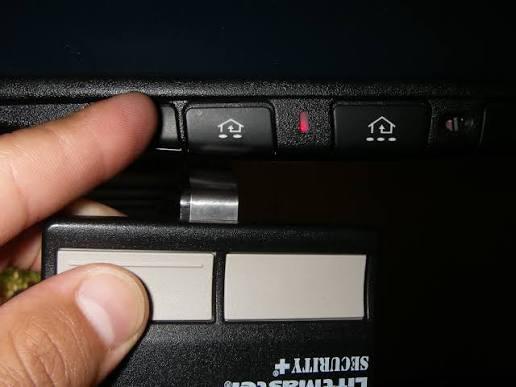
Have you ever stood in your driveway, remote in hand, wondering why your garage door refuses to budge? Or perhaps you’ve just installed a new opener and feel overwhelmed by the technical manual? You’re not alone. Learning how to program a rolling code garage door opener is a common challenge for homeowners, but it’s essential for both convenience and security. In this guide, we’ll walk you through the process clearly and confidently, so you can get back to your day with peace of mind.
What Is a Rolling Code Garage Door Opener?
Before diving into the programming steps, it’s crucial to understand what makes rolling code technology different from older systems. Traditional garage door openers used fixed codes, meaning the same signal was sent every time you pressed the button. This made them vulnerable to “code grabbing” attacks, where thieves could intercept and replay the signal to open your garage.
Rolling code technology, also known as hopping code or code-changing technology, generates a new code every time you use your remote. This significantly enhances security because even if someone intercepts the signal, it becomes useless after one use. According to cybersecurity experts, rolling code systems reduce the risk of unauthorized access by over 90% compared to fixed-code systems.
For more detailed technical background on encryption standards used in modern garage door systems, you can refer to Wikipedia’s article on cryptographic protocols.
Why Programming Your Rolling Code Opener Matters
Programming your garage door opener correctly ensures that:
- Only authorized remotes can operate your door
- Your system remains secure against potential hacking attempts
- All devices (remotes, keypads, wall consoles) work in harmony
Many homeowners skip proper programming, leading to frustration later when devices stop working or security vulnerabilities emerge. Taking the time to do it right saves hours of troubleshooting down the line.
Step-by-Step Guide: How to Program a Rolling Code Garage Door Opener
While specific steps may vary slightly by manufacturer (LiftMaster, Chamberlain, Genie, etc.), the general process follows similar patterns. Here’s a universal approach that works for most major brands.
Step 1: Locate the Learn Button
The first thing you need to find is the Learn button on your garage door opener motor unit. This is usually located on the back or side of the unit hanging from your ceiling. It’s often colored yellow, red, purple, or green, depending on the brand.
Tip: If you can’t find it, consult your owner’s manual or look for a small LED light near the button—it typically blinks when activated.
Step 2: Clear Existing Codes (Optional but Recommended)
If you’re reprogramming due to security concerns or lost remotes, clear all existing codes first:
- Press and hold the Learn button for about 6–10 seconds
- Wait until the indicator light turns off
- Release the button
This erases all previously programmed remotes and keypads, giving you a clean slate.
Step 3: Program Your Remote Control
Now comes the main event—pairing your remote with the opener:
- Press the Learn button once briefly (the LED will start blinking or stay solid)
- Within 30 seconds, press and hold the button on your remote that you want to program
- Hold it until the opener’s lights flash or you hear two clicks
- Test the remote by pressing the button again—the door should respond
Note: Some models require you to press the remote button twice quickly instead of holding it. Check your manual if the first attempt doesn’t work.
Step 4: Program Additional Devices
Repeat Step 3 for any additional remotes, wireless keypads, or vehicle homelink systems. Most openers can store between 5–8 different devices.
Step 5: Test Everything Thoroughly
After programming all devices:
- Test each remote from various distances
- Ensure the wall console still works
- Verify that safety sensors are functioning properly
Common Mistakes to Avoid
Even experienced DIYers make these errors when programming rolling code openers:
| Mistake | Consequence | Solution |
|---|---|---|
| Not clearing old codes | Security vulnerability | Always reset before reprogramming |
| Waiting too long after pressing Learn | Pairing fails | Act within 30 seconds |
| Using wrong remote button | Device won’t sync | Use the primary button only |
| Ignoring battery issues | Weak signal transmission | Replace batteries before programming |
Troubleshooting: What If It Doesn’t Work?
Don’t panic if your first attempt fails. Here are common issues and solutions:
Problem: The Learn button light doesn’t turn on. Solution: Check if the opener has power. Ensure the circuit breaker hasn’t tripped.
Problem: Remote programs but doesn’t operate the door. Solution: Reprogram the remote, ensuring you press the button within the 30-second window. Also, check if the remote batteries are fresh.
Problem: Only some buttons work on a multi-button remote. Solution: Each button may need individual programming. Repeat the process for each button separately.
Problem: The door reverses immediately after starting to close. Solution: This isn’t a programming issue—it’s likely a sensor alignment problem. Check that nothing blocks the safety eyes and that they’re properly aligned.
Frequently Asked Questions
Q: How often should I reprogram my rolling code garage door opener?
A: There’s no set schedule, but consider reprogramming if you lose a remote, move into a new home, or suspect unauthorized access. Annually checking your system is a good practice.
Q: Can I program a universal remote to work with my rolling code opener?
A: Yes, most universal remotes designed for rolling code systems can be programmed. Follow the manufacturer’s instructions carefully, as the process differs from standard remotes.
Q: What’s the difference between DIP switches and rolling code programming?
A: DIP switches use physical switches to set a fixed code, while rolling code uses digital encryption that changes with each use. Rolling code is far more secure and is standard in modern openers.
Q: Will programming my opener affect my smartphone app control?
A: No, smartphone apps typically connect via Wi-Fi hubs separate from the remote control frequency. However, if you clear all codes, you may need to reconnect your hub following the app’s setup instructions.
Q: Can neighbors’ remotes accidentally open my garage?
A: With rolling code technology, this is extremely unlikely. Each system uses unique encryption keys, making cross-interference virtually impossible unless someone deliberately tries to hack your system.
Q: Do I need professional help to program my opener?
A: Most homeowners can successfully program their own openers using this guide. However, if you encounter persistent issues or have an older model without clear documentation, contacting a professional technician is wise.
Final Thoughts
Learning how to program a rolling code garage door opener empowers you to take control of your home’s security and convenience. By following these steps, you ensure that only authorized devices can access your garage, protecting your vehicles, tools, and family.
Remember, the key to success is patience and attention to detail. Take your time, follow each step carefully, and test thoroughly before considering the job done. If you found this guide helpful, share it with friends or neighbors who might be struggling with their own garage door openers. Together, we can make our communities safer—one properly programmed garage at a time.
Stay secure, stay confident, and enjoy the convenience of a perfectly functioning garage door!



Leave a Reply