Introduction
Is your new Chamberlain remote sitting useless on the counter while you struggle to get into your garage? You are not alone; many homeowners find the synchronization process slightly confusing at first glance. This guide will walk you through exactly how to program Chamberlain garage door opener remote 953Estd safely and efficiently, getting you back on track in minutes.
We understand that technology can sometimes feel intimidating, especially when it involves home security systems. However, programming your remote is a straightforward task that requires no special tools or technical expertise. By following this comprehensive tutorial, you will not only save money on service calls but also gain confidence in managing your home’s smart devices. Let’s dive into the details and get that garage door moving again.
Understanding the Chamberlain 953Estd Remote
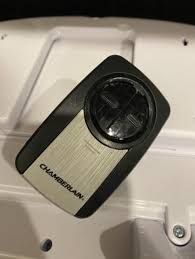
Before we press any buttons, it is helpful to understand what you are working with. The Chamberlain 953Estd is a versatile, multi-function remote control designed to operate up to three different garage door openers or gate operators. It uses Chamberlain’s proprietary Security+ 2.0 encryption technology, which changes the access code every time you use the remote. This rolling code system significantly enhances security by preventing code grabbers from copying your signal.
According to industry standards, modern garage door openers prioritize security to prevent unauthorized access. For more context on how these security protocols have evolved over time, you can refer to general information on garage door opener history and technology. Understanding this background helps appreciate why the programming steps must be followed precisely—to ensure the encrypted handshake between your remote and the motor unit is established correctly.
Key Features of the 953Estd
- Three-Button Design: Allows control of three separate doors.
- Visor Clip: Convenient storage in your vehicle.
- Battery Included: Typically ships with a CR2032 battery.
- Compatibility: Works with most Chamberlain, LiftMaster, and Craftsman openers manufactured after 1993.
Preparation: What You Need Before Starting
Rushing into the programming process without preparation is a common cause of failure. To ensure a smooth experience, gather the following items and check these conditions before you begin.
Checklist for Success
- A Stable Ladder: Ensure you can safely reach the motor unit hanging from your garage ceiling.
- Fresh Batteries: Even if the remote is new, ensure the battery is seated correctly. A weak battery can fail during the programming handshake.
- Access to the Motor Unit: You need to see the “Learn” button on the back or side of the garage door opener motor.
- Clear Line of Sight: Stand within 10–15 feet of the motor unit during programming.
Safety Warning: Always keep your hands and fingers clear of moving parts like springs, cables, and rollers. Never attempt to adjust spring tension yourself; this is a job for certified professionals.
Step-by-Step: How To Program Chamberlain Garage Door Opener Remote 953Estd
This is the core section where we address the primary intent. Follow these steps carefully. The entire process usually takes less than two minutes.
Step 1: Locate the “Learn” Button
Climb your ladder and locate the motor head unit. Look for a small button labeled “Learn” or “Program.”
- Color Coding: The button is typically yellow, purple, orange, or red.
- Location: It is usually found on the back panel near the light lens or on the side under the wire cover.
- Antenna Wire: Note the hanging antenna wire nearby; do not touch it during this process.
Step 2: Clear Old Codes (If Necessary)
If you are reprogramming due to errors or lost remotes, it is best to clear the memory first.
- Press and hold the Learn button for about 6–10 seconds.
- Release the button when the indicator LED turns off.
- Note: This erases all previously programmed remotes and keypads. You will need to reprogram all of them.
Step 3: Initiate Programming Mode
- Press and release the Learn button once.
- The indicator LED will illuminate steadily (not blinking). This means the opener is now in “learning mode.”
- You have approximately 30 seconds to complete the next step before the mode times out.
Step 4: Sync the Remote
- Take your Chamberlain 953Estd remote.
- Choose the button you wish to program (Button 1, 2, or 3).
- Press and hold that button.
- Watch the motor unit’s LED. It will blink or flash once you successfully sync.
- Release the remote button immediately after the flash.
Step 5: Test the Connection
- Step down from the ladder.
- Press the programmed button on the remote.
- The garage door should activate (open or close).
- If the door moves, the programming is successful. If not, repeat Steps 3 and 4, ensuring you are within range.
Troubleshooting Common Issues
Even with careful execution, things can go wrong. Here is a breakdown of common problems and their solutions, structured for quick readability.
| Issue | Possible Cause | Solution |
|---|---|---|
| LED doesn’t light up | Dead battery or loose connection | Replace the CR2032 battery; ensure it is inserted with the correct polarity. |
| Remote fails to sync | Interference or timing error | Move closer to the motor. Ensure you press the remote button within 30 seconds of hitting the Learn button. |
| Door moves slightly then stops | Safety sensor misalignment | Check the photo-eye sensors near the floor. Ensure nothing is blocking the beam and the lights are solid (not blinking). |
| Learn button LED stays on | Board malfunction | Power cycle the opener by unplugging it for 1 minute, then plug it back in. Try again. |
Expert Tip on Interference
LED light bulbs in your garage opener can sometimes emit frequency interference that disrupts the signal. If you recently changed to LED bulbs and programming fails, try temporarily screwing in an incandescent bulb to see if the remote works. If it does, you may need shielded LED bulbs designed for garage openers.
Maintaining Your Remote and Opener
Programming is just the beginning. To ensure long-term reliability, consider these maintenance tips.
- Battery Replacement: Change the battery annually. A weakening battery causes inconsistent signals, forcing you to press the button multiple times.
- Sensor Cleaning: Wipe the safety eyes with a soft cloth monthly. Dust and spiderwebs can block the infrared beam.
- Annual Inspection: Have a professional inspect the springs and cables once a year. These components are under high tension and wear out over time.
By keeping your hardware in top shape, you reduce the likelihood of needing to reprogram your remote due to connectivity glitches.
FAQ Section
1. Can I program the 953Estd to work with a non-Chamberlain opener?
The 953Estd is specifically designed for Chamberlain, LiftMaster, and Craftsman openers that use Security+ or Security+ 2.0 technology. It generally will not work with openers from other brands like Genie or Sommer unless they are compatible with universal frequency standards, which is rare for modern encrypted systems.
2. How do I know if my battery is dead?
If the LED light on the remote does not flash when you press a button, the battery is likely dead or installed incorrectly. Replace it with a fresh CR2032 coin-cell battery. Ensure the positive (+) side is facing up.
3. Why did my remote stop working after a power outage?
Power outages can sometimes reset the logic board of the garage door opener, clearing its memory. If this happens, you will need to reprogram your remote using the steps outlined above. Additionally, check if the opener unit itself has power and that the circuit breaker hasn’t tripped.
4. Can I program multiple remotes to the same button?
No, each button on the 953Estd can only be programmed to one specific opener. However, since the remote has three buttons, you can program it to control three different garage doors or gates simultaneously.
5. What if the “Learn” button is not working?
If pressing the Learn button does not light up the LED, the logic board of the garage door opener may be faulty. Try unplugging the unit for a few minutes to reset it. If it still fails, you may need to contact Chamberlain support or a professional technician for a board replacement.
6. Is it safe to program the remote myself?
Yes, programming the remote is completely safe as it involves low-voltage electronics and simple button presses. Just ensure you use a sturdy ladder when accessing the motor unit and avoid touching any high-voltage wiring or mechanical springs.
Conclusion
Learning how to program Chamberlain garage door opener remote 953Estd is a valuable skill that empowers you to maintain your home’s accessibility and security. By following the step-by-step instructions provided—locating the Learn button, entering programming mode, and syncing the device—you can resolve connectivity issues quickly without professional help.
Remember, patience and precision are key. If you encounter issues, refer to the troubleshooting table or check your battery status first. Most problems are minor and easily resolved.
Did this guide help you get your garage door working again? If so, please share this article on your favorite social media platforms to help friends and family who might be struggling with the same issue. Your share could save someone else a costly service call!



Leave a Reply