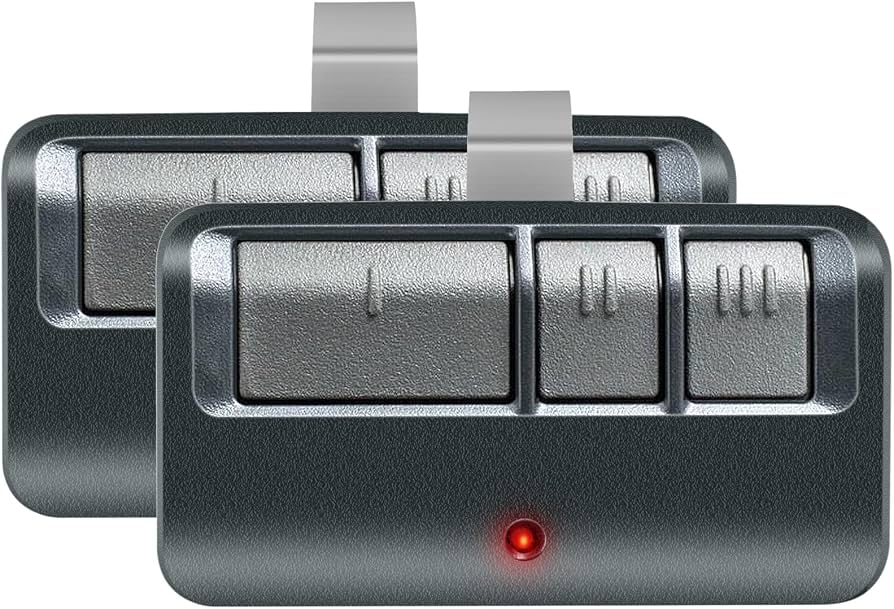
Struggling to sync your new remote with your Chamberlain garage door opener? You’re not alone. Thousands of US homeowners face this challenge every year when setting up their Chamberlain garage door opener model 953Ev/Evc. Whether you’ve just installed a new unit or replaced an old remote, getting the programming right is essential for convenience and security. This comprehensive guide will walk you through the entire process, ensuring your garage door responds perfectly to your commands.
Understanding Your Chamberlain 953Ev/Evc System
Before diving into the programming steps, it’s important to understand what makes the Chamberlain 953Ev/Evc series unique. These models feature MyQ technology, which allows smartphone control and integration with smart home systems. The “Ev” designation typically refers to the standard version, while “Evc” indicates compatibility with additional security features.
According to industry data from the International Door Association, approximately 70% of American homes have at least one garage door opener, with Chamberlain holding a significant market share due to their reliability and innovative features.
Key Features of the 953Ev/Evc Series:
- MyQ Technology: Enables smartphone app control
- Security+ 2.0: Rolling code technology prevents code grabbing
- Battery Backup: Optional feature for power outages
- Multiple Remote Compatibility: Works with various Chamberlain remotes
Step-by-Step Programming Guide
Preparing for Programming
Before you begin, gather these essential items:
- Your Chamberlain 953Ev/Evc garage door opener unit
- The remote control you wish to program
- A sturdy ladder (if needed to reach the opener)
- Fresh batteries for your remote
Important Safety Note: Always ensure the garage door area is clear of people and objects before testing.
Method 1: Programming Using the Learn Button
This is the most common method for programming remotes to your Chamberlain opener.
Step 1: Locate the Learn button on your garage door opener motor unit. It’s typically found on the back or side panel and is usually colored yellow, purple, or red.
Step 2: Press and release the Learn button. The indicator light will illuminate or blink, signaling that the unit is in programming mode. You have 30 seconds to complete the next step.
Step 3: Within 30 seconds, press and hold the button on your remote that you want to program. Hold it until the opener’s lights blink or you hear two clicks.
Step 4: Test the remote by pressing the programmed button. The garage door should respond accordingly.
Method 2: Programming Multiple Remotes
If you need to program several remotes, follow these guidelines:
| Remote Type | Programming Time | Special Instructions |
|---|---|---|
| Standard 3-button | 5-10 seconds | Hold button until lights blink |
| Mini remote | 3-7 seconds | May require closer proximity |
| Keypad entry | 10-15 seconds | Follow keypad-specific instructions |
| Vehicle visor clip | 5-10 seconds | Ensure strong signal transmission |
Pro Tip: Program all remotes within a single session if possible, as some units may exit programming mode after a certain period.
Method 3: Using the MyQ App for Smart Programming
For tech-savvy homeowners, the MyQ app offers an alternative programming method:
- Download the MyQ app from your device’s app store
- Create an account or log in to your existing account
- Follow the in-app instructions to add your garage door opener
- The app will guide you through the wireless pairing process
- Test the connection through the app interface
This method is particularly useful for those who want to integrate their garage door with other smart home devices.
Troubleshooting Common Programming Issues
Even with careful following of instructions, you might encounter some challenges. Here are solutions to the most common problems:
Remote Not Responding After Programming
Possible Causes:
- Weak or dead batteries in the remote
- Remote too far from the opener during programming
- Interference from other electronic devices
- Incorrect button pressed during programming
Solutions:
- Replace the remote batteries with fresh ones
- Move closer to the opener during programming
- Turn off nearby electronics that might cause interference
- Repeat the programming process, ensuring you press the correct button
Learn Button Not Working
If the Learn button doesn’t seem to activate:
- Check if the opener has power
- Ensure you’re pressing the button firmly
- Wait 10 seconds between attempts
- Consult your manual for model-specific instructions
Multiple Remotes Causing Conflicts
When programming multiple remotes:
- Program them one at a time
- Wait for confirmation before moving to the next remote
- Keep a record of which buttons correspond to which remotes
- Consider labeling remotes for family members
Advanced Programming Tips
Security Best Practices
To maximize the security of your Chamberlain 953Ev/Evc system:
- Change codes regularly: Reprogram remotes annually or if you suspect unauthorized access
- Use unique codes: Avoid using the same code for multiple devices
- Monitor activity: Use the MyQ app to track garage door usage
- Secure physical access: Keep remotes in safe locations
Optimizing Signal Strength
For better performance:
- Position the opener antenna vertically
- Keep the area around the opener clear of metal objects
- Ensure remote batteries are fresh
- Consider installing a signal repeater for large garages
When to Seek Professional Help
While most programming tasks can be completed DIY, consider professional assistance if:
- You’ve attempted programming multiple times without success
- The opener shows error codes you cannot resolve
- You notice unusual noises or movements from the door
- The system appears to have electrical issues
According to Chamberlain’s support data, approximately 85% of programming issues can be resolved through proper troubleshooting, but the remaining 15% may require professional intervention.
Frequently Asked Questions
Q: How long does it take to program a Chamberlain 953Ev/Evc remote?
A: The actual programming process takes only 30-60 seconds per remote. However, allow 5-10 minutes total for preparation, testing, and troubleshooting if needed.
Q: Can I program my Chamberlain remote without accessing the opener unit?
A: No, you must physically access the opener unit to press the Learn button. This security feature prevents unauthorized programming from outside your garage.
Q: What should I do if I lose my remote after programming?
A: For security reasons, it’s recommended to clear all programmed remotes and reprogram the ones you still have. Consult your manual for the specific clearing procedure for your model.
Q: How many remotes can I program to one Chamberlain 953Ev/Evc opener?
A: Most Chamberlain openers can accommodate up to 8-10 different remote controls or keypads. Check your specific model’s manual for exact capacity.
Q: Will programming a new remote erase previously programmed remotes?
A: No, programming a new remote does not erase existing ones. However, if you hold the Learn button for too long (typically 10+ seconds), it may clear all programmed devices.
Q: Can I use third-party remotes with my Chamberlain 953Ev/Evc?
A: While some universal remotes may work, Chamberlain recommends using their branded remotes for optimal compatibility and security. Third-party remotes may not support all features, especially MyQ functionality.
Conclusion
Programming your Chamberlain garage door opener model 953Ev/Evc doesn’t have to be complicated. With the right approach and patience, you can have your remote working perfectly in minutes. Remember to follow the safety guidelines, keep your remotes secure, and don’t hesitate to consult your manual for model-specific instructions.
The convenience of a properly programmed garage door opener cannot be overstated – no more fumbling with keys or worrying about security. Your Chamberlain 953Ev/Evc system represents years of engineering excellence, and proper programming ensures you get the most out of this investment.
Did you find this guide helpful? Share it with friends and family who might be struggling with their garage door opener programming. Follow us on social media for more home improvement tips and smart home solutions. Your feedback helps us create better content for the community!
Remember: A well-programmed garage door opener is not just about convenience – it’s about security, peace of mind, and making your daily routine smoother. Take the time to do it right, and you’ll enjoy years of reliable service



Leave a Reply