Introduction
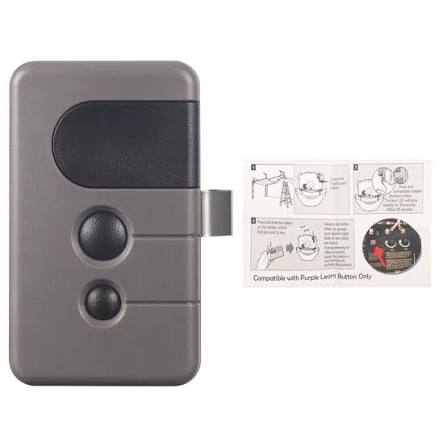
Struggling to sync your new remote with your Craftsman garage door opener? You’re not alone. Thousands of homeowners face this challenge every year, especially when dealing with the 315 MHz frequency models. Whether you’ve lost your old remote or purchased a replacement, knowing how to program Craftsman garage door opener remote 315 can save you time, money, and frustration. In this comprehensive guide, we’ll walk you through the exact steps, common pitfalls, and expert tips to get your remote working perfectly.
Understanding the 315 MHz Craftsman Garage Door Opener
Before diving into the programming process, it’s essential to understand what makes the 315 MHz model unique. Craftsman garage door openers operate on different frequencies, with 315 MHz and 390 MHz being the most common in North America. The frequency determines how your remote communicates with the opener unit.
Why Frequency Matters
- 315 MHz is widely used in older Craftsman models (pre-2010)
- Interference from other devices can affect performance
- Compatibility varies between remotes and opener units
According to the Federal Communications Commission (FCC), garage door openers must comply with specific radio frequency regulations to ensure safe and reliable operation. Understanding your opener’s frequency is the first step toward successful programming.
Step-by-Step Guide: How to Program Craftsman Garage Door Opener Remote 315
Follow these detailed instructions to program your remote successfully. Each step is designed to be beginner-friendly and foolproof.
Step 1: Locate the Learn Button on Your Opener
The Learn button is typically found on the back or side of the garage door opener motor unit. It’s usually colored yellow, red, or purple, depending on the model year.
- Yellow Learn Button: Common in models from 2005–2010
- Red/Purple Learn Button: Found in newer models
Pro Tip: If you can’t find the Learn button, consult your owner’s manual or look for a small LED light near the antenna wire.
Step 2: Clear Existing Remote Codes (If Necessary)
If you’re replacing an old remote or experiencing interference, clear the existing codes first:
- Press and hold the Learn button for 6–10 seconds
- Wait until the indicator light turns off
- Release the button
This action erases all previously programmed remotes and keypads.
Step 3: Program the New Remote
Now, let’s sync your 315 MHz remote with the opener:
- Press the Learn button once briefly (the LED will light up)
- Within 30 seconds, press and hold the button on your remote you wish to program
- Hold it until the opener’s lights flash or you hear a click
- Test the remote by pressing the button again
Note: If the remote doesn’t work on the first try, repeat the process. Sometimes, timing is critical.
Step 4: Test and Troubleshoot
After programming, test your remote from various distances:
- Close range (within 10 feet): Should work immediately
- Medium range (10–20 feet): May require a second press
- Long range (20+ feet): Ensure no obstructions or interference
If the remote fails to operate the door, check the following:
| Issue | Possible Cause | Solution |
|---|---|---|
| Remote not responding | Dead batteries | Replace with fresh alkaline batteries |
| Intermittent operation | Signal interference | Move away from Wi-Fi routers or cordless phones |
| No response at all | Incorrect programming | Repeat Steps 2–3 carefully |
Common Mistakes to Avoid When Programming Your Remote
Even with clear instructions, mistakes happen. Here are the most common errors and how to avoid them:
1. Missing the 30-Second Window
The opener only stays in “learning mode” for 30 seconds after pressing the Learn button. If you wait too long, you’ll need to restart the process.
2. Using the Wrong Remote Type
Not all remotes are compatible with 315 MHz openers. Ensure your remote explicitly states 315 MHz compatibility on the packaging or label.
3. Ignoring Battery Health
Weak batteries can cause inconsistent signals. Always use fresh, high-quality alkaline batteries for optimal performance.
4. Overlooking Interference Sources
Devices like baby monitors, Wi-Fi routers, and even LED lights can interfere with the 315 MHz signal. Try programming your remote with these devices turned off.
Advanced Tips for Optimal Performance
Once your remote is programmed, follow these best practices to maintain reliability:
- Replace batteries annually, even if they seem fine
- Keep the remote away from extreme temperatures (below 0°F or above 120°F)
- Clean the remote’s buttons regularly to prevent stuck contacts
- Store a spare remote in your car for emergencies
According to a study by Consumer Reports, garage door remotes have an average lifespan of 5–7 years with proper maintenance. Regular care can extend this significantly.
FAQ Section
Q1: Can I program multiple remotes to one Craftsman opener?
A: Yes, most Craftsman openers support up to 8 remotes and 2 keypads. Simply repeat the programming steps for each additional remote.
Q2: What if my remote still doesn’t work after programming?
A: First, check the batteries. If they’re fresh, try clearing all codes and reprogramming. If issues persist, your remote may be incompatible or defective.
Q3: Is there a difference between 315 MHz and 390 MHz remotes?
A: Yes. These frequencies are not interchangeable. A 315 MHz remote will not work with a 390 MHz opener, and vice versa. Always match the frequency.
Q4: How do I know if my Craftsman opener uses 315 MHz?
A: Check the label on the motor unit or consult your owner’s manual. You can also look up your model number on the Craftsman official website for specifications.
Q5: Can I program a universal remote to my Craftsman opener?
A: Many universal remotes support 315 MHz frequencies. Ensure the remote lists Craftsman compatibility and follow the manufacturer’s programming instructions.
Q6: What should I do if I lose my Learn button instructions?
A: Visit the Craftsman support page or search for your specific model number online. Most manuals are available as downloadable PDFs.
Conclusion
Programming your Craftsman garage door opener remote 315 doesn’t have to be complicated. By following this step-by-step guide, you can save time and avoid costly service calls. Remember to use fresh batteries, respect the 30-second programming window, and keep interference sources in mind.
Did you find this guide helpful? Share it with friends and family who might be struggling with their garage door remotes! Follow us on social media for more home improvement tips and tricks.
Disclaimer: Always refer to your specific model’s owner manual for detailed instructions. This guide provides general advice applicable to most Craftsman 315 MHz garage door openers.



Leave a Reply