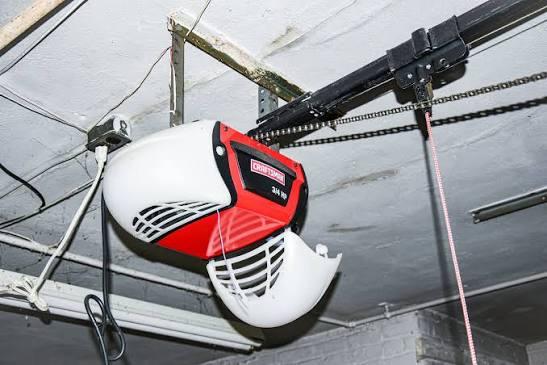
Struggling to get your new remote to work can be incredibly frustrating, especially when you just want to park your car and relax after a long day. Fortunately, learning how to program Craftsman 3/4 Hp Garage Door Opener systems is actually a straightforward process that takes just a few minutes. Let’s walk through this simple setup together so you can regain full access to your garage hassle-free.
How To Program Craftsman 3/4 Hp Garage Door Opener: Step-by-Step
Before we dive into the buttons and blinking lights, let’s ensure you are fully prepared. Having the right tools nearby will make this process a breeze.
Tools You Will Need
- A sturdy stepladder
- Your Craftsman remote control
- Fresh batteries (AA or AAA, depending on your remote)
- A flashlight (your garage might be dimly lit)
Safety First: Ensure the garage door area is clear of people, pets, and objects. While programming does not require you to touch the moving parts, it is always best to practice basic safety around a garage door opener.
Step 1: Locate the “Learn” or “Smart” Button
Climb your stepladder and look at the back or side of the motor head (the main box attached to the ceiling). You are looking for a small, circular button.
- On newer models, this button is usually yellow, purple, orange, or red.
- It is often located near a small LED indicator light.
Step 2: Clear the Old Memory (Crucial Step)
If you are replacing a broken remote or moving into a new house, you must erase the old codes first.
- Press and hold the Learn button for exactly 6 to 10 seconds.
- Watch the LED indicator light. It will blink or turn off completely.
- Release the button. The memory is now wiped clean!
Step 3: Sync Your New Remote
Now comes the fun part.
- Press the Learn button on the motor head once and release it. The LED light will turn on or start blinking.
- Act quickly! You have a 30-second window.
- On your remote control, press and hold the button you want to use to open the door.
- Hold it down until you see the garage door opener lights flash, or you hear a distinct click.
- Release the remote button. Congratulations, your remote is now synced!
How Do You Put a Craftsman Garage Door Opener in Programming Mode?
Understanding the programming mode is the secret to a successful setup. When you press the Learn button briefly, the motor enters a “listening” state.
According to the International Door Association (IDA), over 70% of homeowners use their garage as their primary entry point, making a properly synced system essential for daily security. The 30-second listening window is designed to prevent accidental programming from neighbors’ remotes.
Pro Tip: If the LED light turns off before you can press your remote button, the motor has exited programming mode. Simply press the Learn button once more to reset the 30-second timer.
What Are the Pros and Cons of DIY Programming?
Many homeowners wonder if they should tackle this themselves or call an expert. Here is a quick comparison to help you decide.
| Aspect | DIY Programming | Hiring a Professional |
|---|---|---|
| Cost | $0 (Free to do yourself) | $100 – $200 (Service call fee) |
| Time Required | 5–10 minutes | 1–3 days (Scheduling a visit) |
| Skill Level | Beginner-friendly | Expert handling |
| Satisfaction | High (You did it yourself!) | Moderate (Passive experience) |
As you can see, taking the DIY route saves you both time and money while empowering you to maintain your own home.
How Do You Program a Craftsman Keypad Without the Learn Button?
What if you want to program an external wireless keypad, but your older Craftsman model doesn’t have a Learn button? No worries, we have you covered.
For older models that use DIP switches (tiny toggle switches inside the motor and the remote):
- Open the remote control battery compartment.
- Note the exact pattern of the DIP switches (e.g., Up-Down-Up-Up).
- Open the motor head cover and match the DIP switches inside to the exact same pattern.
- Enter a 4-digit PIN on your external keypad.
- Press and hold the “Enter” or “Arrow” button on the keypad until the motor clicks.
Troubleshooting: Why Won’t My Craftsman Remote Program?
Even with a perfect guide, things can sometimes go wrong. If your remote isn’t syncing, check these common culprits:
- Dead Batteries: This is the most common issue. Even if the remote’s tiny LED lights up, the battery might be too weak to send a strong signal. Replace them with brand-new batteries.
- Distance Issues: You must be within 5 to 10 feet of the motor head during programming. Standing on the ground while the motor is 10 feet high can block the signal. Use your stepladder!
- Dirty Contacts: If you dropped the remote, the battery contacts might be dirty. Wipe them with a dry cotton swab.
- LED Not Blinking: If the Learn button’s LED doesn’t light up when pressed, the logic board might be faulty, or the unit needs a hard reset by unplugging it for 30 seconds.
Frequently Asked Questions (FAQ)
1. How do I reset my Craftsman 3/4 HP garage door opener?
To perform a full hard reset, unplug the opener from the ceiling outlet or flip the dedicated circuit breaker. Wait for 30 seconds, then restore power. Afterward, press and hold the Learn button for 10 seconds to clear the memory, and reprogram your remotes from scratch.
2. What color is the Learn button on a Craftsman opener?
The color depends on the manufacturing year. Older models typically have a red or orange Learn button, while models made after 2011 usually feature a yellow or purple Learn button.
3. Why is my garage door opener blinking but not closing?
If the main light bulb on the motor is blinking and the door reverses when closing, your safety sensors are misaligned. Look at the small “eyes” near the bottom of your door tracks. They should be glowing a solid light (usually green or amber). Adjust them until the lights stop blinking.
4. Can I use a universal remote with a Craftsman 3/4 HP model?
Yes, absolutely! Most modern universal remotes (like those from Chamberlain or Genie) are compatible with Craftsman openers. Just ensure the universal remote explicitly states it works with “Yellow/Purple Learn button” models, as that dictates the internal frequency and coding protocol.
Conclusion
Mastering your garage access doesn’t have to be a headache. By following these clear steps on how to program Craftsman 3/4 Hp Garage Door Opener systems, you save money, avoid the wait for a technician, and gain the satisfaction of solving the problem yourself. You now have a fully synced, secure, and reliable garage door system!
Did this guide save your day? Please share this article on your favorite social media platforms like Facebook, X (Twitter), or Pinterest to help your friends and family troubleshoot their garage doors too!



Leave a Reply