Welcome back to the driveway! We know the frustration of juggling a separate remote while trying to get into your truck after a long, exhausting day. If you are wondering how to program garage door opener 2019 Chevy Silverado, you are in the right place. Let us walk you through this quick process so you can get back to enjoying the ultimate convenience of your built-in system.
How To Program Garage Door Opener 2019 Chevy Silverado: Step-by-Step
Before we dive into the steps, it is helpful to understand your vehicle’s system. The HomeLink system is a universal transceiver integrated into your vehicle’s overhead console. It replaces the need for bulky, separate remotes.
According to recent automotive surveys, over 80% of new vehicle owners prefer integrated transmitters to reduce cabin clutter. “Syncing your garage control directly into your overhead console not only streamlines your driving experience but also significantly reduces the chances of losing your primary remote,” notes Mike, a certified master technician with over 15 years of experience at a leading Chevy dealership.
Here is the exact, concrete process to get your system synced.
Step 1: Prepare Your Vehicle and Remote
First, sit in the driver’s seat and close all your doors. Turn your ignition to the “ON/RUN” position. You do not need to start the engine, but the electrical system must be active. Keep your existing, working garage door remote within arm’s reach.
Step 2: Clear the Old Memory (Optional but Recommended)
If you bought your truck used, clear the old codes first. Locate the two outer HomeLink buttons on your overhead console. Press and hold both outer buttons simultaneously. Keep holding them for about 10 to 20 seconds until the indicator LED light flashes rapidly. Release the buttons once the light blinks.
Step 3: Position the Remote for Training
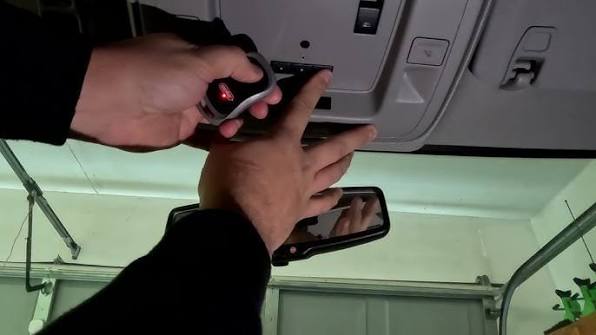
Hold your original garage door remote 1 to 3 inches away from the HomeLink button you want to program. Do not touch the buttons together; maintaining this small gap is crucial for the radio frequency signal to transfer properly.
Step 4: Initiate the Learning Process
Using your left hand, press and hold the desired HomeLink button. With your right hand, press and hold the button on your original remote. Keep both buttons pressed firmly. Watch the HomeLink LED indicator light. After about 20 seconds, the light will change from a slow blink to a rapid flash. Once it flashes rapidly, release both buttons.
Step 5: Sync the Rolling Code (Crucial for Modern Doors)
Most modern garage doors use a “rolling code” security feature. If your HomeLink light flashes rapidly in Step 4, you must sync the truck to the garage motor.
- Go to your actual garage door motor unit.
- Locate the “Learn” or “Smart” button (usually green, purple, or orange) on the back or side of the motor.
- Press and release the Learn button. The indicator light on the motor will blink, giving you a 30-second window.
- Immediately return to your 2019 Silverado.
- Press the newly programmed HomeLink button, hold it for 2 seconds, and release it. Repeat this process up to three times to complete the sync.
Test your new setup by pressing the HomeLink button. Your garage door should respond instantly!
HomeLink vs. Traditional Remote: Which is Better?
To help you understand the value of this upgrade, let us look at a quick comparison of using your newly programmed overhead console versus a traditional handheld remote.
| Feature | Integrated HomeLink System | Traditional Handheld Remote |
|---|---|---|
| Convenience | High. Always in the truck, impossible to lose. | Medium. Easy to misplace in pockets or bags. |
| Power Source | Vehicle Power. Draws directly from the truck. | Batteries. Requires replacing AAA/CR2032 cells. |
| Signal Range | Excellent. Antenna is mounted on the roof (up to 100 ft). | Average. Blocked by your body and vehicle metal (up to 50 ft). |
| Aesthetics | Sleek. Keeps your cabin completely clutter-free. | Cluttered. Adds another item to your center console. |
How to Clear Previously Programmed HomeLink Buttons
Sometimes, you might move to a new house or need to reset the system due to a glitch. Clearing the memory is incredibly straightforward.
Simply turn the ignition to the “ON/RUN” position. Press and hold the two outer HomeLink buttons at the same time. Do not press the middle button. Keep holding them down for approximately 20 seconds.
You will see the LED indicator light begin to flash. Once it flashes, release the buttons. This action erases all three channels, returning the system to its factory default state. You can now start the programming process from Step 1 all over again.
Troubleshooting Common Programming Issues
Even with a perfect guide, technology can sometimes be stubborn. If your garage door is not responding, check these common culprits before calling a professional.
- The LED Light is Not Flashing: Ensure your ignition is fully in the “ON/RUN” position. If the light still does not turn on, the battery in your original handheld remote might be dead. Replace it and try again.
- The Door Only Works When Very Close: This usually means the rolling code synchronization (Step 5) failed. Make sure you pressed the “Learn” button on the garage motor and immediately pressed the HomeLink button in your truck within the 30-second window.
- Interference Issues: LED light bulbs in your garage door opener can sometimes emit radio frequencies that block the HomeLink signal. If you recently switched to LED bulbs, try unscrewing them temporarily to see if the programming works.
- Distance During Training: Remember the golden rule of Step 3. Keeping the remote 1 to 3 inches away is mandatory. If they are too far apart, the signal will not transfer. If they are touching, the frequencies will cancel each other out.
Frequently Asked Questions (FAQ)
1. Can I program my 2019 Silverado without the original remote?
Technically, yes, but it is much more difficult. You will need to use the “Learn” button directly on the garage motor to put it into pairing mode, and then press the HomeLink button in your truck. However, having the original remote makes the process significantly faster and more reliable.
2. How many garage doors can the 2019 Chevy Silverado store?
The HomeLink system in your 2019 Silverado features three independent buttons. This means you can program up to three different devices, such as a main garage door, a side gate, or even a home lighting system.
3. Why is my HomeLink light solid and not flashing?
If the light stays solid and never flashes during the training process, the system is not receiving the radio frequency from your old remote. Check the distance between the two remotes (1–3 inches) and ensure the battery in your old remote is fresh.
4. Does the HomeLink system work with smart garage controllers?
Yes! If you use a smart garage hub (like MyQ or Chamberlain), the HomeLink system will still work perfectly. You simply program the HomeLink button to act exactly like your standard remote. You can then use both the truck’s console and your smartphone app interchangeably.
5. How do I know if my garage door uses a rolling code?
Look at the label on your garage door motor. If you see the words “Securities+” or “Rolling Code”, your system uses this technology. If your motor was manufactured after 1996, it is almost guaranteed to use a rolling code, meaning Step 5 of our guide is mandatory.
Conclusion
Mastering how to sync your vehicle’s transmitter is a game-changer for your daily routine. By following this guide, you have successfully eliminated the hassle of carrying extra remotes and ensured your 2019 Chevy Silverado is fully integrated into your smart home setup. You now have a cleaner cabin, better signal range, and the peace of mind that comes with a reliable system.
If this guide helped you get back into your garage without a headache, please share this article on your favorite social media platforms like Facebook, X (Twitter), or Pinterest! Your friends and fellow truck owners will definitely thank you for saving them from the same driveway struggles. Safe driving, and enjoy your newly upgraded ride!



Leave a Reply