Introduction
Are you struggling to connect your 2021 GMC Sierra’s built-in garage door opener to your home garage? You’re not alone. Many truck owners find the programming process confusing, especially when dealing with rolling code systems or older garage door units. If you’ve been searching for how to program garage door opener 2021 GMC Sierra, this comprehensive guide will walk you through every step with clarity and confidence.
The 2021 GMC Sierra comes equipped with the HomeLink system, a universal transmitter that can control up to three different garage doors, gates, or even home lighting systems. While the technology is convenient, proper setup requires attention to detail. Let’s dive into everything you need to know to get your garage door working seamlessly with your Sierra.
Understanding the HomeLink System in Your 2021 GMC Sierra
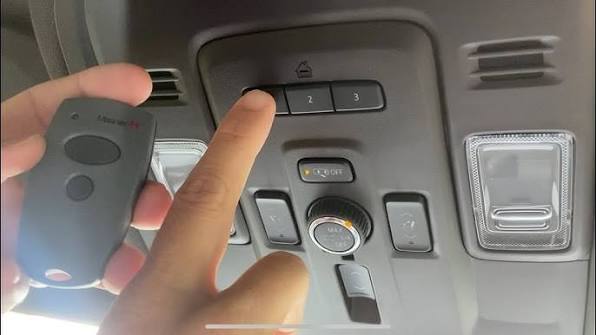
Before jumping into the programming steps, it’s important to understand what you’re working with. The HomeLink system in your 2021 GMC Sierra is located on the overhead console, typically near the rearview mirror. You’ll see three buttons that can each be programmed to control a different device.
What Is HomeLink?
HomeLink is a universal wireless control system integrated into many modern vehicles, including GMC trucks. It eliminates the need to carry separate garage door remotes by consolidating control into your vehicle’s interior. According to HomeLink’s official documentation, the system uses radio frequency signals compatible with most garage door openers manufactured after 1982.
Key Features of the 2021 GMC Sierra HomeLink
- Three programmable buttons for multiple devices
- Compatibility with most major garage door opener brands
- Rolling code technology support for enhanced security
- Indicator light to show programming status
Step-by-Step Guide: How to Program Your Garage Door Opener
Now let’s get into the actual programming process. Follow these steps carefully for the best results.
Step 1: Clear Existing Programs (If Necessary)
If your HomeLink buttons have been previously programmed, you’ll need to clear them first:
- Press and hold the two outer HomeLink buttons simultaneously
- Keep holding for approximately 20 seconds
- Watch for the indicator light to flash rapidly, then turn off
- Release both buttons once the light changes
Note: This step erases all previously stored codes, so only do this if you’re reprogramming existing buttons.
Step 2: Prepare Your Garage Door Opener
Before programming your Sierra, locate your garage door opener motor unit (usually mounted on the ceiling of your garage). You’ll need to:
- Identify the “Learn” or “Smart” button on your opener
- Ensure your garage door is closed during programming
- Have a ladder ready if the opener is mounted high
Most modern garage door openers use rolling code technology, which requires an additional step during programming. Check your opener’s manual to confirm whether yours uses fixed or rolling codes.
Step 3: Begin the Programming Process
Follow these precise steps to program your first button:
- Position your vehicle about 5-10 feet away from the garage door opener motor
- Turn your ignition to the ON/RUN position (engine can be off)
- Press and hold the desired HomeLink button you want to program
- Watch the indicator light – it will start slowly flashing, then change to rapid flashing
- Continue holding the HomeLink button while completing Step 4
Step 4: Sync With Your Garage Door Opener
While still holding the HomeLink button:
- Locate the “Learn” button on your garage door opener motor
- Press and release the Learn button (you typically have 30 seconds to complete the next step)
- Within 30 seconds, press and release the same HomeLink button three times
- Watch for the garage door to move or the opener light to flash, indicating successful programming
Step 5: Test the Connection
After programming:
- Press the programmed HomeLink button once
- Your garage door should activate
- If nothing happens, repeat Steps 3-4
- Test from different distances to ensure reliable operation
Troubleshooting Common Programming Issues
Even with careful following of instructions, problems can arise. Here are solutions to the most common issues:
Problem: Indicator Light Doesn’t Flash Rapidly
Possible Causes:
- Vehicle not in proper ignition position
- Battery voltage too low
- Previous programming not cleared properly
Solution: Ensure your ignition is in ON/RUN mode and try clearing the memory again before reprogramming.
Problem: Garage Door Doesn’t Respond After Programming
Possible Causes:
- Rolling code system requires additional steps
- Distance from opener was too great during programming
- Wrong button pressed on garage door opener
Solution: For rolling code systems, you may need to press the Learn button on your opener again, then press the HomeLink button firmly several times while standing close to the opener.
Problem: Intermittent Operation
Possible Causes:
- Weak battery in backup remote
- Interference from other electronic devices
- Poor signal strength
Solution: Reprogram the button while positioned closer to the garage door opener motor unit.
Comparison: Fixed Code vs. Rolling Code Systems
Understanding your garage door opener type is crucial for successful programming:
| Feature | Fixed Code | Rolling Code |
|---|---|---|
| Security Level | Basic | Enhanced |
| Programming Complexity | Simple | Additional steps required |
| Common Brands | Older models (pre-1993) | Most modern openers |
| Reprogramming Frequency | Rarely needed | May need periodic sync |
| Signal Type | Same code every time | Code changes with each use |
Most garage door openers manufactured after 1993 use rolling code technology for improved security. If you’re unsure which type you have, consult your opener’s manual or look for a “Learn” button – its presence typically indicates a rolling code system.
Expert Tips for Successful Programming
Based on years of experience helping GMC owners, here are professional recommendations:
- Program one button at a time to avoid confusion
- Keep your garage door remote handy as a backup during the process
- Choose a quiet time to minimize electronic interference
- Document which button controls which door if programming multiple devices
- Test thoroughly before relying on the system daily
Frequently Asked Questions
Q1: Can I program my 2021 GMC Sierra to work with any garage door opener?
A: The HomeLink system works with most garage door openers manufactured after 1982. However, some proprietary systems or very old models may not be compatible. Check your garage door opener’s manual for HomeLink compatibility, or visit the HomeLink website for their compatibility database.
Q2: How many garage doors can I program to my 2021 GMC Sierra?
A: You can program up to three different devices using the three HomeLink buttons. This could include multiple garage doors, a gate opener, or even home lighting systems. Each button operates independently.
Q3: What should I do if I sell my 2021 GMC Sierra?
A: For security reasons, clear all HomeLink programming before selling your vehicle. Follow the clearing procedure outlined in Step 1 of this guide. Also, consider changing the codes on your garage door opener itself for added security.
Q4: Why does my garage door only work when I’m very close to it?
A: This typically indicates a weak signal or interference issue. Try reprogramming the button while positioned closer to the garage door opener motor. Also check for potential sources of interference like LED lights, wireless routers, or other electronic devices near the opener.
Q5: Can I program my HomeLink without access to the garage door opener motor?
A: Unfortunately, no. Access to the “Learn” button on your garage door opener motor is essential for programming, especially with rolling code systems. This security feature prevents unauthorized programming of garage door openers.
Q6: How long does the programming process take?
A: The entire process typically takes 5-10 minutes per button if done correctly. Allow extra time if you encounter issues or need to troubleshoot. Having your garage door opener manual nearby can speed up the process significantly.
Conclusion
Learning how to program garage door opener 2021 GMC Sierra doesn’t have to be complicated. With the HomeLink system properly configured, you’ll enjoy the convenience of controlling your garage door directly from your truck’s overhead console. Remember to follow each step carefully, pay attention to whether your system uses rolling codes, and don’t hesitate to consult your garage door opener manual for model-specific instructions.
Once programmed, test your setup regularly and keep your garage door remote as a backup. The few minutes spent on proper programming will save you countless hours of frustration down the road.
Did you find this guide helpful? Share it with fellow GMC Sierra owners who might be struggling with their HomeLink setup! Bookmark this page for future reference, and feel free to leave comments below if you have additional questions or success stories to share.



Leave a Reply