Introduction
There is nothing quite as frustrating as sitting in your driveway, pressing the button on your truck’s ceiling console, and watching your garage door remain stubbornly closed. You just want to get inside, warm up, or unload your groceries, but technology seems to be working against you. If you are wondering how to program garage door opener 2022 GMC Sierra units correctly, you are not alone. Many new owners find the process slightly confusing due to the variety of garage door brands and the specific rolling code security features used today. This guide will walk you through the process with empathy and precision, ensuring you regain control of your home access quickly and safely.
Understanding Your 2022 GMC Sierra’s System
Before we dive into the buttons, it is crucial to understand what system your vehicle uses. The 2022 GMC Sierra typically comes equipped with one of two primary integrated transmitter systems: HomeLink or MyQ.
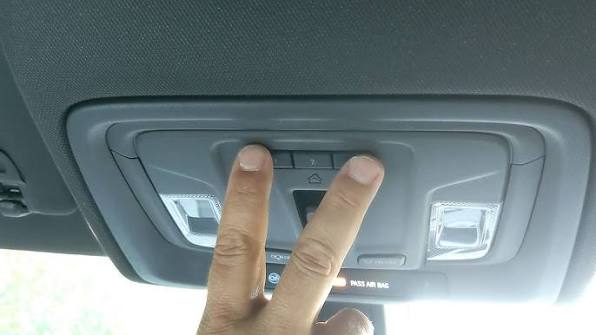
Identifying which system you have is the first step toward successful programming. Look at the overhead console in your cabin.
- HomeLink: Usually features three round or square buttons without a digital screen. It is a universal system compatible with most major garage door brands.
- MyQ: Often found in higher trims or as part of the premium audio packages, this system may have a small digital interface or specific branding. It connects directly to Chamberlain/LiftMaster openers via Wi-Fi.
For the purpose of this comprehensive guide, we will focus primarily on the HomeLink system, as it is the most common standard across the Sierra lineup and requires manual pairing. If you have MyQ, the process often involves downloading an app, but the manual backup method remains similar to HomeLink.
Pro Tip: Always check your owner’s manual first. While this guide is accurate for 95% of cases, GMC occasionally updates firmware or button layouts mid-year.
What Do I Need Before Starting?
Preparation prevents frustration. Programming a garage door opener is not just about pressing buttons; it is about establishing a secure handshake between your vehicle and your garage motor. Ensure you have the following ready:
- A Stable Ladder: You will need to reach the motor unit hanging from your garage ceiling.
- A Helper (Optional but Recommended): Having someone sit in the truck while you stand by the motor can save time.
- Your Existing Remote: Keep your handheld garage remote nearby. It serves as a backup if the car programming fails and helps verify the door is working.
- Clear Garage Space: Ensure no obstacles are under the door path for safety testing.
According to the Consumer Product Safety Commission, garage doors are the largest moving object in most homes. Always prioritize safety by keeping hands and feet clear of the door sections during testing.
Step-by-Step: How to Program Garage Door Opener 2022 GMC Sierra
Follow these steps meticulously. Rushing can cause the system to exit “learning mode” prematurely.
Step 1: Clear Previous Codes (If Necessary)
If you are reprogramming because the previous setup failed, or if you bought the truck used, you must clear the memory.
- Press and hold the two outer HomeLink buttons simultaneously.
- Hold them for about 10 to 20 seconds.
- Watch the indicator light. It will change from a solid orange to a rapidly flashing green.
- Release the buttons once the light flashes green. The memory is now cleared.
Step 2: Position Your Vehicle
Park your 2022 GMC Sierra outside the garage.
- Ensure the front of the truck is facing the garage door.
- Maintain a distance of approximately 5 to 10 feet from the door.
- Keep the engine running or the ignition in “Accessory Mode” to ensure consistent power to the overhead console.
Step 3: Initiate Learning Mode on the Truck
- Choose the HomeLink button you wish to use (Button 1, 2, or 3).
- Press and hold that button.
- Do not release it yet. The indicator light will start slow, then begin to flash rapidly. This indicates the truck is searching for a signal.
Step 4: Train the Garage Door Motor
This is the critical moment where many users get stuck. You need to tell your garage motor to listen to the truck.
- While still holding the HomeLink button in your truck, grab your ladder and go to the garage door motor unit.
- Locate the “Learn” or “Smart” button on the motor. It is usually colored yellow, purple, or red, depending on the brand (LiftMaster, Genie, Craftsman, etc.).
- Press and release the “Learn” button on the motor. You will typically see a small LED light blink on the motor unit.
- You have roughly 30 seconds to complete the next step.
Step 5: Complete the Pairing
- Return to your truck immediately.
- Press and hold the same HomeLink button again.
- Hold it for 2 seconds, release it, and repeat this cycle (Press-Hold-Release) up to three times.
- Watch the indicator light in the truck. If successful, the light will change from flashing green to a solid green.
Step 6: Test the Connection
- Press the programmed HomeLink button once.
- The garage door should activate.
- If it does not work, repeat Steps 3–5. Sometimes, the signal strength needs multiple attempts to register fully.
Troubleshooting Common Issues
Even with perfect technique, things can go wrong. Here is a breakdown of common problems and solutions.
| Issue | Possible Cause | Solution |
|---|---|---|
| Light Flashes Red/Green Alternately | Signal conflict or error. | Clear memory (Step 1) and restart. Ensure no other remotes are being pressed nearby. |
| Door Moves Then Stops Immediately | Safety sensor misalignment. | Check the photo-eye sensors at the bottom of the garage tracks. Clean lenses and ensure they are aligned. |
| No Response from Motor | Wrong “Learn” button pressed. | Verify you pressed the correct color-coded button on the motor unit. Some motors have multiple buttons for different frequencies. |
| Range is Very Short | Interference or weak battery. | Replace the battery in your handheld remote to test. If that works, the issue may be with the truck’s antenna location. Try parking closer. |
Rolling Codes vs. Fixed Codes
It is important to understand why this process exists. Modern garage doors use rolling code technology. Unlike older fixed-code systems, the code changes every time you press the button. This prevents hackers from intercepting your signal and opening your garage.
When you program your 2022 GMC Sierra, you are syncing the truck’s transmitter with the motor’s receiver algorithm. If you press the button in the truck too many times without the door moving, the codes may become unsynchronized. If this happens, simply repeat the programming process to resync them.
For more detailed technical specifications on radio frequency standards, you can refer to the general overview of Radio-frequency identification on Wikipedia, which explains the underlying technology used in modern access controls.
FAQ Section
Q1: Can I program multiple garage doors to my 2022 GMC Sierra? Yes, the HomeLink system typically supports up to three different devices. You can program one button for your home garage, one for a vacation home, and one for a gate or second garage. Follow the same steps for each button individually.
Q2: What if my garage door opener does not have a “Learn” button? Older garage door openers (pre-1993) may use dip switches instead of a learn button. In this case, you must match the dip switch positions on the motor to the settings in your HomeLink manual. However, for a 2022 vehicle, it is highly recommended to upgrade your garage opener for security reasons, as older systems are vulnerable to code grabbing.
Q3: Why does my garage door close immediately after opening when using the truck button? This is usually a safety feature trigger. Check your garage door’s safety sensors (the eyes near the floor). If they are blocked, dirty, or misaligned, the door will reverse immediately. Also, ensure the force settings on the motor are not too low.
Q4: Is it safe to leave my truck running while programming? Yes, it is safe and actually recommended. Keeping the ignition in accessory mode or the engine running ensures that the voltage remains stable. Programming draws minimal power, but a stable electrical system prevents the console from resetting mid-process.
Q5: Can I use the MyQ app instead of the buttons? If your 2022 Sierra is equipped with the MyQ connected services package, you can link your garage door via the GMC mobile app. This requires a Wi-Fi-enabled garage door opener. However, the manual HomeLink method described above works regardless of Wi-Fi availability and is often more reliable for immediate local control.
Q6: What do I do if the indicator light never turns solid green? If the light continues to flash or turns red, the pairing failed. Ensure you are within range (5-10 feet). Try pressing the “Learn” button on the motor unit again, and then press the HomeLink button in the truck firmly. If it persists, consult a professional installer, as there may be a frequency incompatibility between your specific garage motor and the truck’s transmitter.
Conclusion
Learning how to program garage door opener 2022 GMC Sierra models doesn’t have to be a headache. By understanding whether you have HomeLink or MyQ, preparing your tools, and following the step-by-step synchronization process, you can restore convenience to your daily routine. Remember, patience is key—especially when syncing the rolling codes.
Once programmed, enjoy the seamless integration of your vehicle and home. No more fumbling for remotes in the rain or snow.
Did this guide help you get your garage door working? Share this article with fellow GMC owners on Facebook or Twitter who might be struggling with their setup. If you have additional tips or encountered a unique issue, leave a comment below to help our community grow!



Leave a Reply