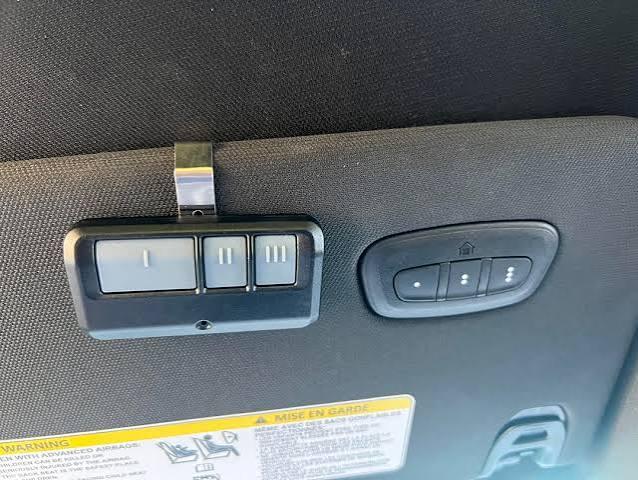
Struggling to connect your garage door with your new truck? You’re not alone. Many 2022 Ram 1500 owners face confusion when setting up their built-in garage door opener system. Learning how to program garage door opener 2022 Ram 1500 doesn’t have to be frustrating. This comprehensive guide will walk you through every step, ensuring your HomeLink system works perfectly with your garage door.
What Is HomeLink and Why Does Your 2022 Ram 1500 Have It?
HomeLink is a universal transceiver system integrated into your vehicle that allows you to control compatible garage doors, gates, and other home automation devices directly from your truck. The 2022 Ram 1500 comes equipped with this convenient feature, typically located on the rearview mirror or sun visor, depending on your trim level.
According to Wikipedia, HomeLink technology has been helping drivers since 1992, providing wireless control for over 300 million garage door openers worldwide. This widespread compatibility makes it one of the most reliable systems available today.
Benefits of Using HomeLink in Your Ram 1500
- Convenience: No more fumbling for separate remotes
- Security: Encrypted signals protect against unauthorized access
- Versatility: Controls multiple devices beyond just garage doors
- Weather Protection: Keep your remote safe inside your vehicle
Before You Begin: Essential Preparation Steps
Successful programming requires proper preparation. Follow these crucial steps before starting the programming process:
Gather Required Information
First, identify your garage door opener brand and model. Common brands include Chamberlain, LiftMaster, Genie, Craftsman, and Sommer. Check your existing remote or the motor unit itself for this information.
Next, locate your garage door opener’s “Learn” or “Smart” button. This button is typically found on the back or side of the motor unit hanging from your garage ceiling. The button color varies by manufacturer:
- Purple: Chamberlain/LiftMaster (Security+ 2.0)
- Yellow: Chamberlain/LiftMaster (older models)
- Red: Genie
- Orange: Sommer
- Green: Various brands
Clear Existing HomeLink Memory
If your HomeLink system previously controlled other devices, clear its memory first:
- Press and hold the two outer HomeLink buttons simultaneously
- Continue holding for approximately 20 seconds
- Release when the indicator light begins flashing rapidly
- All three buttons should now be cleared
Important: This action cannot be undone, so ensure you want to erase all previous programming.
Step-by-Step Guide: How to Program Garage Door Opener 2022 Ram 1500
Now let’s dive into the actual programming process. Follow these detailed instructions carefully for best results.
Step 1: Position Your Vehicle Correctly
Park your 2022 Ram 1500 outside your garage, facing the garage door. Ensure you’re within 15-20 feet of the garage door opener motor unit. Keep your engine running or turn the ignition to the “ON” position to maintain power during programming.
Step 2: Initiate HomeLink Programming Mode
- Press and hold the desired HomeLink button (choose from the three available buttons)
- While holding the HomeLink button, bring your original garage door remote within 1-3 inches of the HomeLink buttons
- Continue holding both buttons simultaneously
Step 3: Wait for Signal Recognition
Keep both buttons pressed until the HomeLink indicator light changes from slow blinking to rapid flashing. This typically takes 20-30 seconds. The rapid flashing indicates that HomeLink has successfully learned the frequency from your original remote.
Pro Tip: If nothing happens after 30 seconds, try moving the remote closer or adjusting its angle relative to the HomeLink sensors.
Step 4: Program the Garage Door Opener Motor Unit
This critical step establishes communication between HomeLink and your actual garage door mechanism:
- Locate the “Learn” or “Smart” button on your garage door opener motor unit
- Press and release this button (you’ll have approximately 30 seconds to complete the next step)
- Return to your Ram 1500 within 30 seconds
- Press and hold the programmed HomeLink button for 2 seconds, then release
- Press and hold the same HomeLink button again for 2 seconds, then release
- Repeat this press-and-release cycle up to three times if necessary
Your garage door should activate during this process, confirming successful programming.
Step 5: Test the System
Test your newly programmed HomeLink button several times to ensure consistent operation:
- Press the HomeLink button once – the garage door should open or close
- Wait for the door to complete its movement
- Press again to reverse the action
- Test from different distances to verify range
Troubleshooting Common Programming Issues
Even with careful following of instructions, problems can occur. Here are solutions to frequent issues:
Problem: HomeLink Light Doesn’t Flash Rapidly
Solutions:
- Ensure your vehicle’s ignition is ON
- Check that you’re holding both buttons simultaneously
- Verify battery strength in your original remote
- Try a different HomeLink button
Problem: Garage Door Doesn’t Respond After Programming
Solutions:
- Confirm you pressed the “Learn” button on the motor unit
- Ensure you completed the press-release cycle within 30 seconds
- Check if your garage door opener uses rolling code technology (requires additional steps)
- Verify you’re using the correct “Learn” button color for your brand
Problem: Intermittent Operation
Solutions:
- Reprogram using the steps above
- Check for interference from LED bulbs in garage (replace with incandescent temporarily)
- Ensure no large metal objects block the signal path
- Contact your garage door opener manufacturer for compatibility verification
Rolling Code Technology: Special Considerations
Many modern garage door openers use rolling code security technology, which changes the access code with each use. If your opener uses this technology (most units manufactured after 1996 do), you must complete an additional synchronization step:
- After initial programming, press the “Learn” button on your motor unit
- Within 30 seconds, press and hold the HomeLink button for 2 seconds
- Release, then press and hold again for 2 seconds
- Repeat once more for a total of three press-hold cycles
- Test operation immediately
This process ensures HomeLink and your garage door opener stay synchronized with changing codes.
Alternative Programming Method: Direct Motor Unit Programming
If the remote-based method doesn’t work, try programming directly from the motor unit:
- Clear HomeLink memory (as described earlier)
- Press and hold your chosen HomeLink button
- Without releasing, press the “Learn” button on your garage door motor unit
- Hold both for 20-30 seconds until the HomeLink light flashes rapidly
- Test operation
This method bypasses the need for your original remote but may not work with all garage door opener models.
Frequently Asked Questions
Q: Can I program multiple garage doors to my 2022 Ram 1500 HomeLink?
A: Yes! Your HomeLink system has three independent buttons, allowing you to program up to three different garage doors, gates, or other compatible devices. Simply repeat the programming process for each device using a different HomeLink button.
Q: What if my garage door opener isn’t listed as compatible with HomeLink?
A: HomeLink maintains compatibility with over 95% of garage door openers manufactured since 1982. Visit the official HomeLink compatibility checker online to verify your specific model. If your opener isn’t compatible, consider purchasing a HomeLink compatibility bridge module from your garage door manufacturer.
Q: How long does the programming process typically take?
A: Most users complete the entire programming process in 5-10 minutes. However, allow up to 30 minutes if you encounter troubleshooting issues or need to clear previous programming. Patience and careful attention to each step yield the best results.
Q: Will programming HomeLink affect my existing garage door remote?
A: No, programming HomeLink doesn’t disable or interfere with your original remote controls. Both your HomeLink system and existing remotes will continue working independently. You can use either method to operate your garage door.
Q: Can I reset HomeLink if I sell my 2022 Ram 1500?
A: Absolutely. To clear all HomeLink programming, press and hold the two outer buttons for 20 seconds until the indicator light flashes rapidly. This erases all stored codes and returns HomeLink to factory settings, protecting your privacy when selling your vehicle.
Q: What should I do if none of the troubleshooting steps work?
A: If you’ve followed all steps correctly and still experience issues, contact HomeLink customer support at 1-800-355-3515 or reach out to your garage door opener manufacturer. Some older or specialized systems may require professional assistance or additional hardware modules.
Conclusion
Learning how to program garage door opener 2022 Ram 1500 transforms your daily routine, adding convenience and security to your driving experience. With HomeLink’s user-friendly interface and broad compatibility, you’ll wonder how you ever managed without it.
Remember these key points for success:
- Prepare by identifying your garage door opener brand and locating the “Learn” button
- Follow the step-by-step programming process carefully
- Complete rolling code synchronization if applicable
- Test thoroughly before relying on the system
- Don’t hesitate to troubleshoot or seek professional help if needed
Your 2022 Ram 1500 represents a significant investment in comfort and technology. Take advantage of every feature, including HomeLink, to maximize your ownership experience. Once programmed correctly, you’ll enjoy seamless garage access for years to come.
Found this guide helpful? Share it with fellow Ram 1500 owners on Facebook, Twitter, or Reddit who might be struggling with their HomeLink setup. Your share could save someone hours of frustration! Have questions or additional tips? Leave a comment below – our community thrives on shared knowledge and real-world experiences



Leave a Reply