Introduction
Are you tired of juggling multiple remotes every time you pull into your driveway? It is a common frustration for new car owners, but integrating your garage door with your vehicle offers seamless convenience and enhanced security. If you are wondering how to program garage door opener Audi Q5 2023 models, you are in the right place. This guide simplifies the process, ensuring you can open your garage with just a press of a button on your ceiling console.
The 2023 Audi Q5 utilizes the HomeLink® system, a universal transceiver that replaces handheld remotes for controlling devices like garage doors, gate operators, and home lighting. While the technology is robust, the initial setup can seem intimidating if you have never done it before. However, with the right steps, you can complete this task in under 15 minutes. Let’s dive into the specifics of getting your Audi connected to your home.
Understanding the HomeLink System in the 2023 Audi Q5
Before we begin the programming process, it is essential to understand what you are working with. The 2023 Audi Q5 comes equipped with HomeLink, which is typically located in the overhead console near the rearview mirror or integrated into the sun visor, depending on the trim level (Premium, Premium Plus, or Prestige).
HomeLink works by learning the radio frequency signal from your existing garage door opener remote. It acts as a bridge between your car and your garage door motor. According to HomeLink’s official documentation, this system is compatible with over 95% of garage door openers manufactured since 1995, including major brands like Chamberlain, LiftMaster, Genie, and Craftsman.
Why Use HomeLink?
- Convenience: No more searching for lost remotes.
- Security: Rolling code technology ensures that hackers cannot easily intercept your signal.
- Cleanliness: Reduces clutter in your car and home.
Prerequisites: What You Need Before Starting
To ensure a smooth programming experience, gather the following items before you sit in your driver’s seat:
- Your Original Garage Door Remote: You will need the handheld remote that currently opens your garage. Ensure it has fresh batteries.
- A Step Ladder (Optional): Helpful if your garage door motor unit is high up and requires manual interaction.
- Patience: Some older garage door openers may require multiple attempts to sync.
- Clear Garage Area: Ensure no people or pets are near the garage door during testing.
Note: If you have a “Smart” garage door opener (like MyQ by LiftMaster), you may need to disable certain security features temporarily or use a specific compatibility mode. Check your garage door opener’s manual if you encounter issues.
Step-by-Step Guide: How To Program Garage Door Opener Audi Q5 2023
Follow these precise steps to program your HomeLink system. We have broken this down into two main phases: Clearing Memory (if needed) and Programming.
Phase 1: Clear Previous Programming (If Necessary)
If you are replacing an old garage door or if the buttons were previously programmed, you must clear the memory first. If this is a brand-new car, you can skip to Phase 2.
- Turn the ignition to the “On” position (you do not need to start the engine).
- Press and hold the two outer HomeLink buttons simultaneously.
- Hold them for about 20 seconds until the indicator light begins to flash rapidly.
- Release the buttons. The memory is now cleared.
Phase 2: Programming the New Garage Door
This is the core process for how to program garage door opener Audi Q5 2023 vehicles.
Step 1: Position Your Vehicle
Park your Audi Q5 outside your garage, facing the door. Ensure you are within range (usually 10–20 feet) of the garage door opener motor unit. Keep the engine running or the ignition in the “On” position to prevent the car from going to sleep during the process.
Step 2: Initiate Learning Mode
- Choose one of the three HomeLink buttons you wish to use.
- Press and hold the chosen HomeLink button.
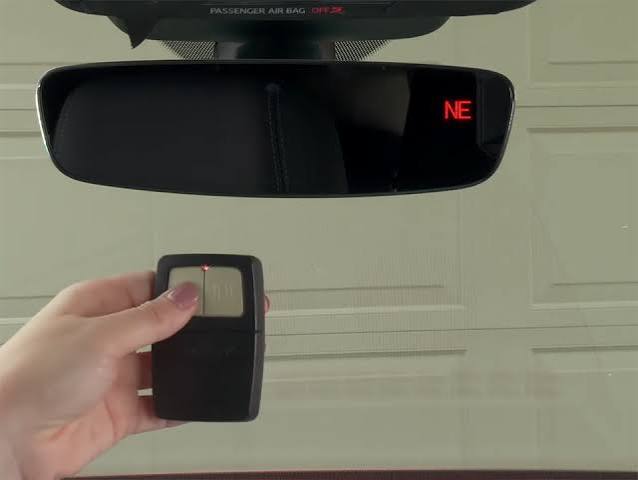
- While holding the HomeLink button, bring your original garage door remote close to the HomeLink buttons (about 1–3 inches away).
- Press and hold the button on your handheld remote that operates the garage door.
- Continue holding both buttons. The HomeLink indicator light will change from a slow blink to a rapid flash.
- Once the light flashes rapidly, release both buttons.
Step 3: Test the Connection
Press the programmed HomeLink button in your Audi. Observe the garage door.
- If the door moves: You are done! Skip to the “Rolling Code” section below if your door only moves briefly and stops.
- If nothing happens: You may need to repeat Step 2, ensuring the remote is closer to the HomeLink unit.
Handling Rolling Code Technology
Most modern garage door openers (manufactured after 1995) use rolling codes for security. This means the code changes every time you press the button. If your garage door moved but stopped immediately, or if it didn’t move at all after Step 3, you likely have a rolling code opener.
To complete the programming for rolling codes:
- Locate the “Learn” or “Smart” button on your garage door opener motor unit (inside the garage, hanging from the ceiling). It is usually colored yellow, purple, or red.
- Press and release the “Learn” button. You typically have 30 seconds to complete the next step.
- Return to your Audi Q5.
- Press and hold the programmed HomeLink button for 2 seconds, then release.
- Repeat this press-and-release cycle three times.
- Test the door again. It should now open and close fully.
Pro Tip: If you cannot reach the motor unit, some openers allow you to put the remote into “programming mode” by holding its button until the light blinks, then pressing the HomeLink button. Consult your garage door manual for this alternative method.
Troubleshooting Common Issues
Even with careful following, issues can arise. Here is a quick troubleshooting table:
| Issue | Possible Cause | Solution |
|---|---|---|
| Light doesn’t flash rapidly | Weak remote battery | Replace the battery in your handheld remote. |
| Door moves partially | Rolling code not synced | Perform the “Learn Button” steps on the motor unit. |
| No response at all | Wrong frequency | Ensure your garage opener is compatible (most are). Try repositioning the car closer. |
| Interference | LED lights in garage | Old LED bulbs can interfere with signals. Try turning off garage lights while programming. |
FAQ Section
1. Can I program multiple garage doors to my Audi Q5 2023?
Yes, the HomeLink system in the 2023 Audi Q5 has three separate buttons. You can program each button to control a different device, such as two different garage doors and a gate operator.
2. What if I don’t have the original garage door remote?
If you have lost your original remote, you cannot program HomeLink using the standard method. You will need to purchase a universal remote compatible with your garage door opener brand, program that universal remote to the door first, and then use it to program your Audi.
3. Does programming HomeLink void my warranty?
No, using the HomeLink system is a standard feature provided by Audi and does not void your vehicle’s warranty. However, always follow the instructions carefully to avoid accidental resets.
4. Why does my garage door reverse immediately after opening?
This is often a safety sensor issue unrelated to the car. Check the photo-eye sensors at the bottom of your garage door tracks. Ensure they are aligned and clean. If they are blocked, the door will reverse for safety.
5. Can I use HomeLink for devices other than garage doors?
Absolutely. HomeLink is universal. You can program it to control home lighting systems, security alarms, pool heaters, and even entry gates, provided they operate on a radio frequency compatible with HomeLink.
Conclusion
Learning how to program garage door opener Audi Q5 2023 models is a straightforward process that significantly enhances your daily driving experience. By following the steps outlined above—clearing memory, initiating learning mode, and syncing rolling codes—you can enjoy the luxury of hands-free garage access.
Remember, patience is key, especially when dealing with rolling code technology. If you encounter persistent issues, consult your Audi owner’s manual or contact a certified Audi dealer for assistance.
Did you find this guide helpful? Share this article with fellow Audi owners on social media to help them simplify their tech setup!
Disclaimer: This article provides general guidance based on standard 2023 Audi Q5 specifications. Always refer to your specific vehicle’s owner’s manual and your garage door opener’s manual for model-specific instructions.



Leave a Reply