Introduction
Are you tired of fumbling for a separate remote every time you pull into your driveway? You are not alone. Many new Audi Q5 owners find the integrated HomeLink system slightly confusing at first, but mastering it transforms your daily routine. Knowing how to program garage door opener Audi Q5 2022 models ensures seamless access to your home without cluttering your car with extra devices. This guide will walk you through the process clearly, safely, and efficiently.
Understanding the HomeLink System in Your Audi Q5
Before we dive into the buttons, it is essential to understand what you are working with. The 2022 Audi Q5 comes equipped with HomeLink, a universal transceiver that can replace up to three hand-held remotes. It works by mimicking the radio frequency signal of your original garage door opener.
Why Use HomeLink?
- Convenience: No more digging through bags or glove compartments.
- Security: Modern rolling-code technology keeps your home secure.
- Cleanliness: Reduces clutter on your sun visor or keychain.
According to HomeLink’s official documentation, their system is compatible with over 95% of garage door openers manufactured since 1993. This high compatibility rate means your 2022 Q5 is likely ready to pair with your existing setup right out of the box.
Preparation: What You Need Before Starting
Programming your garage door is not just about pressing buttons in the car. Safety and preparation are key to a successful sync.
Checklist for Success
- Your Original Remote: Ensure you have the working hand-held remote for your garage door.
- A Ladder: You may need to access the motor unit inside the garage.
- A Helper: While not strictly required, having someone to press the car buttons while you watch the garage door is highly recommended.
- Clear Space: Ensure no people or pets are near the garage door during testing.
Pro Tip: Check your garage door opener’s manual to identify if it uses a “rolling code” or a “fixed code.” Most modern openers (post-1993) use rolling codes, which require an extra step during programming.
Step-by-Step: How To Program Garage Door Opener Audi Q5 2022
Follow these steps carefully. The process generally takes less than 10 minutes.
Step 1: Clear Existing Memory (If Necessary)
If you are replacing an old garage door or if the buttons were previously programmed, clear them first.
- Turn on your Audi Q5 ignition (press the Start button without foot on brake).
- Press and hold the two outer HomeLink buttons simultaneously.
- Hold for about 20 seconds until the indicator light begins to flash rapidly.
- Release the buttons. The memory is now cleared.
Step 2: Initial Programming in the Car
- Position your car outside the garage, facing the door. Keep the engine running or in accessory mode.
- Hold your original garage remote 1–3 inches away from the HomeLink buttons on your sun visor.
- Choose the HomeLink button you wish to use.
- Simultaneously press and hold the chosen HomeLink button and the button on your handheld remote.
- Do not release until the HomeLink indicator light changes from a slow blink to a rapid flash. This usually takes 20–30 seconds.
- Once it flashes rapidly, release both buttons.
Step 3: Programming the Garage Motor Unit
This is the critical step for rolling code openers (which most 2022-compatible doors are).
- Locate the “Learn” or “Smart” button on your garage door opener motor unit (inside the garage). It is usually located on the back or side of the motor housing.
- Press and release the “Learn” button. You typically have 30 seconds to complete the next step.
- Return to your Audi Q5.
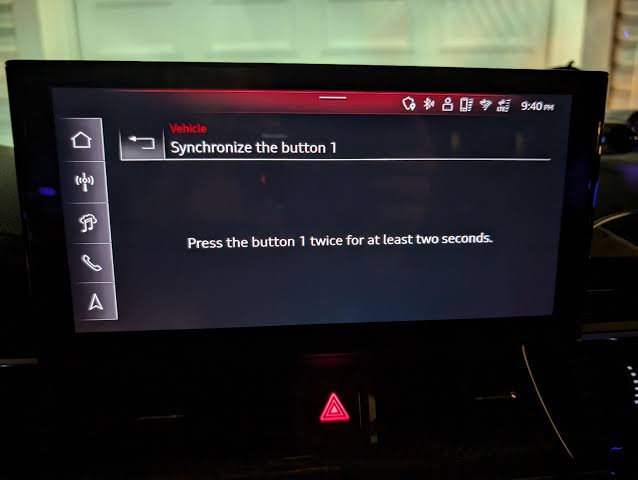
- Firmly press and hold the programmed HomeLink button for two seconds, then release.
- Repeat this “press-hold-release” cycle up to three times.
- Watch your garage door. If it moves, the programming is successful.
| Action | Indicator Light Status | Meaning |
|---|---|---|
| Initial Press | Slow Blink | Ready to learn signal |
| Signal Received | Rapid Flash | Signal stored in memory |
| Final Sync | Solid Light (Briefly) | Successful transmission to motor |
Troubleshooting Common Issues
Even with careful following, things can go wrong. Here are solutions to the most frequent problems.
The Light Flashes But the Door Doesn’t Move
This usually indicates a timing issue with the rolling code.
- Solution: Repeat Step 3. Ensure you are pressing the “Learn” button on the motor unit before pressing the car button. You must act within the 30-second window.
The Light Does Not Change to Rapid Flash
This suggests the car is not receiving the signal from your handheld remote.
- Solution: Check the battery in your handheld remote. Try moving the remote closer to the visor or changing the angle. Some remotes have weak signals that struggle to penetrate the car’s glass.
Compatibility Issues with Older Openers
If you have an older opener (pre-1993) or a specific brand like Chamberlain or LiftMaster with security+ 2.0, you might need a compatibility bridge.
- Solution: Visit the HomeLink website and use their compatibility tool. You may need to purchase a small repeater device that plugs into your opener’s power source.
Advanced Tips for Audi Q5 Owners
Using Voice Commands
The 2022 Audi Q5 features advanced MMI (Multi Media Interface) integration. Once programmed, you can often activate your garage door using voice commands if your vehicle is equipped with the appropriate connectivity package. Simply say, “Open Garage,” and the system will trigger the HomeLink button.
Security Best Practices
- Change Codes Regularly: If you lose your handheld remote, reprogram the HomeLink system to ensure unauthorized access is prevented.
- Disable When Selling: Always clear the HomeLink memory before selling or trading in your Audi Q5.
Battery Conservation
Programming consumes minimal energy, but leaving your car in accessory mode for extended periods can drain the 12V battery. Try to complete the process within 15 minutes. If you need a break, turn off the car and restart the process later; the saved signal in the HomeLink button usually persists.
FAQ Section
Q1: Can I program more than one garage door to my Audi Q5 2022?
A: Yes. The HomeLink system in the 2022 Audi Q5 supports up to three different devices. You can program a garage door, a gate, and even a home lighting system. Each button operates independently.
Q2: What if I don’t have the original handheld remote?
A: Without the original remote, direct programming is difficult. You may need to contact your garage door manufacturer to get a new remote or use a “wireless keypad” if your system supports it. In some cases, a professional installer can help clone the signal.
Q3: Is it safe to program the garage door while the car is moving?
A: No. For safety reasons, always program your HomeLink system while the vehicle is parked and stationary. Distracted driving laws also prohibit interacting with such systems while in motion.
Q4: Why does my garage door reverse immediately after closing?
A: This is likely a sensor issue, not a programming issue. Check the safety eyes (sensors) at the bottom of your garage door tracks. If they are misaligned or blocked, the door will reverse as a safety precaution. Reprogramming the HomeLink will not fix this mechanical/sensor fault.
Q5: Does programming HomeLink void my garage door warranty?
A: No. Using a universal remote like HomeLink does not void your garage door opener’s warranty. It simply sends the same signal your original remote would send. However, always consult your opener’s manual for specific brand guidelines.
Q6: Can I use HomeLink for non-garage devices?
A: Absolutely. HomeLink is versatile. You can program it to control entry gates, community pool gates, exterior lighting, or even alarm systems, provided they operate on a compatible radio frequency.
Conclusion
Learning how to program garage door opener Audi Q5 2022 models is a small task that yields significant daily convenience. By following the steps above, you can integrate your home access directly into your vehicle’s sleek interface. Remember to prepare your tools, identify your opener type, and patiently follow the rolling-code synchronization process.
Now that your garage door is synced, enjoy the seamless entry every time you return home. If you found this guide helpful, please share it with fellow Audi enthusiasts on social media or leave a comment below with your experience!
Disclaimer: Always refer to your specific Audi Q5 owner’s manual and your garage door opener’s manual for model-specific instructions. Safety should always be your top priority when working with mechanical doors.



Leave a Reply