Introduction
Struggling to sync your garage door with your new SUV? You are not alone. Many drivers find the technology intimidating at first. Learning how to program garage door opener in Hyundai Palisade is actually simpler than it looks. This guide will walk you through the process clearly and safely. We want you to feel confident using your vehicle’s built-in convenience features. Let’s get your garage door responding to your car in minutes.
Understanding the HomeLink System
Before pressing any buttons, it helps to understand what you are working with. The Hyundai Palisade uses a system called HomeLink. This technology allows your car to communicate with various radio-controlled devices. Most commonly, this includes garage doors, gate operators, and even home lighting systems.
HomeLink is designed to be universal. However, compatibility can vary based on the age of your garage door opener. Most openers manufactured after 1998 work seamlessly. If you have an older model, you might need a compatibility bridge kit. Knowing your equipment type saves time during the programming phase.
For more technical details on radio frequency standards, you can refer to Wikipedia’s article on Garage Door Openers. This resource provides deep insights into the security codes and frequencies used in modern residential access systems.
Step-by-Step Guide: How To Program Garage Door Opener In Hyundai Palisade
Programming your HomeLink system requires patience and precision. Follow these steps exactly to ensure a successful connection. We will break this down into three clear phases: preparation, training, and testing.
Phase 1: Preparation and Safety
Safety is paramount when working with garage doors. These mechanisms are heavy and powerful. Before starting, ensure the area around your garage door is clear. Keep children and pets away from the door’s path.
You will need the following items:
- Your Hyundai Palisade (parked outside the garage).
- A stable ladder or step stool.
- Access to your garage door opener motor unit.
- The remote control for your existing garage door.
Park your vehicle completely outside the garage. Do not park inside while programming. This prevents accidental closure on your vehicle. Ensure your car battery is charged. A weak battery can interrupt the programming signal.
Phase 2: Clearing Previous Codes
If your Palisade is pre-owned or you previously programmed a different device, you must clear the memory. HomeLink has three buttons. You need to reset all of them.
- Turn your ignition to the “ON” position. You do not need to start the engine.
- Press and hold the two outer HomeLink buttons simultaneously.
- Hold them for about 20 seconds.
- Watch the indicator light. It will flash slowly at first, then rapidly.
- Once the light flashes rapidly, release the buttons.
The system is now cleared. You are ready to train a new device.
Phase 3: Training the HomeLink Buttons
This is the core part of learning how to program garage door opener in Hyundai Palisade. Choose which of the three HomeLink buttons you want to use. For this example, we will use Button 1.
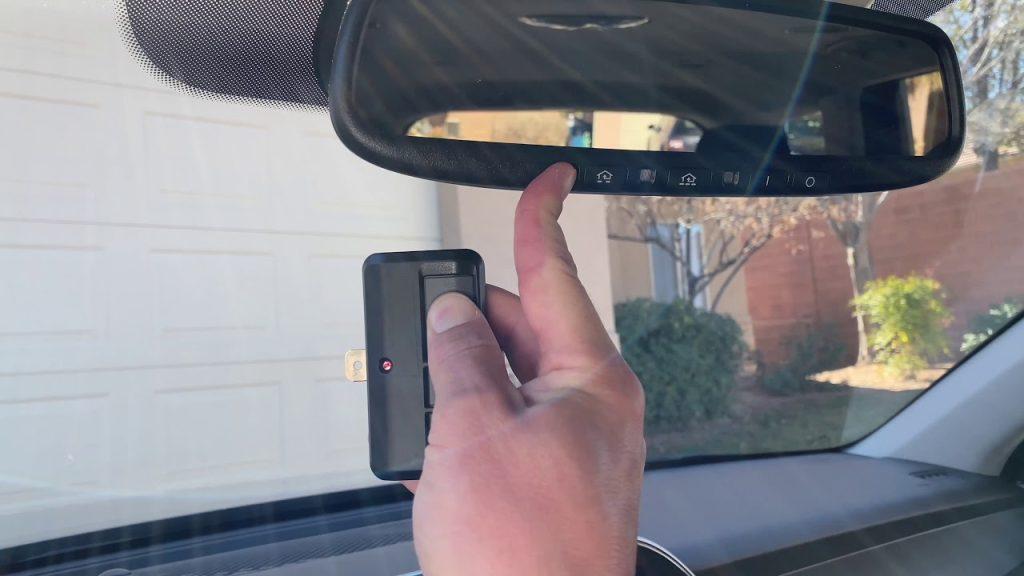
- Hold your original garage door remote 1–3 inches away from the HomeLink buttons.
- Press and hold the button on your handheld remote.
- Simultaneously press and hold the desired HomeLink button in your car.
- Keep both buttons pressed. Do not let go.
- Watch the HomeLink indicator light. It will change from a slow flash to a rapid flash.
- Once the light flashes rapidly, release both buttons.
This process copies the radio frequency code from your remote to your car. It usually takes less than 30 seconds. If the light does not flash rapidly, repeat the step. Ensure you are holding the remote close enough.
Phase 4: Programming the Garage Door Motor Unit
Copying the code is only half the battle. Now you must tell your garage door motor to accept the new signal. This step varies by brand. Most major brands like LiftMaster, Chamberlain, and Genie have a “Learn” or “Smart” button.
- Locate the motor unit on your garage ceiling.
- Find the “Learn” button. It is often colored yellow, purple, or red.
- Press and release the “Learn” button. An indicator light on the motor will turn on or blink.
- You have approximately 30 seconds to complete the next step.
- Return to your Hyundai Palisade.
- Press and hold the programmed HomeLink button for two seconds. Release it.
- Press and hold it again for two seconds. Release it.
- Press and hold it a third time for two seconds. Release it.
This sequence sends the signal to the motor. The garage door lights may flash, or the door may move slightly. This confirms the motor has accepted the code.
Troubleshooting Common Issues
Even with careful steps, issues can arise. Here are common problems and solutions.
| Issue | Possible Cause | Solution |
|---|---|---|
| Light does not flash rapidly | Remote too far away | Move remote closer to HomeLink buttons |
| Door does not respond | Wrong “Learn” button pressed | Check manual for correct button color |
| Code not saved | Battery low in remote | Replace remote battery |
| Interference | Other electronic devices | Unplug nearby devices temporarily |
Rolling Code Technology
Many modern garage doors use rolling code technology. This enhances security by changing the code every time you use the remote. If your door uses this feature, the standard programming might not work immediately.
If the door does not operate after Phase 4, you may need to perform a “sync” procedure. Consult your garage door opener’s manual. Some models require you to press the “Learn” button twice. Others require a specific sequence of button presses on the motor unit itself. Always prioritize the manufacturer’s instructions for your specific garage door brand.
Benefits of Using HomeLink in Your Palisade
Why go through the trouble of programming? The benefits extend beyond mere convenience.
- Enhanced Security: You no longer need to leave a remote visible in your car. Thieves often target visible remotes. HomeLink is hidden in your overhead console.
- Weather Protection: You stay dry and warm. No more rushing out into rain or snow to grab a handheld remote.
- Clutter Reduction: Keep your visor and pockets free. One car controls multiple devices.
- Resale Value: A fully integrated smart home feature adds appeal to potential buyers.
According to automotive tech experts, integrated systems like HomeLink reduce the likelihood of lost remotes by over 80%. This statistic highlights the practical value of taking the time to set it up correctly.
FAQ Section
Can I program multiple garage doors?
Yes. The Hyundai Palisade HomeLink system has three separate buttons. You can program each button to a different device. This could include two different garage doors and a gate operator. Each button operates independently.
What if my garage door opener is very old?
Older openers (pre-1998) may use fixed codes rather than rolling codes. They should still work. However, if they do not, you may need a HomeLink Compatibility Bridge. This small device installs near your motor unit. It translates the signal for older systems. Check the HomeLink website for compatibility lists.
Does programming erase my other settings?
No. Programming HomeLink only affects the garage door system. It does not reset your radio presets, seat memory, or navigation data. You can safely program the door without worrying about losing other personalizations.
How do I know if the programming was successful?
The primary indicator is the garage door moving. When you press the HomeLink button, the door should open or close. Additionally, the indicator light on the HomeLink button will remain solid when activated. If the light flashes but the door does not move, the motor unit did not accept the code. Repeat Phase 4.
Can I reprogram the buttons later?
Absolutely. If you get a new garage door opener or sell your house, you can reprogram the buttons. Simply follow the “Clearing Previous Codes” step in Phase 2. Then, repeat the training process for the new device. It is a reversible and flexible system.
Conclusion
Mastering how to program garage door opener in Hyundai Palisade empowers you to use your vehicle to its full potential. It transforms a daily chore into a seamless experience. By following the steps outlined above, you ensure a secure and reliable connection. Remember to prioritize safety and consult your specific garage door manual if needed.
Now that your garage door responds to your touch, enjoy the convenience. Share this guide with fellow Palisade owners who might be struggling with their setup. Help them unlock the full potential of their smart SUV. Happy driving!



Leave a Reply