Introduction
Is your morning routine disrupted because you have to juggle coffee, keys, and a separate garage remote just to get into your house? You are not alone. Many Ram 1500 owners struggle with integrating their vehicle’s built-in system with their home security. Knowing how to program garage door opener in Ram 1500 models can transform this daily hassle into a seamless, one-touch experience. This guide will walk you through the process safely and efficiently, ensuring your truck talks to your garage without any glitches.
Understanding the HomeLink System in Your Ram 1500
Before pressing buttons, it is crucial to understand what technology you are working with. Most Ram 1500 trucks (from the classic models to the latest generations) utilize a system called HomeLink. This is a universal transceiver that replaces the need for multiple handheld remotes.
HomeLink works by learning the radio frequency signal from your existing garage door opener. It is compatible with most major brands, including LiftMaster, Chamberlain, Genie, and Craftsman. However, the programming method can vary slightly depending on whether your garage opener uses a “fixed code” or a “rolling code” security system.
Expert Insight: According to Wikipedia, HomeLink is the most widely installed universal wireless control system in vehicles, integrated into over 60 million vehicles worldwide. Its reliability stems from its ability to mimic the exact signal structure of your original remote.
Fixed Code vs. Rolling Code: What’s the Difference?
- Fixed Code: Older systems that send the same digital code every time. These are easier to program but less secure.
- Rolling Code: Newer systems that change the code with every use to prevent hacking. Programming these requires an extra step involving the “learn button” on your garage motor unit.
Most Ram 1500s manufactured after 2010 are designed to handle rolling codes seamlessly, but identifying your opener type helps troubleshoot if the initial setup fails.
Step-by-Step: How to Program Garage Door Opener in Ram 1500
Follow these precise steps to sync your Ram 1500 with your garage door. Ensure your vehicle is parked outside the garage with the engine running or in accessory mode to maintain consistent power during the process.
Step 1: Clear Previous Settings (If Applicable)
If you are reprogramming a button that was previously used, or if you bought a used Ram 1500, you must clear the memory first.
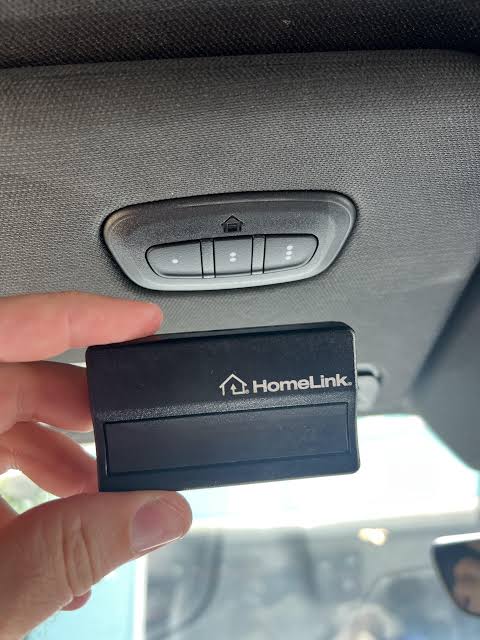
- Locate the HomeLink buttons. In most Ram 1500 models, these are found on the rearview mirror or the overhead console near the sunroof controls.
- Press and hold the two outer HomeLink buttons simultaneously.
- Keep holding them for about 20 seconds until the indicator light begins to flash rapidly.
- Release the buttons. The memory is now cleared.
Step 2: Initiate the Learning Mode
Now, you will teach the truck to recognize your garage remote.
- Hold your original handheld garage door remote 1 to 3 inches away from the HomeLink buttons in your Ram.
- Press and hold the desired HomeLink button in your truck.
- While holding the HomeLink button, press and hold the button on your handheld remote.
- Continue holding both buttons. Watch the indicator light on the HomeLink system.
- It will start slow, then flash rapidly.
- Once it flashes rapidly, release both buttons.
- Test the connection by pressing the programmed HomeLink button. If the garage door moves, you are done! If not, proceed to Step 3.
Step 3: Programming Rolling Code Openers (The “Learn Button” Method)
If your garage door did not respond in Step 2, you likely have a rolling code opener. This requires physical access to your garage door motor unit.
- Locate the “Learn” or “Smart” button on your garage door opener motor unit (usually hanging from the ceiling). It is often colored yellow, purple, or red.
- Press and release the “Learn” button. You typically have 30 seconds to complete the next step.
- Return to your Ram 1500.
- Press and hold the programmed HomeLink button for 2 seconds, then release it.
- Press and hold it again for 2 seconds, then release it.
- Repeat this cycle (press-hold-release) up to three times.
- Observe the garage door. It should move, indicating the code has been successfully accepted.
Troubleshooting Common Issues
| Issue | Possible Cause | Solution |
|---|---|---|
| Light flashes slowly but never fast | Interference or distance | Move closer; ensure no metal objects block the signal. |
| Door moves but stops immediately | Safety sensors misaligned | Check the photo-eye sensors at the bottom of your garage tracks. |
| “Learn” button times out | Too slow between steps | Have a helper press the garage button while you stay in the truck. |
| Inconsistent operation | Weak battery in handheld remote | Replace the battery in your original remote before reprogramming. |
Why Use HomeLink Instead of a Separate Remote?
Integrating your garage door into your Ram 1500 offers more than just convenience. Here is a breakdown of the benefits:
- Enhanced Security: You no longer risk leaving a standalone remote in your car where it can be stolen. Your truck requires a key fob or push-button start to activate HomeLink.
- Cleaner Cabin: Reduces clutter on your visor or center console.
- Universal Compatibility: One system can control up to three different devices (e.g., garage door, gate, and home lighting).
- Resale Value: A fully functional, programmed HomeLink system is a attractive feature for potential buyers of your Ram 1500.
Safety Precautions During Programming
While programming is simple, safety is paramount. Always adhere to these guidelines:
- Clear the Area: Ensure no people, pets, or objects are in the path of the garage door while testing.
- Check Sensor Alignment: Modern garage doors have infrared safety beams. If these are blocked or misaligned, the door will reverse immediately. This is a safety feature, not a programming error.
- Keep Hands Clear: Never place your hands near the moving parts of the door mechanism during testing.
- Verify Manual Operation: Before relying on the Ram 1500 system, ensure the garage door opens and closes smoothly using the wall-mounted switch inside your home.
Frequently Asked Questions (FAQ)
1. Can I program my Ram 1500 HomeLink without the original remote?
It is difficult but possible. Some newer garage openers allow you to program via a keypad on the outside of the garage or a smart app. However, having the original handheld remote is the most reliable method. If you lost it, you may need to buy a universal remote compatible with your garage brand to act as the “teacher” for your HomeLink system.
2. Why does my HomeLink work intermittently?
Intermittent issues are often caused by low batteries in the original remote used during programming, or interference from LED light bulbs in the garage. LED bulbs can emit radio frequency noise that disrupts the signal. Try switching back to incandescent bulbs temporarily to test if this resolves the issue.
3. Does this method work for all Ram 1500 model years?
The general process is similar for most models from 2011 to 2026. However, the location of the buttons may differ. In older classics, they might be on the visor; in newer models, they are integrated into the rearview mirror or overhead console. Always consult your specific owner’s manual for button placement.
4. How many devices can I program into my Ram 1500?
Standard HomeLink systems in the Ram 1500 allow you to program up to three different devices. You can assign one button to your garage door, another to a security gate, and a third to exterior home lights.
5. What should I do if the “Learn” button on my garage opener doesn’t work?
If the learn button is unresponsive, check if the garage opener unit has power. Also, ensure you are pressing the correct button. Some units have a “lock” feature that disables remote programming. Refer to your garage opener’s manual to unlock the system before attempting to program your Ram 1500 again.
Conclusion
Learning how to program garage door opener in Ram 1500 is a straightforward process that pays off in daily convenience and security. By following the steps above—clearing memory, initiating learning mode, and syncing with rolling codes if necessary—you can master this feature in under 10 minutes. Remember to prioritize safety by keeping the door path clear and checking sensor alignment.
Now that your truck is synced, enjoy the luxury of entering your home with just the push of a button. Did this guide help you get set up? Share this article with fellow Ram owners on social media who might still be struggling with their garage remotes!



Leave a Reply