Introduction
If you’ve ever pulled into your driveway only to realize you forgot your garage remote inside the house, you know how frustrating it can be. Fortunately, learning how to program garage door opener in Subaru Outback can save you time, hassle, and even improve your home’s security. Whether you’re a new Subaru owner or just upgraded your garage system, this guide will walk you through every step clearly and confidently.
Why Programming Your Garage Door Opener Matters
Before diving into the steps, let’s understand why this feature is worth setting up:
- Convenience: No more digging for remotes in your bag or coat pocket.
- Security: Integrated systems reduce the risk of lost or stolen remotes.
- Compatibility: Most modern Subaru Outbacks come with HomeLink, a universal garage door opener system that works with 95% of garage door openers on the market.
According to HomeLink’s official compatibility data, their system supports nearly all major garage door brands, including Chamberlain, LiftMaster, Genie, and Craftsman.
What You’ll Need Before Starting
To successfully program your garage door opener, gather these items:
- Your Subaru Outback (model year 2015 or newer recommended for easiest setup)
- A working garage door remote control
- Access to your garage door motor unit (usually mounted on the ceiling)
- A ladder (if needed to reach the motor unit)
- Approximately 10–15 minutes of uninterrupted time
Pro Tip: Make sure your garage door is closed before starting the programming process for safety reasons.
Step-by-Step: How to Program Garage Door Opener in Subaru Outback
Step 1: Locate the HomeLink Buttons
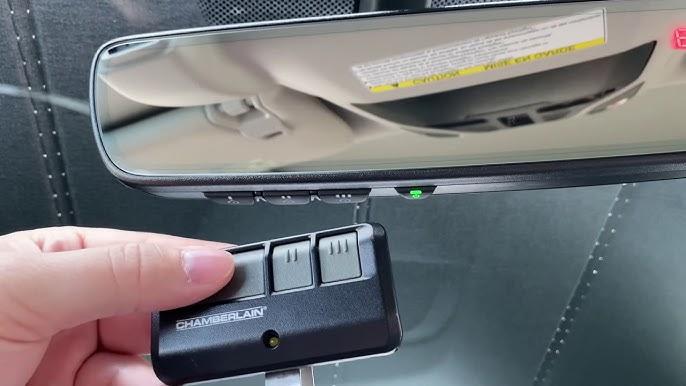
In most Subaru Outback models, the HomeLink buttons are found on the rearview mirror or overhead console. Look for three small buttons labeled 1, 2, and 3. Each button can be programmed to control a different device—garage door, gate, or even home lighting.
Step 2: Clear Existing Memory (If Needed)
If you’re reprogramming or replacing an old code:
- Press and hold buttons 1 and 3 simultaneously.
- Keep holding until the indicator light begins to flash slowly (about 20 seconds).
- Release both buttons. The memory is now cleared.
Step 3: Put Your Garage Door Remote in “Learn” Mode
- Take your original garage door remote.
- Hold it 1–3 inches away from the HomeLink buttons in your Subaru.
- Press and hold the desired HomeLink button (e.g., button 1).
- While holding the HomeLink button, press and release the button on your garage remote.
- Continue pressing the garage remote button every 2 seconds until the HomeLink indicator light changes from slow blink to rapid flash.
This indicates successful signal transmission.
Step 4: Test the Connection
- Press the programmed HomeLink button.
- Observe if the garage door responds.
- If it doesn’t work immediately, repeat Step 3, ensuring closer proximity between the remote and HomeLink buttons.
Step 5: Program Rolling Code Systems (If Applicable)
Many modern garage doors use rolling code technology for enhanced security. If your door uses this system:
- Locate the “Learn” or “Smart” button on your garage door motor unit.
- Press and release this button. You’ll have 30 seconds to complete the next step.
- Return to your Subaru and press the programmed HomeLink button three times, pausing briefly between each press.
- Your garage door should now respond correctly.
Note: If unsure whether your system uses rolling codes, consult your garage door manual or manufacturer website.
Troubleshooting Common Issues
Even with careful steps, issues can arise. Here’s how to fix them:
| Problem | Possible Cause | Solution |
|---|---|---|
| HomeLink light doesn’t flash | Weak remote battery | Replace battery in garage remote |
| Garage door doesn’t respond | Incorrect programming | Repeat Steps 3–5 carefully |
| Light flashes but door won’t move | Rolling code not synced | Complete Step 5 above |
| Only works intermittently | Signal interference | Reprogram in a different location |
People Also Ask: Common Questions Answered
Can I program multiple garage doors?
Yes! Each of the three HomeLink buttons can be programmed separately. Simply repeat the process for each button using a different garage remote or channel.
Does this work with all Subaru Outback years?
Most models from 2015 onward include HomeLink as standard or optional equipment. Earlier models may require an aftermarket adapter. Check your owner’s manual for specifics.
What if my garage door opener is very old?
Older openers (pre-1995) may not be compatible with HomeLink. In such cases, consider upgrading your garage door receiver or using a universal remote bridge device.
Is it safe to leave my garage door connected to my car?
Yes, especially with rolling code systems, which change the access code each time you use it. This prevents code theft or unauthorized access.
Can someone else copy my HomeLink signal?
Modern HomeLink systems use encrypted signals, making duplication extremely difficult. Always keep your garage remote secure and avoid lending it out.
Do I need professional help?
No. Programming HomeLink is designed for DIY users. However, if you encounter persistent issues, contact Subaru support or a certified garage door technician.
Benefits of Using HomeLink in Your Subaru Outback
- Seamless Integration: Works directly with your vehicle’s existing controls.
- Universal Compatibility: Supports most major garage door brands.
- Enhanced Security: Rolling code technology protects against hacking.
- Clean Dashboard: Eliminates clutter from multiple remotes.
Final Tips for Success
- Read your owner’s manual: Subaru provides model-specific instructions that may vary slightly.
- Work in daylight: Better visibility helps when locating small buttons.
- Be patient: Programming may take a few attempts, especially with rolling code systems.
- Keep your remote handy: You’ll need it during the initial setup.
Conclusion
Learning how to program garage door opener in Subaru Outback is a simple yet powerful way to enhance your daily routine. With just a few minutes and clear instructions, you can enjoy hands-free access to your garage while boosting convenience and security.
If you found this guide helpful, don’t forget to share it with fellow Subaru owners on social media or in community forums. Have questions or tips of your own? Drop them in the comments below—we’d love to hear from you!
Disclaimer: Always prioritize safety when working near garage door mechanisms. If unsure, consult a professional technician.



Leave a Reply